Blog

How to Make an AI Video from a Script in 2026 (Step-by-Step Guide)

HiggsfieldAug 17, 20269 min
How to Make an AI Video from a Script in 2026 (Step-by-Step Guide)

To make an AI video from a script, split the script into scenes, turn each scene into a shot list with camera directions, then generate the shots one by one and assemble them in order. The work has five steps: format the script, split it into scenes, build a shot list, generate the shots, and assemble the final cut.

How to make an AI video from a script?

The process has five steps: format the script, split it into scenes, build a shot list, generate the shots, and assemble the final cut. The most common mistake is pasting the whole script into a text-to-video prompt box. The model reads it as one long description and returns a single generic clip, with no cuts and no story structure.

A script asks more from a tool than a single clip. It needs the same character in every scene, a consistent look across shots, and control over where the cuts land. Higgsfield is built as an AI-native creative suite, so every step lives in the same project. Cinema Studio is how Higgsfield handles cinematic video production: it turns planned shots into video with camera, light, and pacing set before generation, while Popcorn covers the storyboard stage and Soul ID keeps characters consistent across projects.

Here is each step in order.

How do you prepare a script for AI video?

A working script has four beats: hook, problem, solution, call to action. This shape fits ads, explainers, and short stories, because it gives every scene a clear job.

  1. Hook (first scene). One strong visual that shows what the video is about, without setup or logos.

  2. Problem (one or two scenes). The tension the viewer recognizes. Keep it concrete: a person, a situation, an obstacle.

  3. Solution (two or three scenes). The turn. Your product, idea, or character resolves the tension on screen.

  4. CTA (final scene). One clear action, spoken or shown as text.

For spoken video, around 60 to 80 words per 30 seconds is a useful starting range, but read the script aloud and time it, because delivery speed and pauses change the final length.

Formatting matters as much as structure. Give every scene a header with the location and time of day, keep action lines short and visual, and hold each scene to one idea. If a scene needs two ideas, it works better as two scenes. Write what the camera can see: "she feels conflicted" leaves the model without direction, while "she stops mid-step and looks back at the door" describes a shot.

How to turn a script into a storyboard or shot list?

A shot list turns each scene into camera instructions: shot type, camera move, who is in frame, and what happens. This is the stage that decides whether the result reads as a film or as a set of unrelated clips.

A simple shot list has five columns: scene number, shot type (wide, medium, close-up), camera move (static, pan, dolly), character, and action. One scene usually becomes two to four shots. A hook can be a single wide shot, while a solution scene might need a medium shot, a close-up reaction, and an insert.

In Higgsfield this stage has two built-in tools. In Cinema Studio, paste the script into the assistant chat next to the prompt box, and it splits the script into shots with camera parameters pre-filled. The prompts appear in the prompt box for review, and nothing generates until you start it yourself. Popcorn then turns the planned shots into a connected storyboard sequence before video generation, keeping the character, location, and visual style consistent across the frames. For more detail on this stage, see the guide on turning a script into a storyboard with AI.

How do you generate the video from your shot list?

Generation goes scene by scene, and project-level settings keep all scenes looking like one film. In Cinema Studio 4.0 a single generation runs up to 30 seconds at up to 1080p, enough to carry a full scene, and it can come back already cut into several shots depending on the tempo you set. The order below works for most projects.

Step 1. Set the genre. Genre changes how the model handles light, framing, and pacing. Drama holds the camera closer and longer, Action ties it to the moving subject, Horror withholds the frame and lets the shadow do the work. Without a genre, the output tends to land in a flat middle ground.

Step 2. Set the era. Choose the decade the shot is set in, and grain, color, and lens style adjust to match. The same scene set in the 80s and in the 2010s comes out as two different films.

Step 3. Configure the camera. Choose a camera type (Modern, 35mm Film, 8mm Film, DV Camcorder), a lens, and an aperture, then pick from 30+ camera movement presets. These settings apply at generation time, so the prompt only needs to describe the scene itself.

Step 4. Set the tempo. Tempo controls how often the edit cuts inside a generation: Chaotic for action, Dynamic for commercial pacing, Calm for drama, Single Shot for one continuous take.

Step 5. Direct the emotions. Tag a character in the prompt with one of 8+ emotions, for example @character_name Joy or @character_name Anger, and the model builds it into the expression and body language. Without a tag, AI characters tend to default to a neutral expression.

Step 6. Generate with references. One generation accepts up to 50 reference images. Use them to lock a face, a product, or a style before the first frame renders. This is what keeps the same character recognizable in every scene.

Step 7. Grade the color. Color Grading finishes the look with 50+ palettes and manual control over temperature, contrast, grain, and exposure. Grading at the project level keeps every scene in the same tonal world.

A Real Script-to-Video Example

Here is the full chain applied to one short script: four beats, five shots, one character, one generation. The script is four lines long:

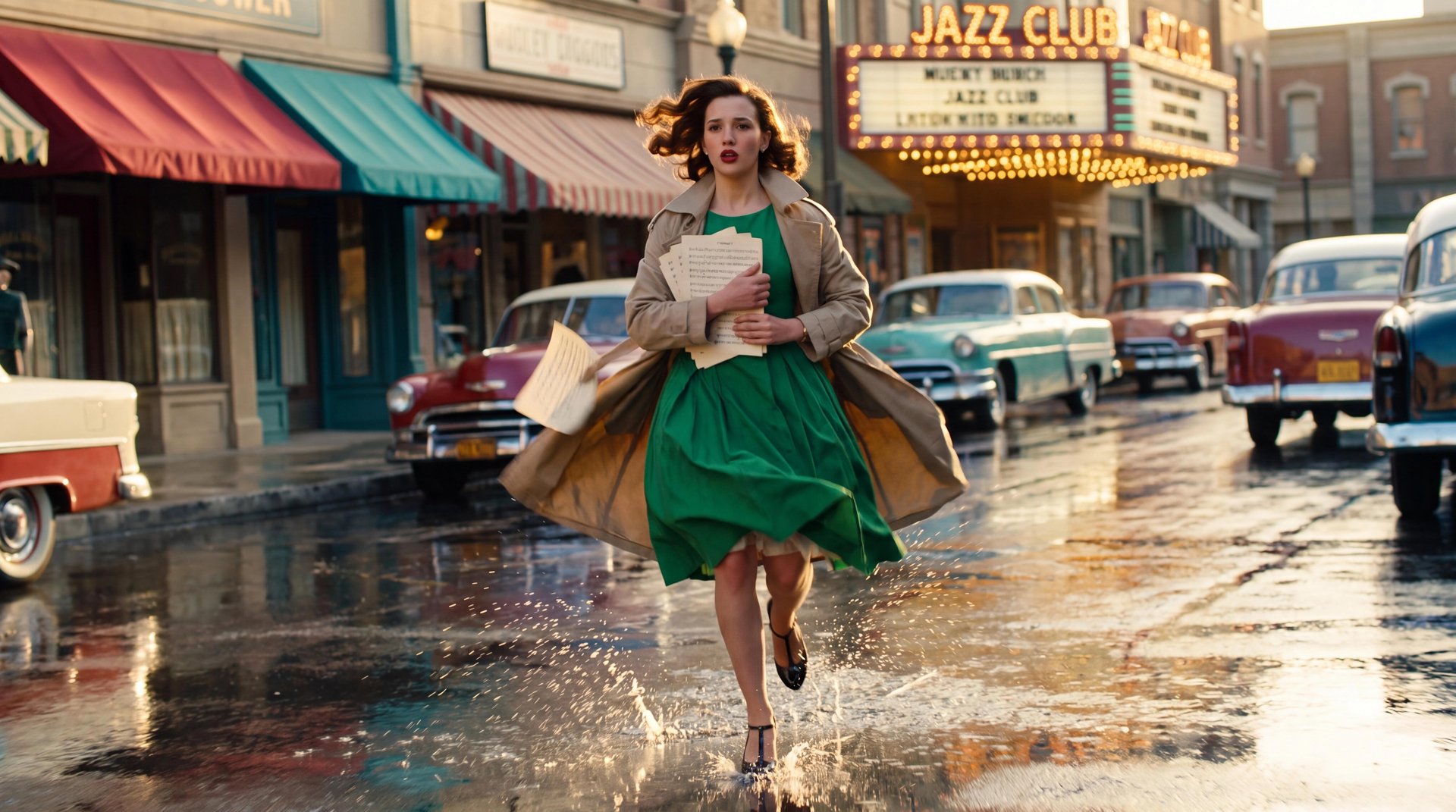
A young jazz pianist is late for her matinee debut. She sprints through a sunlit 1950s street after rain (hook). She hits the stage door and it is locked (problem). She cuts through a back alley to the side entrance (solution). She walks onto the warmly lit stage, sets down her sheet music, and sits at the piano as the room falls silent (final).

The shot list breaks those four beats into five shots:

A Real Script-to-Video Example

#

Beat

Shot

Camera

Action

1

Hook

Wide tracking

Wide-angle, tracking backward, handheld

She sprints toward camera through the wet sunlit street

2

Problem

Medium

Normal lens, handheld

She slams into the stage door and pulls the handle twice

3

Problem

Close-up

Telephoto

Reaction: sharp inhale, eyes snap open, gaze whips right

4

Solution

Alley tracking

Wide-angle, tracking alongside

She rounds the corner at full sprint and reaches the side door

5

Final

Stage reveal

Wide-angle, slow push-in

She steps into the amber light, sets the music down, and sits

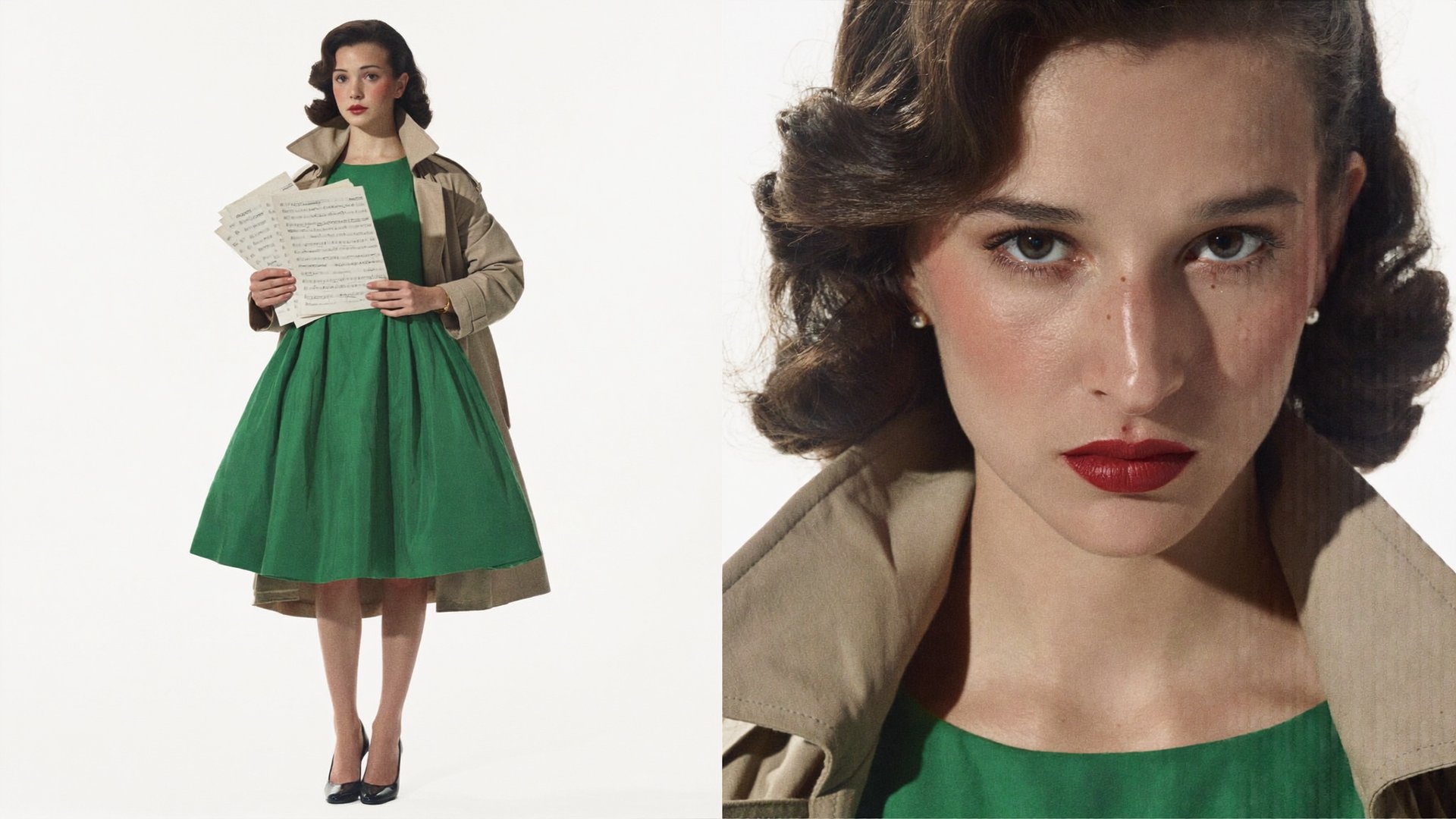
The character exists as one reference image, and every shot in the prompt points back to it, which is what keeps the same face, dress, and coat through all five shots.

The prompt used:

SCENE CONTEXT A young female jazz pianist, late for her matinee debut, sprints through a sunlit 1950s city street just after rain, hits a locked stage door, then cuts through a bright back alley and steps onto a warmly lit stage. One character only, no other featured faces. ACTIVE REFERENCES <<<image_1>>>: young woman in her early twenties, 1950s jazz pianist, voluminous chestnut-brown Hollywood waves, red lipstick, emerald green sweetheart cocktail dress with a full knee-length skirt, open beige trench coat, black T-strap heels, pearl stud earrings, gold bracelet, folded ivory sheet-music papers clutched to her chest under her left arm. Face, hair, body, and wardrobe 100% match the reference. Identical in all five segments, no duplicates, no extra featured characters. FORMAT MODE Controlled five-segment sequence with four HARD CUTS. Real-time motion, aggressive dynamic pacing. Large-format cinema image: extreme clarity, deep environmental detail, fine film grain. Anamorphic lens character throughout: oval bokeh, subtle horizontal flare streaks from the sun and bright speculars, gentle cylindrical background stretch. Vivid saturated mid-century color palette: rich reds, teals, and yellows, warm golden sunlight, bright open exposure — the whole sequence reads luminous and colorful, never murky, never desaturated. ACTION TIMING 0.0s to 3.0s — HOOK, wide tracking shot. 84° diagonal field of view, classic wide-angle lens character, camera 1.2 meters ahead of subject at chest height, tracking backward fast, low, and slightly handheld — urgent momentum, not smooth gimbal glide. A 1950s downtown street in late-afternoon sun right after rain: wet asphalt blazes with golden sun reflections, storefronts in saturated red, teal, and cream, striped awnings, colorful vintage cars along the kerb, a jazz club marquee with round bulbs lit deep in BG, blue sky with white clouds above the rooflines. First visible frame already contains <<<image_1>>> mid-sprint at frame center, x 50%, y 55%, full body visible, running hard toward camera, trench coat cracking behind her, waves bouncing with each stride, heels splashing shallow sunlit puddles. Real sprint physics: heel strikes, opposing right-arm swing, torso lean, sheet music pinned under her left arm. 3.0s HARD CUT. 3.0s to 5.5s — PROBLEM, medium shot. 47° diagonal field of view, standard normal lens character, camera 3 meters from subject, handheld with tense micro-movement. Warm red-brick side wall of the club washed in direct golden sunlight, a steel stage door painted deep teal, "STAGE DOOR" stencil in white on the metal, hard sun raking across the brick texture. <<<image_1>>> bursts in from screen-left at full speed, slams into the door, right hand seizing the handle and yanking twice — the door holds with a dull metallic clunk, hinge and lock resisting with real weight. Body faces the door, profile to camera, sunlight modeling her face brightly, sheet music pinned under her left arm. Muffled MC voice and crowd murmur bleed through the wall. 5.5s HARD CUT. 5.5s to 7.5s — PROBLEM, reaction close-up. 18° diagonal field of view, classic telephoto lens character, camera 6 meters from subject, tight close-up on <<<image_1>>>, sunlit brick dissolving into warm golden and teal oval bokeh, one thin horizontal flare crossing the frame. Her face is lit by soft warm bounce off the sunlit wall, skin tones bright and clean, brown eyes alive and catching the sun with soft natural catchlights. First frame opens on her face already in frame: eyes wide, breathing fast, a wave of hair fallen across her cheek. At 6.3s she closes her eyes, one sharp inhale, exhale, eyes snap open with resolve, and her gaze whips toward screen-right. Lips stay closed, no dialogue. 7.5s HARD CUT. 7.5s to 10.0s — SOLUTION SPRINT, alley tracking shot. 84° diagonal field of view, classic wide-angle lens character, camera tracking alongside <<<image_1>>> at 1.2 meters, screen-right of her body, slight whip energy on the turn. A narrow back alley cut by a bright diagonal shaft of late sun: warm brick walls, laundry lines with colorful fabric overhead catching light, puddles throwing gold reflections up the walls, a plain side door at the alley end glowing in a pool of direct sunlight. First frame: she is already in frame rounding the corner from screen-left at full sprint, coat, skirt, and waves whipping with the turn, sunlit spray kicking behind her heels, her figure flashing through alternating bars of light and open sun. She reaches the sunlit side door at 9.6s and pulls it open — warm interior light meets daylight as the frame cuts. 10.0s HARD CUT. 10.0s to 16.0s — FINAL, stage reveal. 84° diagonal field of view, classic wide-angle lens character. Interior of the jazz club during a matinee, seen from inside the house — bright and festive, not dark: warm cream-and-gold walls, red velvet curtains glowing under warm tungsten wash, tall side windows spilling soft daylight across the room, the whole stage bathed in warm amber light. A grand piano sits at frame center-right, x 60%, y 55%, its lacquer throwing bright warm speculars, a clean spotlight adding sparkle rather than cutting darkness. Camera starts low near the stage edge and pushes in slowly, rising. Audience heads fill the bottom 15% of frame as softly lit warm bokeh shapes. At 10.8s <<<image_1>>> steps out of the wings from screen-left into the amber light, still catching her breath, composes herself mid-stride, walks to the piano, sets the sheet music on the stand, and sits at 15.0s as the crowd murmur falls silent. Hold the final composition: her emerald dress glowing against red velvet and gold, the frame bright, warm, and celebratory. High-key warm exposure, faces and colors fully readable, no crushed shadows, no gloom. PHYSICS Puddles splash with sunlit droplets in exterior segments. The full knee-length skirt swings with her stride, the trench coat and Hollywood waves react with natural delay to sprinting, the corner whip, and the sudden stop into stillness. Heel strikes, the door clunk, and heels on stage boards carry real weight. LIGHTING Segments 1 to 4: direct golden late-afternoon sun as primary source, bright blue sky fill, wet surfaces throwing warm speculars, exposure bright and open with clean readable faces — vivid and sunny, never flat grey, never underexposed. Segment 5: warm tungsten stage wash plus soft window daylight, high-key and golden, red velvet and emerald green saturated, gentle sparkle flares off the piano lacquer. AUDIO Footsteps, splashes, and lively daytime street ambience in segments 1 to 4; muffled MC and crowd behind the door in segment 2; echoing alley footsteps in segment 4; in segment 5 the room murmur ducks to silence as she sits. No music score, no narration, no spoken lines. POSITIVE LOCKS <<<image_1>>> is the single woman in all five segments, identical face, hair, dress, coat, heels, jewelry, and sheet music matching the reference throughout. Screen direction: her resolve gaze in segment 3 aims screen-right, she enters segment 4 from screen-left moving screen-right, and enters the stage in segment 5 from screen-left. Each segment's first frame already contains her as described; no empty establishing frames. The entire sequence stays bright, warm, and color-saturated from first frame to last.

The whole sequence is one 16-second generation: four beats, five shots, four hard cuts, one character held by a single reference from the first frame to the last.

Assembling and Finishing the Video

The final step is arranging the generated scenes in story order and closing the gaps between them. Watch the scenes back to back in script order first: this is where pacing problems and missing beats become visible.

When a shot needs more room, Forward and Backward Extend continues a clip in either direction, so a scene can grow without regenerating it from scratch. If a transition between two scenes feels abrupt, an extended lead-in or lead-out on either side usually solves it.

For the final timeline, Higgsfield connects to the editors most people already cut in. The DaVinci Resolve plugin puts generation and finishing tools in a panel inside Resolve, and the After Effects and Premiere Pro plugin brings generated footage straight to the timeline, with reframing for the aspect ratio each platform needs. The same account and assets carry through: a cast saved as Elements returns in the next project, and a Soul ID character stays consistent across videos. The script, the storyboard, the footage, and the edit stay in one pipeline.

How to Make an AI Video from a Script in 2026 (Step-by-Step Guide)

Try Cinema Studio

Got any questions left?

Partially. The assistant can break a script into shots and pre-fill camera settings, but the shot list, takes, and pacing still need your review. Full automation without review produces footage, not a finished film.

No. A written shot list with scene number, shot type, camera move, and action replaces drawn frames, and Popcorn generates the visual storyboard from those planned shots.

Because every generation starts from zero when characters exist only in the prompt text. The fix is reusable assets: saved characters and locations that every shot pulls from, plus fixed camera and color settings for the whole project.

Generate the hook shot first. If the opening shot does not communicate the idea on its own, revise the script before spending time on the remaining scenes.

by Higgsfield

Share article