Higgsfield
  • Explore
  • Image
  • Video
  • Audio
  • Cinema Studio
  • MCP & CLINew
  • AcademyNew
  • Supercomputer
  • PluginsNew
  • Marketing Studio
  • Canvas
  • Originals
  • Shorts Studio
  • Explainer

THE ULTIMATE AI-POWERED CAMERA CONTROL FOR FILMMAKERS & CREATORS

Higgsfield AI

  • About
  • Trust
  • Careers
  • Contact
  • Pricing
  • Apps
  • Supercomputer
  • Cinema Studio
  • Marketing Studio
  • Higgsfield Canvas
  • Higgsfield Collab
  • Higgsfield MCP
  • Higgsfield Games
  • AI Influencer
  • Community
  • Enterprise
  • Team
  • Copilot
  • Reference Extension
  • Blog
  • Contests
  • Discord

Image

  • AI Image
  • Soul ID Character
  • Draw to Edit
  • Fashion Factory
  • Edit Image
  • Image Upscale
  • Photodump Studio
  • Higgsfield Popcorn
  • Nano Banana
  • Prompt Guide
  • Flux 2
  • Seedream 5
  • GPT Image 2
  • Inpaint
  • Soul 2.0
  • Soul Cinema
  • Soul Cast

Video

  • AI Video
  • Mixed media
  • Sora 2 Introduction
  • Veo 3.1 Introduction
  • Create Video
  • Lipsync Studio
  • Talking Avatar
  • Draw to Video
  • UGC Factory
  • Video Upscale
  • Kling 3.0
  • WAN 2.6
  • Seedance 2.0
  • Grok Imagine 1.5
  • Gemini Omni Flash

Edit

  • Banana Placement
  • Product Placement
  • Edit Image
  • Multi Reference
  • Upscale
  • Sora 2 Upscale
  • About
  • Trust
  • Careers
  • Contact
  • Pricing
  • Apps
  • Supercomputer
  • Cinema Studio
  • Marketing Studio
  • Higgsfield Canvas
  • Higgsfield Collab
  • Higgsfield MCP
  • Higgsfield Games
  • AI Influencer
  • Community
  • Enterprise
  • Team
  • Copilot
  • Reference Extension
  • Blog
  • Contests
  • Discord
  • X / Twitter
  • Youtube
  • Instagram
  • LinkedIn
  • Tiktok

535 Mission St, 14th floor, San Francisco, CA, 94105

  • X / Twitter
  • Youtube
  • Instagram
  • LinkedIn
  • Tiktok

© 2026 Higgsfield, Inc. All rights reserved.

  • Cookie Notice
  • Terms
  • Privacy
  1. Blog
  2. /
  3. How To Guides
  4. /
  5. Script to Storyboard AI Guide

AI Storyboard Generator: How to Turn Scripts Into Frames

Higgsfield

·

Jul 16, 2026

·

10 min

AI Storyboard Generator: How to Turn Scripts Into Frames

Storyboarding used to mean hiring an artist, waiting days, and spending money before a single shot was planned. Now you upload a character photo, describe the scene in plain text, and get a complete multi-frame sequence in minutes with the same face in every panel. This guide walks through the full workflow from script to storyboard to video.


What You Need Before You Start

A script or scene description. It does not need to be formatted or finalized. A rough paragraph describing what happens in a scene is enough to generate a usable storyboard sequence. If you have character photos or location references, gather those too. Popcorn accepts up to four image references per generation alongside the text prompt, and those references anchor everything: the character who appears in frame one will look exactly the same in frame eight.

If you are starting from a full script, you do not need to board every page. Focus on the scenes where visual planning matters: action sequences, emotionally complex moments, scenes with specific camera requirements, and any moment where the director need to agree on coverage before they arrive on location or start generating.


What Popcorn Is and Why It Works for Storyboarding

Popcorn is Higgsfield's AI storyboard generator, and the thing that separates it from every other AI image tool is how it handles the sequence. Standard AI image models treat every frame as a completely independent generation. There is no shared context between them, which is why a character generated in frame one looks like a cousin of themselves by frame four. Different jaw, different lighting logic, slightly different hair. By frame six of a storyboard produced this way, you effectively have six different people playing the same role.

Popcorn generates the full sequence as a single coherent output. The model understands that frames one through eight are the same scene, the same characters, the same spatial logic. Character identity carries through automatically: same face, same body, same clothing. Lighting established in the first frame holds across the sequence. The depth and spatial relationships between elements remain consistent. Emotional atmosphere does not reset between panels.

The practical result is a storyboard that reads as a storyboard, not as a collection of loosely related images that happen to share a prompt. For directors presenting to producers, or DPs aligning with directors on coverage, that coherence is the difference between a useful planning document and a confusing collection of frames that require explanation.

Popcorn outputs up to 8 coherent frames per generation. The workflow has two modes. Auto mode takes one prompt, a frame count, and a story arc description, then distributes the narrative across the frames automatically. Manual mode gives you control over each frame individually, which is the right approach when specific beats need to land on specific panels.

Access: Create → Image → Popcorn.


The Full Workflow: Script to Storyboard in 7 Steps

Step 1: Break Your Script Into Boardable Sequences

Read through the script and identify which scenes actually need visual planning. Not every scene needs a full storyboard. A scene with two characters sitting and talking across a table might need two or three panels to establish geography. An action sequence with seven distinct beats needs eight panels or more. A dialogue-heavy scene with no camera movement might need just a single panel to establish the framing.

For each sequence you decide to board, write a brief description covering four things: who is on screen, where the action happens, what the key moment or moments are, and what the emotional register should be. Keep these descriptions at the scene level for now. They will become the foundation of your Popcorn prompts.

If a scene is long or structurally complex, break it into sub-sequences. Popcorn handles up to 8 frames per generation. A 45-second action sequence with significant blocking and camera movement might need two or even three separate generations to cover all the beats you actually need to plan.

Step 2: Gather Reference Images

This is the step that makes the biggest difference in storyboard quality and is the most commonly skipped. Before you generate anything, prepare the references that anchor the visual logic of your boards.

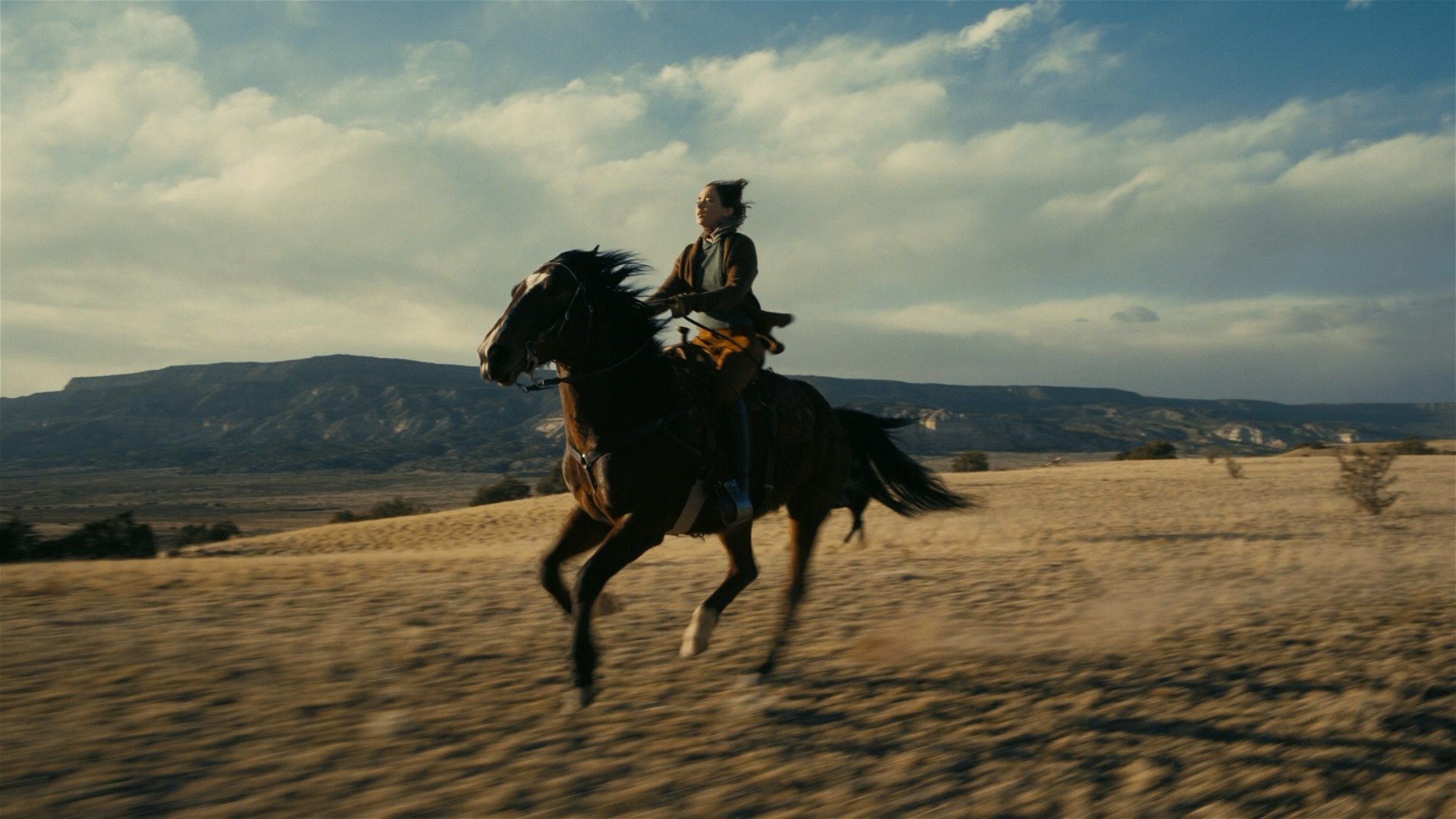
For a character whose face needs to hold consistently across the entire storyboard: a clear portrait photograph with good, even lighting. Not a group photo. Not a photo where the character's face is partially obscured. A clean, well-lit portrait that the model can work from. For a location: an establishing image that captures the specific atmosphere you want, whether that is a real location, a reference image from another film, or a concept art piece.

Popcorn accepts up to four image references per generation and can combine them in a single call. You can pull the character from image one, place them in the setting of image two, and have them wear the clothing from image three. The model merges these references into a coherent output rather than requiring you to describe every detail in text.

If you are generating from pure text without image references, Popcorn will still maintain character consistency across all frames within a single generation. The problem appears when you return for a second generation without reference images: the model generates a fresh interpretation of the text description, and the character will look different from the previous run. Use a strong output frame from the first generation as a reference image for every subsequent generation to carry the character identity forward without drift.
Step 3: Write the Prompt

Popcorn rewards cinematic thinking. The prompt is not a description of a single image. It is a description of a scene with an arc, and the more specifically you describe the physical and emotional logic of that arc, the more the output will reflect it. Structure each prompt around five elements:

Subject: who is on screen, described specifically. Not "a detective" but "a middle-aged detective in a rumpled suit, tired, suspicious." The more specific the description, the more consistent the character reads across frames.

Setting: where the action happens, described with sensory specificity. Not "a city street" but "a narrow side street in the financial district at 2am, wet pavement reflecting neon, deserted." The setting description gives the model the spatial and atmospheric logic it needs to build the frame.

Style: the visual register of the output. State it explicitly at the very start of the prompt. "Cinematic photorealistic style" anchors the model before any other information is processed. If you want concept art, storyboard sketch style, or a specific aesthetic, say so first.

Action: what happens across the sequence. Describe the arc, not a single frozen moment. "The detective approaches the suspect, sits down across the table, leans forward, then pulls back as he hears something outside" is an arc. "A detective and a suspect in an interrogation room" is a single frozen moment. The arc gives the model something to distribute across the frames.

Atmosphere: the light, mood, and emotional texture of the scene. "Cold blue-grey light, single overhead source, shadows deep, the room feels small and airless" tells the model something specific about how the scene should feel that will carry through every frame.

Here is what that looks like assembled into a complete prompt:

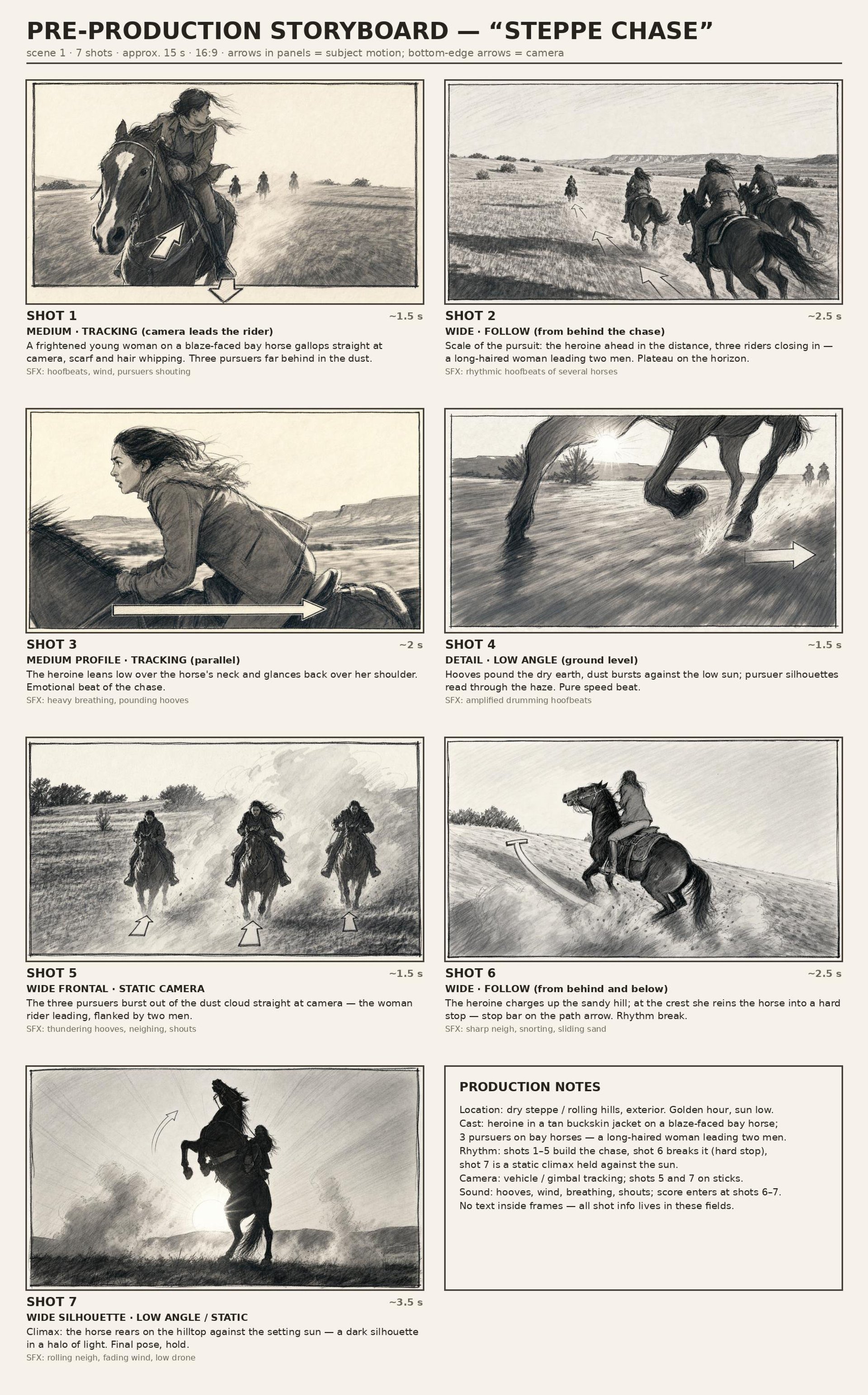
THE CHASE — 16:9 full-frame (no letterbox), ~15s, 24fps real-time (no slow motion), 7 shots, hard cuts only. Look matches the uploaded keyframe: warm sunset gallop across a vast golden-grass steppe, distant flat-topped mesa, heavy motion blur. STYLE — Maximally photoreal, indistinguishable from a real chase filmed on 35mm: authentic film grain, naturalistic golden-hour grade — warm amber grass and dust, true filmic blacks, cool teal sky. No CGI, plastic or waxy look; no warped horse anatomy. CHARACTERS — THE WOMAN: young, generic, long dark hair, pale cream scarf, worn dark leather jacket, tan riding trousers; driven, fierce, never looks at the lens. HER HORSE: real dark bay, sweat-sheen, flying mane and tail, true gait, plain tack. PURSUERS: three generic riders, plain dark gear, no logos, no weapons, relentless. Same characters, steppe and lowering sun throughout; the gap closes shot by shot. CAMERA / LIGHT — Rectilinear lenses, vehicle-tracked and drone feel, heavy real motion blur. Low raking golden sun, long shadows, backlit dust glowing; the rear-up near-silhouetted against the sun. PHYSICS — Real equine mass: hooves tear the earth throwing dirt and dust, muscle flexes under the coat, riders move with the gait, hair and manes stream in the wind; the pivot skids with real inertia; the rear-up rocks back onto the hind legs with real weight. No floaty or rubbery motion. AUDIO — Diegetic SFX only, no music, no dialogue: thundering massed hooves with deep low-end, wind rush, labored breathing and snorts, creaking leather, dirt scattering, skidding hooves at the pivot, a loud whinny at the rear-up. THE 7 SHOTS: Shot 1 — HOOK, low near-frontal tracking: she gallops hard past camera, snaps a look back — behind her, pursuers thunder out of the golden dust. HARD CUT. Shot 2 — Wide from behind the pursuers: three riders flat-out, closing. HARD CUT. Shot 3 — Fast side tracking: she leans low, urging the horse on, scarf streaming. HARD CUT. Shot 4 — Low ground-level: pounding hooves tearing the earth, clods exploding. HARD CUT. Shot 5 — Long lens, compressed: the pursuers loom right behind her through haze. HARD CUT. Shot 6 — At a ridge she hauls the reins — the horse skids and wheels hard around, dust spraying. HARD CUT. Shot 7 — CLIMAX, low wide: the horse REARS UP, forelegs pawing the air, near-silhouetted against the sun, she holds on fierce, a whinny rings out; hold to end. A tense pursuit only — no contact, no weapons, no one harmed.
Recreate

Step 4: Choose Your Mode and Frame Count

Auto mode is the right starting point for most scenes. You describe the full narrative arc in the prompt, choose how many frames you want, and Popcorn distributes the beats across them. The model decides where the cuts go based on the logic of the arc you described. For scenes where you have a clear sense of the story but do not need to control exactly which beat lands on which frame, Auto mode is faster and produces coherent results.

Manual mode is for scenes where the beat placement matters. If the revelation needs to land on frame six out of eight, or if you need a specific camera angle change to happen at a specific moment in the sequence, Manual mode gives you control over each frame individually. The tradeoff is time: each frame requires its own direction.

Frame count guidance, based on production use: 4 frames covers a scene with two or three distinct beats and a straightforward coverage plan. 6 frames covers a scene with a clear beginning, middle, and end where the middle has some complexity. 8 frames is the right choice for action sequences, scenes with significant blocking changes, or any moment where you need to show how coverage shifts across the scene.

For a feature film storyboard, a standard commercial production might use 400 to 600 panels total. At 8 frames per generation, that is 50 to 75 Popcorn generations for the full film. For a 30-second commercial: 20 to 40 panels, 3 to 5 generations. For a 5-minute short film: 60 to 120 panels, 8 to 15 generations.

Step 5: Set the Aspect Ratio

Aspect ratio is a production decision, not just a format choice. The ratio you choose should match how the final content will be consumed. Popcorn supports five ratios:

3:4 for portrait or character-focused frames where vertical height is the primary compositional axis. 2:3 for cinematic balance, the closest to a traditional storyboard panel format. 3:2 for editorial feel, wider and more horizontal. 1:1 for square social formats. 9:16 for vertical video: TikTok, Reels, and Shorts.

For a production storyboard, 2:3 or 3:2 are the most natural choices. Keep the ratio consistent across all generations in a project. Mixing ratios makes the finished board harder to read and weakens the visual argument you are making about the scene.

Step 6: Generate and Review

Generate the sequence. Popcorn produces the full set of frames with character identity, lighting, and atmosphere consistent across all of them.

Review against the scene description rather than against abstract aesthetic standards. The questions to ask: does the character read as the same person across every frame, does the lighting logic hold from panel to panel, does the sequence communicate the camera positions and angles you intended, and does the emotional register of the scene come through without requiring explanation.

If the output is close but not quite right, adjust the text prompt before re-uploading references. Adding or removing specific details in the prompt changes what the model prioritizes, and a refined prompt almost always produces better coherence than starting from scratch with new inputs.

Step 7: Build the Full Storyboard

Repeat the process for each scene in the script that needs visual planning. When you move from one generation to the next in the same storyboard and the same character appears, use the strongest output frame from the previous generation as a reference image for the next run. This is how you maintain character identity across the full production without drift.

Organize the completed panels by scene and sequence. A finished storyboard should read as a navigable document, not a folder of images. Label each sequence, number each panel, and include the key information from the prompt description alongside each panel so that a DP or director who was not in the room when it was generated can understand what they are looking at.

storyboard.pdfapplication/pdf

From Storyboard to Video in Cinema Studio

The storyboard is not the end of the workflow. It is the beginning of production planning.

The frames generated in Popcorn become reference inputs for video generation in Cinema Studio. You upload the storyboard frame alongside the character reference, and from there you set the shot-level cinematic decisions that most AI generation tools skip entirely: genre, which shapes the physical logic and framing conventions the model applies; lighting preset, which determines where light actually comes from in the scene rather than approximating it from text; lens character, which shapes how the image breathes and how highlights behave; focal length, which controls field of view and spatial compression; aperture, which determines depth of field and subject separation; and color palette.

These settings are not stylistic preferences applied on top of a finished output. They are the creative logic the model builds the shot from at generation time. When the interrogation scene storyboard frame goes into Cinema Studio alongside the character reference, you set Drama genre, Soft Cross lighting, Classic Static camera movement, Fine Film sensor, Warm Halation lens at 50mm, and f/1.4 Wide Open for the close-up on the detective's face. The visual logic planned in Popcorn becomes the instruction set for the video generation. The storyboard frame shows the model what the composition should be. The Cinema Studio settings tell it how that composition should feel, move, and read.

The result is not a rough animatic. It is cinematic video that reflects the visual decisions made in the storyboard phase, with the production values of a directed shot rather than an AI approximation of the scene description.

Your browser does not support the video.

What Popcorn Maintains Across Frames

Character identity: same face, same body type, same visible features across every frame in a sequence. This is the foundational capability that makes Popcorn useful for production storyboarding rather than just ideation.

Consistent lighting and clothing: the lighting logic established by the prompt and references in the first frame carries through to the last. A character lit from the left in frame one will be lit from the left in frame eight.

Spatial logic: depth, reflection, and perspective relationships between elements remain consistent. A table between two characters in frame one is at the same distance in frame six.

Emotional atmosphere: the mood established in the prompt reads coherently across all panels. A scene described as tense and airless does not suddenly open up in the middle frames.

Popcorn also handles combinations of real photos and AI-generated images in the same sequence without losing consistency between input types.


How to Write Prompts That Work

Lead with style keywords. "Cinematic" and "photorealistic" at the start anchor the visual register before the model processes any other information. This single habit makes a bigger difference in output quality than almost any other adjustment.

Describe action, not category. "A knight walks through fire toward the camera, cape burning at the edges" produces better output than "fantasy battle scene." The specific physical action gives the model something concrete to distribute across the frames. Category descriptions give it nothing.

Use clear emotional language. "Soft light, hopeful tone, warmth in the shadows" or "harsh shadows, cold blue, the scene feels wrong" communicate atmosphere in a way that translates directly into how the model builds the frame. Vague emotional language produces vague output.

Describe camera position when it matters. "Low angle on the detective" or "over-shoulder on the suspect" give the model information about how the coverage should shift across the sequence. Most storyboard prompts skip camera language entirely, which is exactly why most AI storyboards feel directorially empty.

Match aspect ratios across inputs. If the reference images are in portrait orientation and the target output is 2:3 landscape, the model handles the adaptation, but keeping input and output ratios consistent produces the most natural results with the fewest geometric compromises in the output.

AI Storyboard Generator: How to Turn Scripts Into Frames

Try Popcorn

Got any questions left?

Auto mode distributes the story across the chosen frame count automatically. Manual mode lets you define each frame individually. Use Auto for general scene coverage, Manual when specific beats need to land at specific moments.
Up to 8. Choose based on the complexity of the scene and how many distinct beats need visual coverage.
Use the strongest output frame from the first generation as a reference image input for the next run. The character's visual identity carries forward from that reference without requiring you to re-describe the character in text.
Yes. Popcorn accepts up to 4 image references per generation including portraits, props, and locations. It combines real photos and AI-generated images in the same sequence without losing consistency.
Standard image models generate each frame independently with no awareness of the other frames in the sequence. Popcorn generates the sequence as a whole, maintaining character identity, lighting, and spatial logic across all frames automatically.
The Popcorn frames become reference inputs for Cinema Studio. Upload the storyboard frame alongside the character reference, set the per-shot cinematic settings, and generate the shot as actual video.
Feature film: 400 to 600 panels. Commercial: 20 to 40 panels. Short film: 60 to 120 panels. At 8 frames per generation, a 120-panel short film storyboard takes 15 Popcorn generations.
3:4 (portrait), 2:3 (cinematic balance), 3:2 (editorial), 1:1 (social), 9:16 (vertical video for Reels and Shorts).

by Higgsfield

Share article

Discover more

post preview

How to Keep AI Persona Consistent in 2026 using Higgsfield Popcorn?

post preview

How We Created Higgsfield Popcorn? An AI Tool That Allows You to Replace Faces in a Movie Scene

post preview

How to Use AI for Storyboards? Generate with Higgsfield Popcorn