Creator Hub

Soul 2.0 vs Nano Banana Pro: Which AI Image Model Should You Use?

Higgsfield10 mins
Soul 2.0 vs Nano Banana Pro: Which AI Image Model Should You Use?

Soul 2.0 is stronger on cinematic realism, ready-made presets, and holding one face consistent across many generations. Nano Banana Pro is stronger on style range, object editing, and text rendering. Both run on Higgsfield. This guide covers the difference between Soul 2.0 and Nano Banana Pro, how they work, and which one fits which job.

What Is Soul 2.0?

Soul 2.0 is Higgsfield's own foundation image model, built in-house for fashion-aware, culture-native image generation.

Unlike a general-purpose model, it's tuned specifically for how fashion, editorial, and internet-native aesthetics actually look. That means era-specific styling, camera and film grain characteristics, and natural posing, the kind of specificity that comes from training on the actual subject matter, not approximating it from general knowledge.

It ships with 20+ curated presets, each tuned to a specific aesthetic register. Soul HEX pulls and applies color palettes directly. Moodboard locks in a visual direction from reference images. Soul ID holds one face consistent across a whole set of images and videos, no re-uploading a reference for each new generation. The result reads closer to a styled editorial shot than a raw generation.

How Nano Banana Pro Works

Nano Banana Pro is Google's Gemini-powered image model, available on Higgsfield with up to 4K resolution.

It's a one-shot reference tool: give it a photo and a prompt, and it generates or edits directly.

It works from plain-language prompts in any language, and supports multi-image fusion for combining several reference photos into one generation, pose control for directing exactly how a subject is positioned, and object-level editing for changing one specific element without regenerating the whole image. It also handles text rendering inside an image more reliably than most competing models, useful for anything that needs readable packaging text, signage, or on-image copy.

At a Glance

At a Glance

Axis

Soul 2.0

Nano Banana Pro

Quality and realism

Editorial, cinematic

Photorealistic

Style range

Realistic presets, 20+ looks

Broad, stylized and illustrative

Text rendering

Not a core strength

Reliable

Object editing and swapping

Limited

Strong, direct

Prompt adherence

Strong within its register

Strong, general-purpose

Speed

Fast, slower first-time setup

Fast, no training step

Presets and controls

20+ presets, Soul HEX, Moodboard

Pose control, multi-image fusion

Resolution

Up to 2K

Up to 4K

Reference-based generation

Via Moodboard, character upload

Single reference image

Face consistency across generations

Strong, no drift with Soul ID

Weaker, drifts over time

Background and crowd handling

Weaker, can clone the face

Strong, keeps crowd distinct

Which One for Which Job?

  • A quick, single shot from a reference photo: Nano Banana Pro. No training step, generates directly from one image and a prompt.
  • A cinematic portrait or editorial shot: Soul 2.0. The preset library and Soul HEX are built for this specific look.
  • A product shot with text on the packaging: Nano Banana Pro. Text rendering inside the image is one of its strongest features.
  • A series built around one consistent character: Soul 2.0. Soul ID is designed for stronger identity consistency across a series, something Nano Banana Pro struggles to match over a long run.
  • A stylized illustration outside a realistic register: Nano Banana Pro. Its style range extends well past Soul 2.0's realistic presets.

Choose Soul 2.0 for recurring characters, fashion, and editorial workflows. Choose Nano Banana Pro for flexible editing, text-heavy images, and broader visual styles. Use both when you need character consistency and detailed image editing in the same workflow.

Where Each Model Falls Short

Where Soul 2.0 falls short:

  • More focused on realistic, fashion, and editorial aesthetics than broad illustration or highly stylized looks.
  • Weaker with background crowds, the trained face can end up cloned onto background people in a scene
  • Limited product-mockup support compared to a model built around direct object editing

Where Nano Banana Pro falls short:

  • Face consistency drifts across many generations without a trained identity behind it
  • No trained, persistent identity the way Soul ID provides, each generation reinterprets the reference fresh
  • Weaker at the specific fashion and editorial aesthetic register Soul 2.0's presets are built around

Full Workflow: Testing the Same Prompt on Both Models

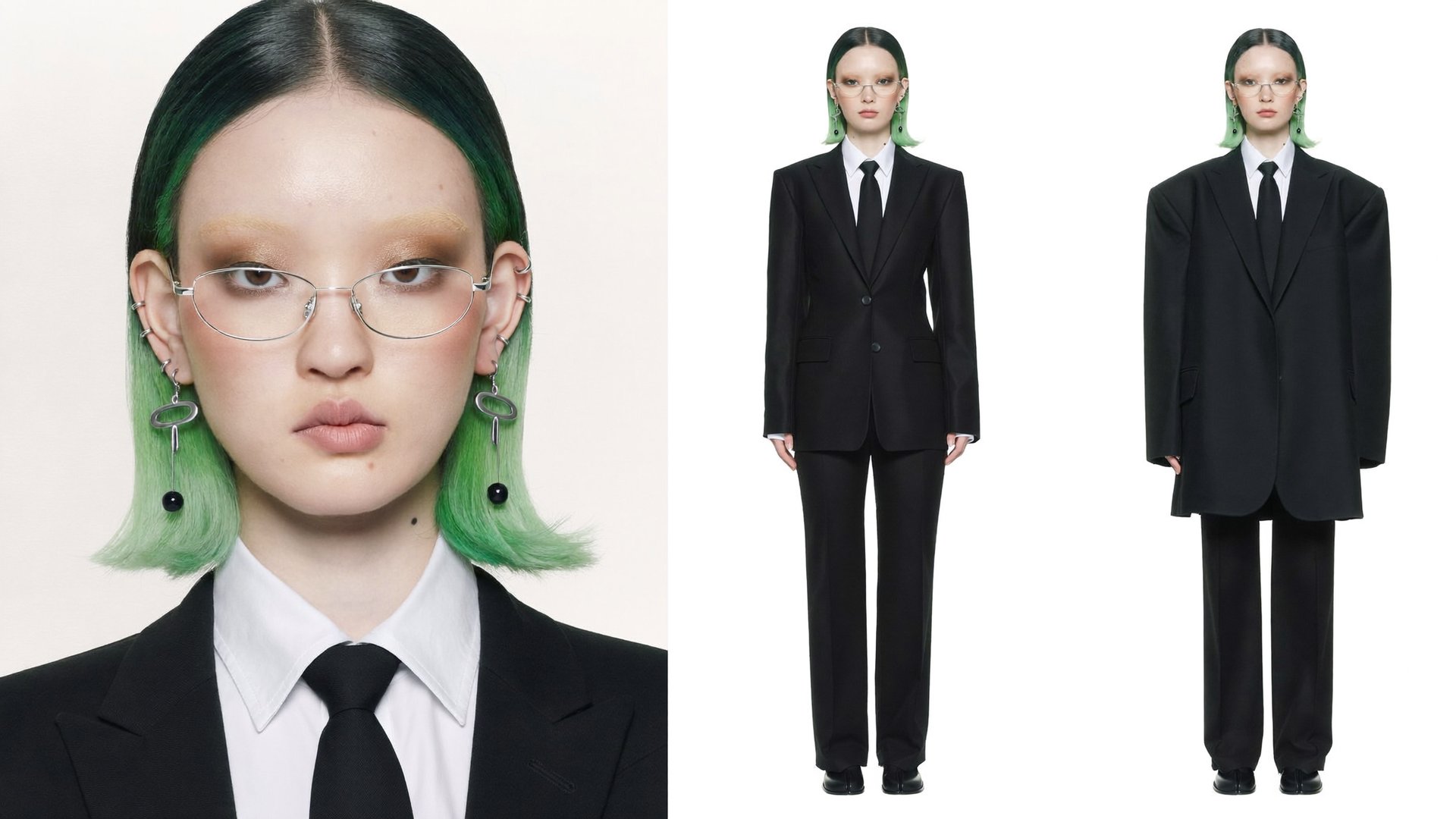
Step 1: Choose one reference image or character. The same photo, prompt, or scene description used across both models, so the comparison is fair. 
Reference Image

Step 2: Generate through Soul 2.0. Apply a preset, add Soul HEX if a color reference is available, write the prompt leading with aesthetic direction. 

Create a 16:9 high-fashion studio editorial photograph of one young woman standing alone at the centre of a flat coloured backdrop, surrounded by oversized cut flowers, holding an open laptop in one hand and raising the other to her face. Render it as a clean, sharp, high-saturation digital fashion image with a collage sensibility: real photographic subject, real photographic flowers, no landscape, no floor and no horizon anywhere in the frame. Place the camera high above her, roughly 2.6 metres from the ground and about three metres from her body, angled approximately thirty degrees downward so it looks down onto her. This elevated viewpoint is the defining characteristic of the image: her head and shoulders read large and near, her torso foreshortens as it recedes, and her legs and boots taper small at the bottom of the frame. She occupies about eighty percent of the frame height, centred horizontally, standing upright and facing the camera with her feet close together and both boots fully visible. Her chin is slightly lowered while her eyes look up into the lens. Use a 50mm full-frame- equivalent refined spherical lens with an approximately 40-degree horizontal field of view, clean rectilinear rendering and distortion off. Hold the whole frame in sharp deep focus: her face, the glasses, the wool weave, the laptop edges and every petal stay crisp. Give her a chin-length blunt black bob, centre-parted and sleek across the crown, with vivid spring-green lengths showing through beneath the black at both sides of her face and flicking outward at the jaw. She wears slim silver oval wire-frame glasses resting low on the bridge of her nose, both lenses clear and both eyes fully visible above the rims. Her makeup is pale- skinned with warm bronze-gold shimmer across the lids, softly bleached brows, flushed cheeks and a muted rose lip, with one tiny silver stud below her lower lip. Three small silver cuffs stack along the upper curve of her left ear; one long silver drop earring, an oval link on a thin bar, hangs beside her right jaw. Dress her in one heavily oversized black wool blazer with broad squared shoulders, wide notched lapels, two buttons fastened and sleeves reaching her wrists; a crisp white cotton shirt with a large pointed collar; a narrow black silk tie knotted tight; wide black wool trousers; and black leather square-toed boots. She holds the open laptop in her right hand, out to frame left at chest height, her palm under its base and fingers curled around the front edge. The lid is hinged open to about one hundred degrees and tilted away from the camera, so the high viewpoint sees both the plain outer back of the lid and, below it, the keyboard deck in perspective. The outer face of the lid is one completely smooth, blank, uninterrupted panel of brushed silver aluminium, entirely free of any logo, emblem, apple shape, fruit silhouette, glowing symbol, badge, engraved mark, sticker or lettering. This is a generic unbranded laptop of no identifiable make. Her left hand rises to the left side of her head, elbow lifted wide, fingers gracefully splayed and curved near her ear and the temple arm of her glasses, palm turned inward, her face and both lenses left completely clear. The backdrop is one seamless studio sweep in saturated turquoise, glowing to pale cyan-white in the upper-left corner and deepening to teal toward the lower corners and edges, with a soft natural vignette. It is a continuous flat field: no wall line, no seam, no ground plane, no shadow on the floor. Arrange the flowers as isolated oversized stems standing around her, some crossing in front of her body and some behind her shoulders, their stems curving up out of the bottom of the frame with no soil or vase. On frame left, place two huge coral-salmon Iceland poppies, each about seventy centimetres across, with thin crumpled crepe petals veined in deeper rose and a dense lime-green stamen crown; set one facing the camera in the lower left and crop the second at the extreme left edge. Above them, place one tall slender white flower spire and one small blue- violet cornflower with a scaly bud. On frame right, place two more coral poppies, one rising behind her right shoulder with light glowing through its petals and one lower in the corner, plus two large violet agapanthus clusters of narrow star-shaped florets, one compact round purple allium globe on a long bare stem at the far right, and one more tall white spire near the top corner. Light her with one large soft frontal source slightly above and to camera left, giving gentle even modelling on her face, soft short shadows under her jaw and lapels, a thin bright specular line along the top of the glasses frame and a crisp highlight down the edge of the open lid. Keep the petals softly translucent where light passes through them. There is no visible sun, flare or hard shadow. Hold every colour to its own surface: turquoise and cyan in the backdrop alone, coral-salmon in the poppies, lime green in their centres, violet in the agapanthus and allium, spring green in her hair, pure black in the suit and boots, crisp white in the shirt, and brushed silver in the laptop and jewellery. Keep saturation high and clean with no single tint washing the frame. Differentiate materials clearly: dense matte wool with visible twill, crisp cotton poplin, satin silk tie, brushed aluminium, polished silver, papery crepe petals and smooth green stems. Finish with a clean modern digital capture character, restrained contrast and a faint soft glow in the brightest corner. Exactly one person is present, and every surface in the frame is free of text, logos, numbers and signage. The laptop lid stays a blank unmarked silver panel with nothing on it. Her hands have five fingers each, her arms are correctly proportioned to the high viewpoint, the laptop stays whole and firmly in her grip, and each flower connects to one continuous stem.
Soul 2.0

Step 3: Generate through Nano Banana Pro. Upload the same reference, write the same core prompt, adjusted only for how each model expects input.

Nano Banana Pro

Step 4: Compare the two results.

Soul 2.0 followed the prompt more closely, especially the high-angle perspective, asymmetric composition, laptop placement, and editorial styling. Nano Banana Pro kept the character and overall concept consistent but simplified the composition, made it more symmetrical, and changed several spatial details from the prompt.

Price Comparison

Price Comparison

Model

Credits

Approx. Cost

Soul 2.0

0.125

$0.006

Nano Banana Pro 2K

2

$0.10

Nano Banana Pro 4K

4

$0.20

5 Tips for Better Results

  • Keep one Moodboard per Soul 2.0 series to hold the same visual direction across generations.
  • Use Soul HEX for color control instead of relying only on color descriptions in the prompt.
  • Train Soul ID before a character-based series if the same face needs to stay consistent.
  • Be specific with Nano Banana Pro prompts: define the subject, composition, action, location, and style.
  • Use exact constraints when needed: specify framing, camera details, text in quotation marks, and anything the model should avoid.

Soul 2.0 vs Nano Banana Pro: Which AI Image Model Should You Use?

Try Soul 2.0

Got any questions left?

Yes. It runs on Higgsfield with up to 4K generation available through credits.
Nano Banana Pro is faster for a first generation, since it skips the character training step Soul ID needs. Per image, Nano Banana Pro runs about 2 credits, among the cheaper generations on the platform.
Yes. A common workflow uses Soul 2.0 to establish the character and the aesthetic direction, then Nano Banana Pro to refine specific details, text, product accuracy, or an object-level edit, on top of that generation.
Nano Banana Pro. Text rendering inside a generated image is one of its more reliable features, ahead of Soul 2.0's core strengths.
Soul 2.0, through Soul ID. A trained identity carries across every image in a series without drifting, which single-reference tools tend to lose over multiple generations.
Use one Moodboard for the entire series instead of a new one per image. It locks in the aesthetic direction, lighting, and color register so every generation reads as part of the same shoot.

by Higgsfield