Creator Hub
Back

How to Make Restaurant Video Ads with AI (Full Guide)

Higgsfield
14 min

To make a restaurant video ad with AI, start with a photo of your real dish and turn it into a short clip with a small camera move or light steam. Then add a hook, an offer, a call to action, captions and sound, check the food against the photo, and export vertical 9:16 versions. Film guests and staff yourself.

Key Takeaways

  • A restaurant video ad should start from a photo of the real dish. AI adds motion such as steam or a slow zoom toward the dish, and you check that the ingredients, portion and plating still match what guests receive.
  • Film guests, staff and the dining room yourself. AI adds the dish’s motion, and it can lay out the text and captions that you write.
  • Instagram Reels, TikTok and YouTube Shorts all favor vertical 9:16 video. Meta advises keeping the bottom 35% of a Reels ad free of text and logos, and Google calls 9:16 the format best suited to Shorts.
  • Build each ad around one reason to visit, such as a new dish, a lunch offer or delivery. Give it one next step, such as booking a table or ordering, with a link that opens that exact page.

How Do You Make a Restaurant Video Ad with AI?

Making a restaurant video ad with AI takes seven steps. Start with a photo of your real dish, add motion with an image-to-video tool, then add your own text and sound. Export a 9:16 version for Instagram Reels, TikTok and YouTube Shorts.

  1. Pick the ad format. Decide what the ad sells: a new dish, a lunch special, delivery or an evening event.
  2. Prepare your material. Take a clear photo of the dish and write down the offer, price and dates.
  3. Write the prompt. Describe the motion you want and list what must not change in the dish.
  4. Generate two or more versions. Make at least two versions of each clip so you have a choice.
  5. Check every version against the real plate. Reject any clip where the food changed.
  6. Add text, captions and sound. Put the hook, the offer and the call to action on screen.
  7. Export a version for each app and run the final check. Keep text out of the areas the app covers.

Which Restaurant Video Ads Work Best?

A restaurant video ad works when it matches a single reason to visit: a new dish, an offer with a deadline, delivery or an event. Each format below needs a different shot and a different call to action, so pick one per ad instead of combining them. We did not test these formats against each other. The table lists them by purpose, not by results.

Which Restaurant Video Ads Work Best?

Format

When you need it

What’s in the frame

Call to action

New dish

A dish joins the menu

The dish up close, its name, “New”

Book a table

Lunch or daily special

A weekday offer with a set price and hours

The dish, the price, the hours

Come in today

Seasonal or limited-time menu

A holiday, a season, a short run

The dish and the last day of the offer

Try it before [date]

Delivery and takeout

You want more online orders

The dish, your real packaging

Order now

Evening event or happy hour

Bars, live music, tasting nights

Drinks and the room, filmed by you

Reserve a spot

Behind the kitchen

You want to show who cooks

Real cooks at work, filmed by you

Follow us

For the visual side of a food shot, such as hero, macro, pour and steam, see our guide on food product video ads. This guide focuses on what changes for a restaurant: the offer, the location and the people.

Hook Examples for Food Ads

A hook is the first line on screen. It names the dish or the reason to come, and it fits on one line of a phone screen. Examples to adapt:

  • “New on our menu this week: [dish]”
  • “[Dish] is back for the winter”
  • “Lunch special: [dish] + drink for [price]”
  • “Made fresh every morning: [dish]”
  • “Only until Sunday: [dish]”
  • “Your Friday night table is waiting”
  • “Order [dish] tonight, delivered hot”
  • “The dish our regulars order first”

Each hook is a promise, so use it only if it’s true for your restaurant. “Made fresh every morning”, “delivered hot”, the end date of an offer and what your regulars order must all be true.

What Do You Need Before You Start?

Before you start, you need a clear photo of the real dish, the exact offer and the place where the ad will run. The logo, sound and captions come later. Gather this list first, so you don’t stop in the middle of generating.

Gather Your Materials

  • A photo of the real dish. Clean the phone lens, and use soft window light and no heavy filters. Keep the whole plate in frame and move anything distracting out of the shot. Leave space above and below the dish for a vertical crop.
  • The offer, in writing. Dish name, price, dates and hours, exactly as they will appear on screen.
  • The call to action. Book, order, visit or call, and the link or address it leads to.
  • Your logo and restaurant name. For the last frame.
  • Where the ad runs. Instagram Reels, TikTok, YouTube Shorts or all three, since the safe areas for text differ.
  • Permission for any people on camera. If staff or guests appear in footage you film, get their consent.

What to Film Yourself and What to Leave to AI

Real footage covers the people and the place. AI covers the dish’s motion and the layout of the text you write. Here is how to split the work:

What to Film Yourself and What to Leave to AI

What’s in the ad

Shoot it yourself

Let AI do it

The dish

Photograph the real plate

Add motion: steam, a slow zoom toward the dish, light moving across the sauce

Guests and staff

Film real people, with consent

Don’t generate them

Dining room and exterior

Film or photograph the real space

Animate your photos with a gentle camera move

Offer, prices, dates

Write them yourself

Lay out text and captions

Sound

Record kitchen sounds or your own voice

Music or a voiceover

For turning photos of the room into short clips, see how to create AI real estate videos from photos: the same approach works for a dining room.

How Do You Turn a Dish Photo into a Video Ad?

A dish photo becomes a video clip in four steps. Upload the photo to an image-to-video tool. Describe one simple motion and list what must stay the same. Generate two or more versions. Keep only the ones where the dish still matches the plate. Here is our example, step by step.

Higgsfield is a generative platform for creative production, with 35+ frontier models for generating images and turning them into video scenes. For this example, we used Higgsfield’s image-to-video generator with the dish photo as the reference. To compare other tools, see our list of the 9 best AI tools for restaurant ads.

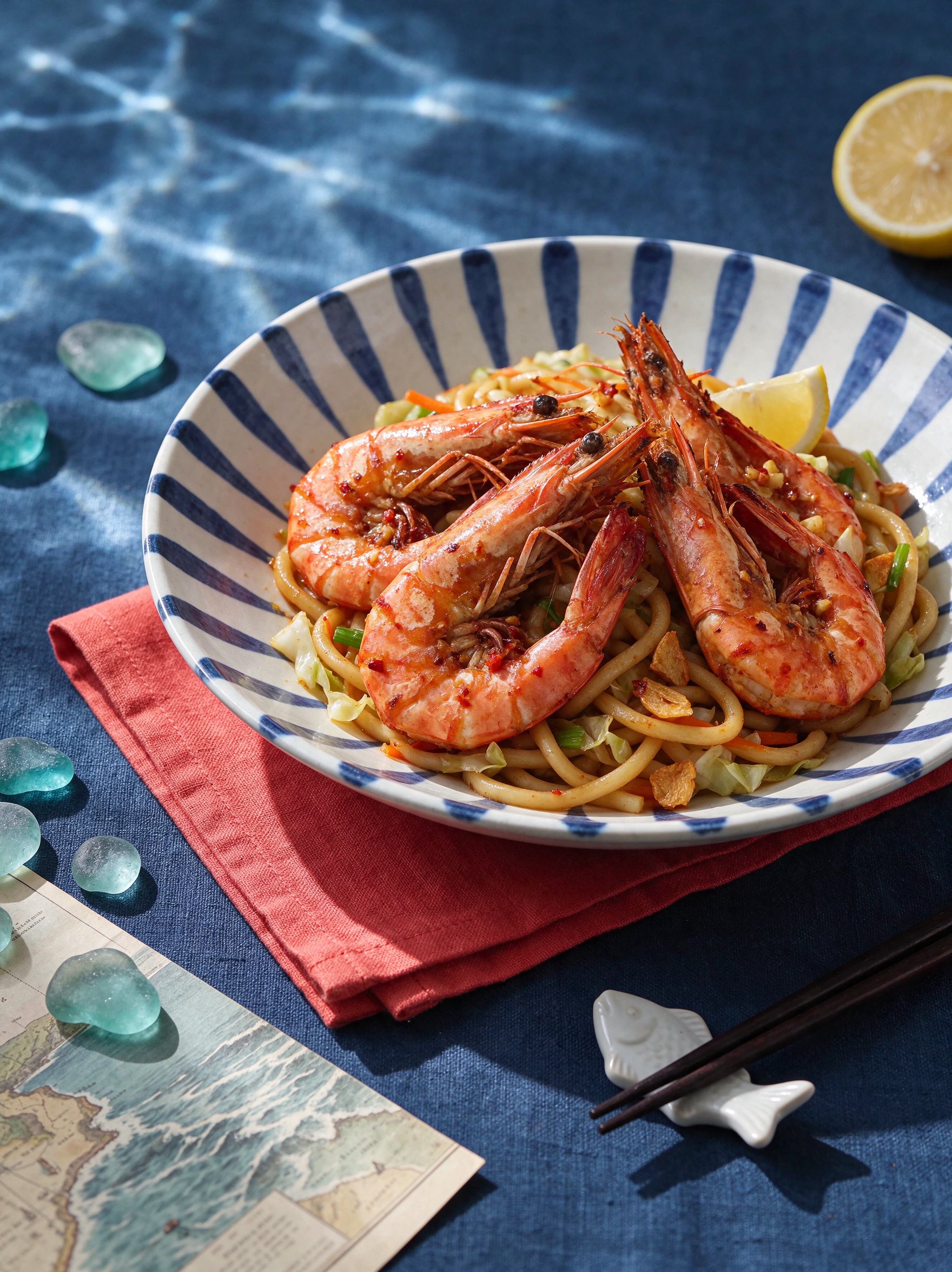
A note on our example: we did not work with a real restaurant, so we generated the starting photo of the dish, tiger prawns in a chili-garlic glaze on wok-fried udon, and invented the restaurant and its offers. For your ad, use a photo of your real dish: guests should get what they saw in the ad.

Step 1: Start with the Dish Photo

The photo is the reference for everything that follows: ingredients, portion, plate and colors.
Step 2: Write the Prompt

A good prompt for a dish has four parts:

  • The motion: one simple move, such as a slow zoom toward the dish, a slow sideways move or light steam.
  • The light: soft side light or warm evening light, described the same way for every clip.
  • What must not change: the ingredients, portion, plating, plate and colors, plus “do not add or remove anything”.
  • What to leave out: no people, no hands, no text, and empty space where your text will go.

Keep the camera close to the angle of the photo. Avoid a full orbit around the dish: a single photo doesn’t show the back of the plate, so the AI has to invent it, and invented food makes an ad look fake.

We made two clips from one photo, each with three shots. Below is the part of each prompt that describes the shot where the dish matches the photo: the whole dish on the table in clip A and a close-up of its texture in clip B.

Clip A, the whole dish:

The finished dish on the styled table exactly as in image 1, a 45-degree high angle; rippling caustic water light drifts slowly across the linen, the plate and the glossy prawns; a slow smooth push-in from the full table to a closer hero frame of the plate, the whole plate still visible; a glint passes over the lemon; hold the final frame calmly. No people and no hands anywhere; no text, no logos.

Clip B, the close-up:

Image 1 defines the dish, plate, table, props and light exactly: 100% match in every shot. Extreme macro; a probe lens glides slowly along the back of one glazed prawn from head to tail: glossy lacquered glaze, chili flakes, charred edges, tiny oil droplets; rippling caustic water light slides across the shell; very shallow depth of field. No people and no hands; no text, no logos.

Step 3: Generate Two Versions of Each Clip

We generated each clip twice, in 9:16 at 1080p with sound. Clip A is 15 seconds long and clip B is 12 seconds. Here are the takes we chose, without any editing:

Step 4: Compare Each Version with the Dish

Play each version next to the photo and check these points:

Step 4: Compare Each Version with the Dish

Check

What to look for

Ingredients

Nothing added, nothing missing

Portion

The same size as on the plate

Plate and table

Same shape and pattern, no warping

Colors

Sauce, crust and garnish match the photo

Motion

Steam is light and rises naturally, the camera moves smoothly

Here is how our two clips compare with the photo:

  • Clip A, last shot (from 9.5 s): the dish on the table matches the photo, with only light moving across it. This shot works for an ad.
  • Clip A, first two shots: a prawn falling from the sky onto a fork, then the ingredients floating down onto the plate. They look striking, but the photo shows neither scene, so the AI had to invent the food in motion. For an ad about a real dish, this is a risk.
  • Clip B, first shot (0 to 4 s): a slow close-up along one prawn. The glaze and chili flakes match the photo. This shot works for an ad.
  • Clip B, middle shot: sauce pouring over the prawns. The pour was generated, not filmed, and the sound adds a sizzle although nothing on the plate is frying.
  • Clip B, last shot: a second plate of noodles appears in the foreground. The prompt asked for a low close-up along the rim of the plate, and the AI drew another plate instead.

When you edit your ad, keep only the shots where the dish matches the photo.

If every version changes the food, skip generation for that shot: a slow zoom on the original photo in a video editor still gives you motion, and the dish stays exactly as photographed.

How Do You Add Text, Sound and an Offer?

Build your first restaurant ad around three text elements: the hook at the top in the first seconds, the offer in the middle, and the call to action with your name and address or link at the end. Add captions for any spoken words, add sound, and export a 9:16 version for each app.

Text and Offer on Screen

Keep each ad to three short lines of text:

  1. The hook, at the start: what the dish is or why to come.
  2. The offer, in the middle: price, dates or hours, exactly as on your menu.
  3. The call to action, at the end: “Book a table”, “Order now” or “Visit today”, with the name of the restaurant.

Sound and Captions

Use music you have the rights to, real kitchen sounds or a short voiceover. Don’t add a crunch, sizzle or pour that the viewer doesn’t see happen on screen: a sound without its action is another detail that makes the ad feel staged. If the ad has a voiceover, add captions, then watch the ad muted to check that the dish, the offer and the next step are still clear. Google recommends sound in Shorts ads, such as music, a voiceover or both, and says it has been shown to increase conversions by over 20%.

Versions for Each App

All three apps favor vertical video, but each covers a different part of the screen with buttons and captions:

Versions for Each App

Where the ad runs

Format

Length

Where to put text

Source

Instagram and Facebook Reels

9:16

See Meta’s Ads Guide for your objective

Keep the bottom 35% of the frame free of text and logos

Meta

TikTok feed ads (not Spark Ads, which boost an existing post)

9:16 recommended, at least 540×960 px

Up to 10 minutes

Depends on caption length: check TikTok’s templates that show which areas the app covers

TikTok

YouTube Shorts

9:16

Under 60 seconds; 10 to 30 seconds for ads that ask for an action

Check the preview on a phone

Google

Specs checked on November 17, 2026. Platform requirements may change.

Make sure the link behind the ad opens what the call to action promises: “Book a table” goes to your booking page, “Order now” to your ordering page.

Turning Our Test Clips into Ads

Our clips have no text yet. Here is how the two shots that passed the check could become two ads for our made-up restaurant:

Turning Our Test Clips into Ads

Ad

Shots

Hook

Offer

Call to action

New dish

Clip B close-up, then clip A dish on the table

“New on our menu: chili-garlic prawn udon”

Available from [date]

Book a table

Lunch

Clip A dish on the table

“Prawn udon for lunch”

[price] on weekdays, [hours]

Order now

How Do You Keep AI Food Looking Real?

AI food looks real when the motion is small, the prompt lists what must stay the same, and every clip is compared with the real plate before you publish. When a version fails, simplify the motion and generate again, or use a gentle zoom on the original photo.

How Do You Keep AI Food Looking Real?

What goes wrong

How to fix it

The dish gains or loses an ingredient

Name every ingredient that must stay, add “do not add or remove anything”, and ask for less motion

The portion looks bigger or smaller

Ask for a slower zoom or a still camera, and compare the first and last frames

Steam looks like smoke

Ask for “light, thin steam”, and skip steam for cold dishes

The food looks plastic or too glossy

Describe natural light instead of a commercial look

Sauce or cheese moves strangely

Ask for a still moment with only light and steam moving

The plate, cutlery or table warps

Keep the background simple and the camera still

Text or a logo appears garbled in the clip

Generate without text and add it in the editor

The background turns into a different room

Keep the camera close to the photo’s angle, or film the room yourself

Signs or menu lettering in the background warp

Crop them out of the photo, or replace the shot with real footage

Serving or cutting looks wrong

Don’t generate the action: film the real one in your kitchen

A second plate or extra food appears

Ask for one plate only, avoid asking for details in the foreground, and cut the shot if it still happens

Before you publish, ask someone from the kitchen to confirm the garnish, portion size and presentation in the final ads.

Checklist Before You Publish

Check this list on a phone:

  • Every clip passed the comparison with the dish photo from Step 4.
  • Steam appears only on hot dishes.
  • Paused at the start, middle and end, no frame shows warping.
  • The price, dates, hours and address are correct.
  • All text sits outside the areas the app covers and is readable on a phone.
  • The link opens the page the call to action promises.
  • The AI disclosure is set where the platform requires it (see the FAQ).
  • Ads for a bar or for drinks with alcohol follow the platform’s age and country rules.

For the general checks every ad needs, such as rights, claims and a working link, see how to make video ads for your small business with AI.

How to Make Restaurant Video Ads with AI (Full Guide)

Try Marketing Studio

Got any questions left?

by Higgsfield