Creator Hub
Back

Best AI Image Models for Fashion and Brand Content in 2026

Higgsfield
12 min

For fashion and brand content in 2026, choose the model by the job. Higgsfield Soul 2.0 fits editorials with one recurring model. Nano Banana Pro and Kling O1 fit work from reference photos. Seedream 5.0 Pro and FLUX 3 fit precise edits. GPT Image 2.5 fits images with text, and Recraft V4.1 fits product mockups in brand colors. We ran one outfit prompt through all seven models and noted which details each one kept.

Best AI Image Models for Fashion and Brand Content in 2026

Model

Best for

Matched prompt details

Visible errors

Credits per image (approx. cost)

Higgsfield Soul 2.0

Editorials with one recurring model

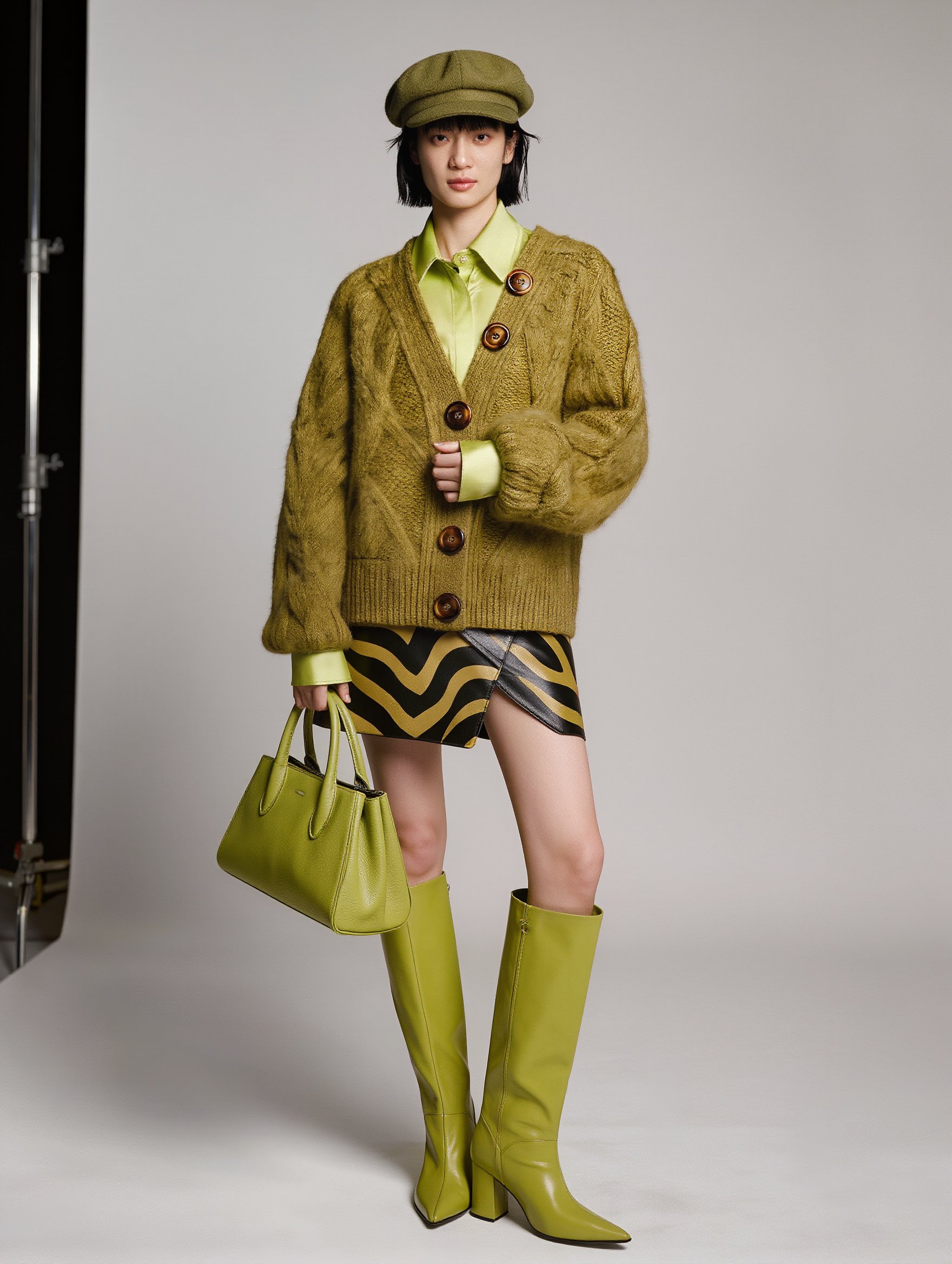
Collar, cuffs, wavy stripes, wrap hem, boots, cap

Six buttons instead of five

0.125 ($0.006)

Nano Banana Pro

Combining a garment and a model from photos

Collar, cuffs, wavy stripes, wrap hem, boots

Four buttons, beret instead of cap, extra pockets

2 ($0.10)

Kling O1

Series built from reference images

Collar, cuffs, wrap hem

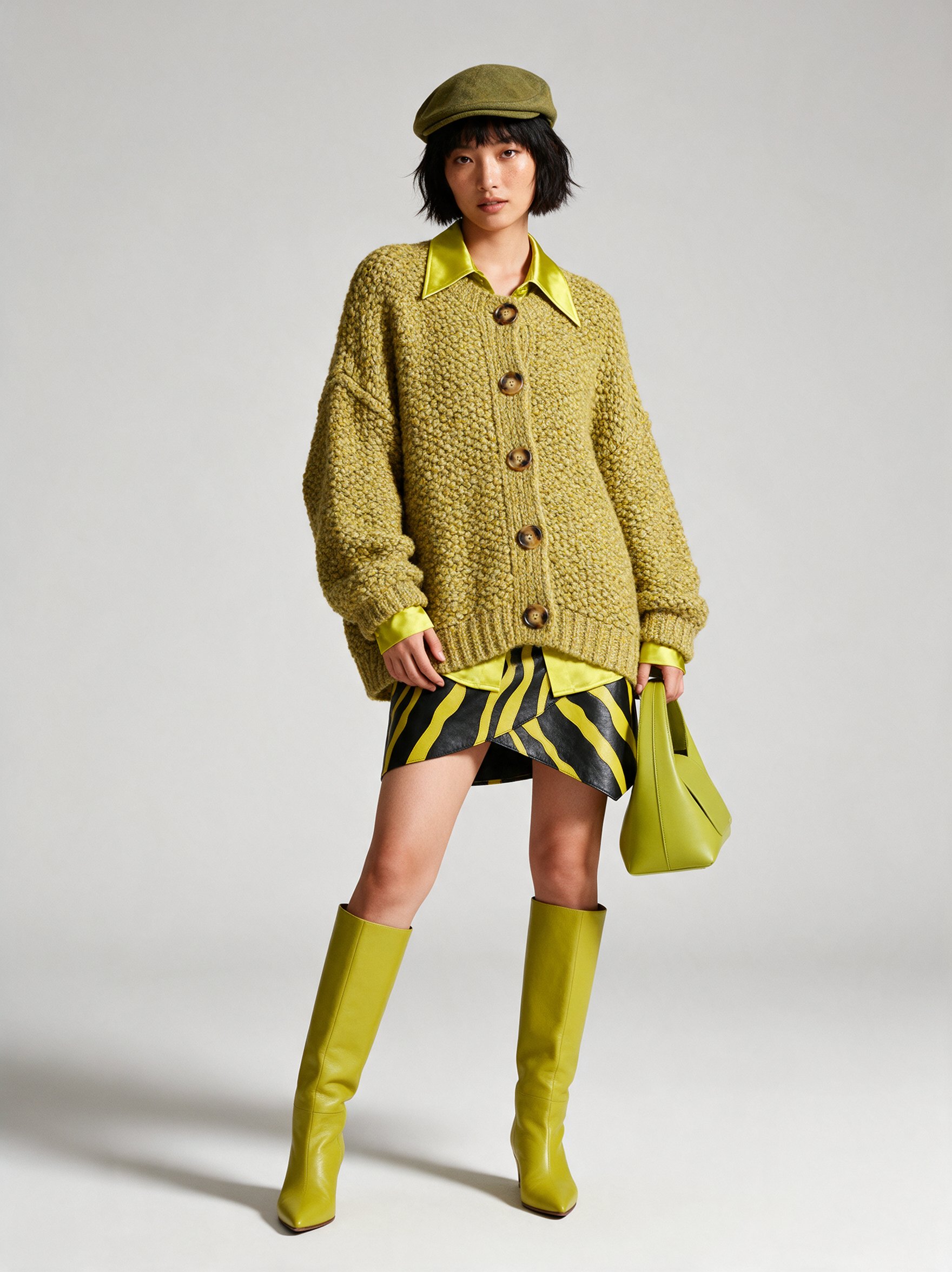
Two buttons off the band, block heels, zigzag stripes, light stand in frame

0.5 ($0.02)

Seedream 5.0 Pro

Recoloring and material swaps

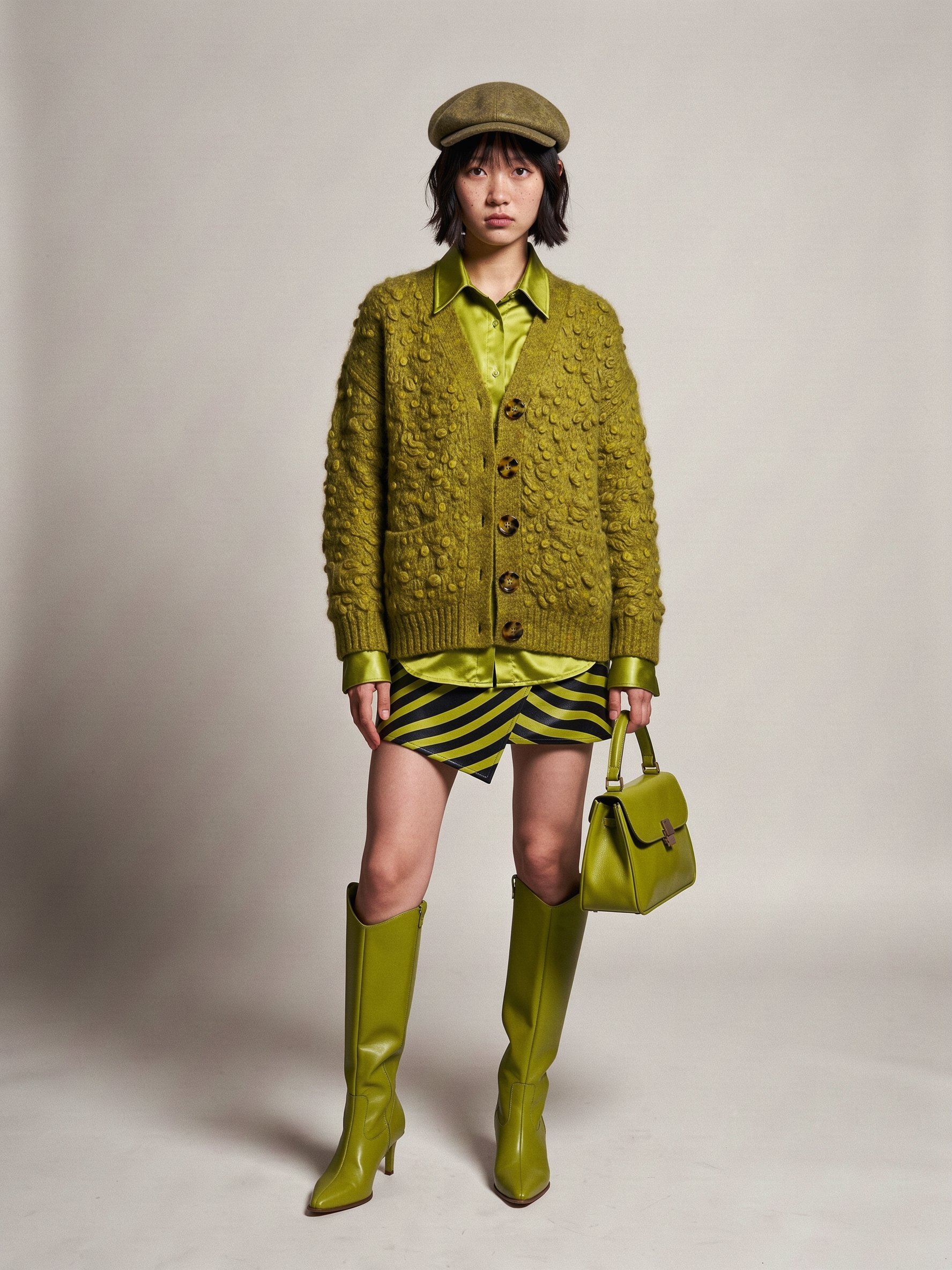
Five buttons, collar, cuffs, wrap hem, boots

Straight stripes, soft bag

3 ($0.15)

FLUX 3

One garment from several reference angles

Five buttons, collar, cuffs, structured bag, boots, cap

Straight stripes

3 ($0.15)

GPT Image 2.5

Campaign graphics with text

Five buttons, collar, cuffs, wavy stripes, wrap hem, boots, cap

None in the checked details

3 ($0.15)

Recraft V4.1

Product mockups in a set palette

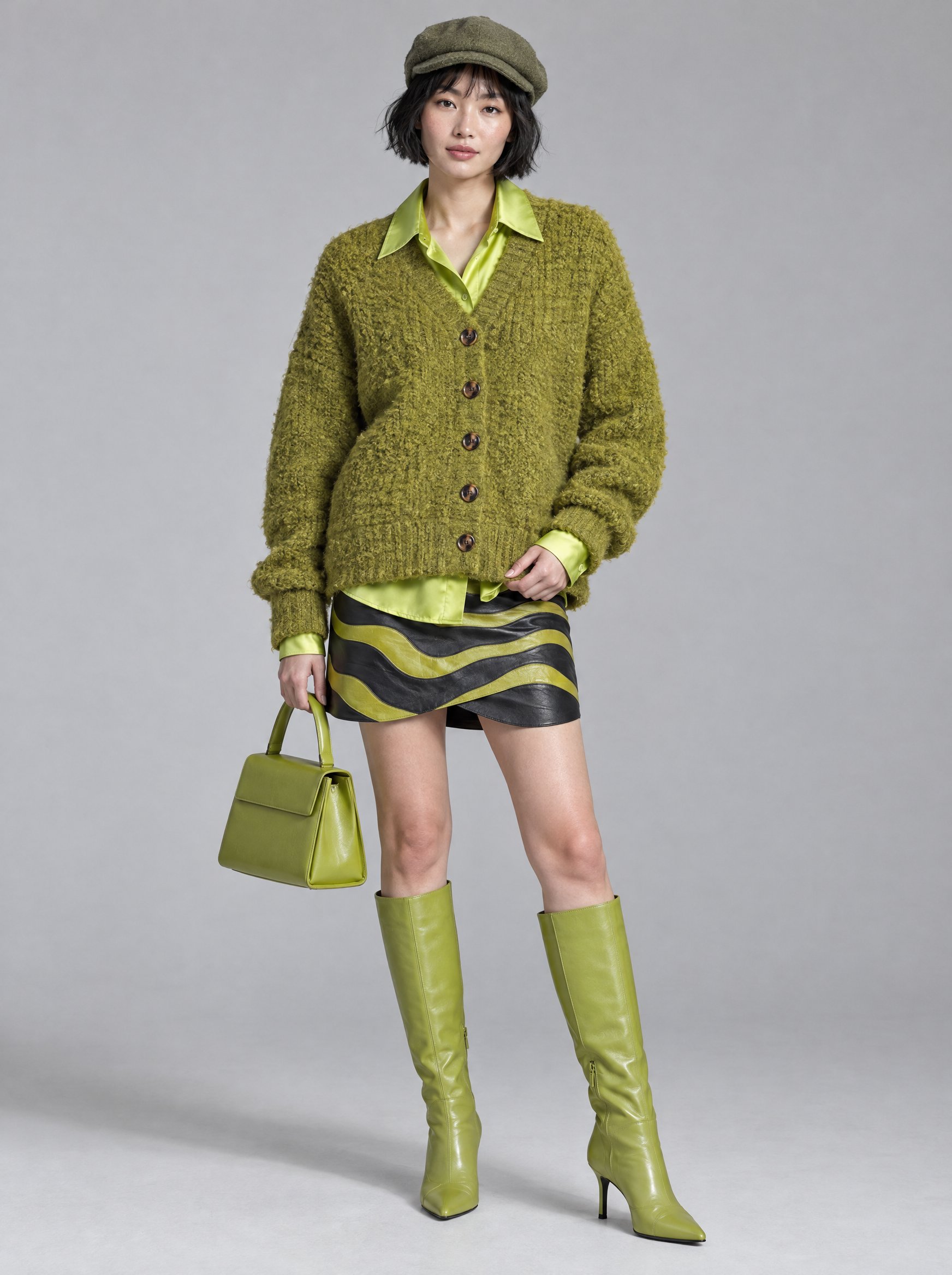
Five buttons, collar, cuffs, wavy stripes, wrap hem, boots

Mint stripes instead of chartreuse, hard light on the floor

8 ($0.39)

Pricing checked on November 5, 2026. Regular credits per image on Higgsfield for a 3:4, 2K image. For Recraft V4.1, 2K is the Pro tier; the Standard tier costs 1.25 credits ($0.06) and gives a 896 × 1216 px image at 3:4. Approx. cost uses $49 for 1,000 credits. Prices and plan details may change.

The models are grouped by task: fashion images with people first, then precise editing, then brand graphics.

How We Tested the Models on One Outfit

We gave all seven models the same English prompt describing one outfit with countable details. Every model ran on Higgsfield with a 3:4 frame and 2K resolution. Each model made four images, and we show the one we picked, so each result is our pick of four, not a first try.

  • Platform: Higgsfield, Image section, no presets, styles or prompt enhancement
  • Attempts: four per model, one picked
  • What we checked: button count and placement, stripes, the shirt collar and cuffs, skirt hem, bag, boots and cap against the prompt, and objects that are not in the prompt

We list only details anyone can check in the image. Judge realism and fabric texture from the result shown in each model’s section below.
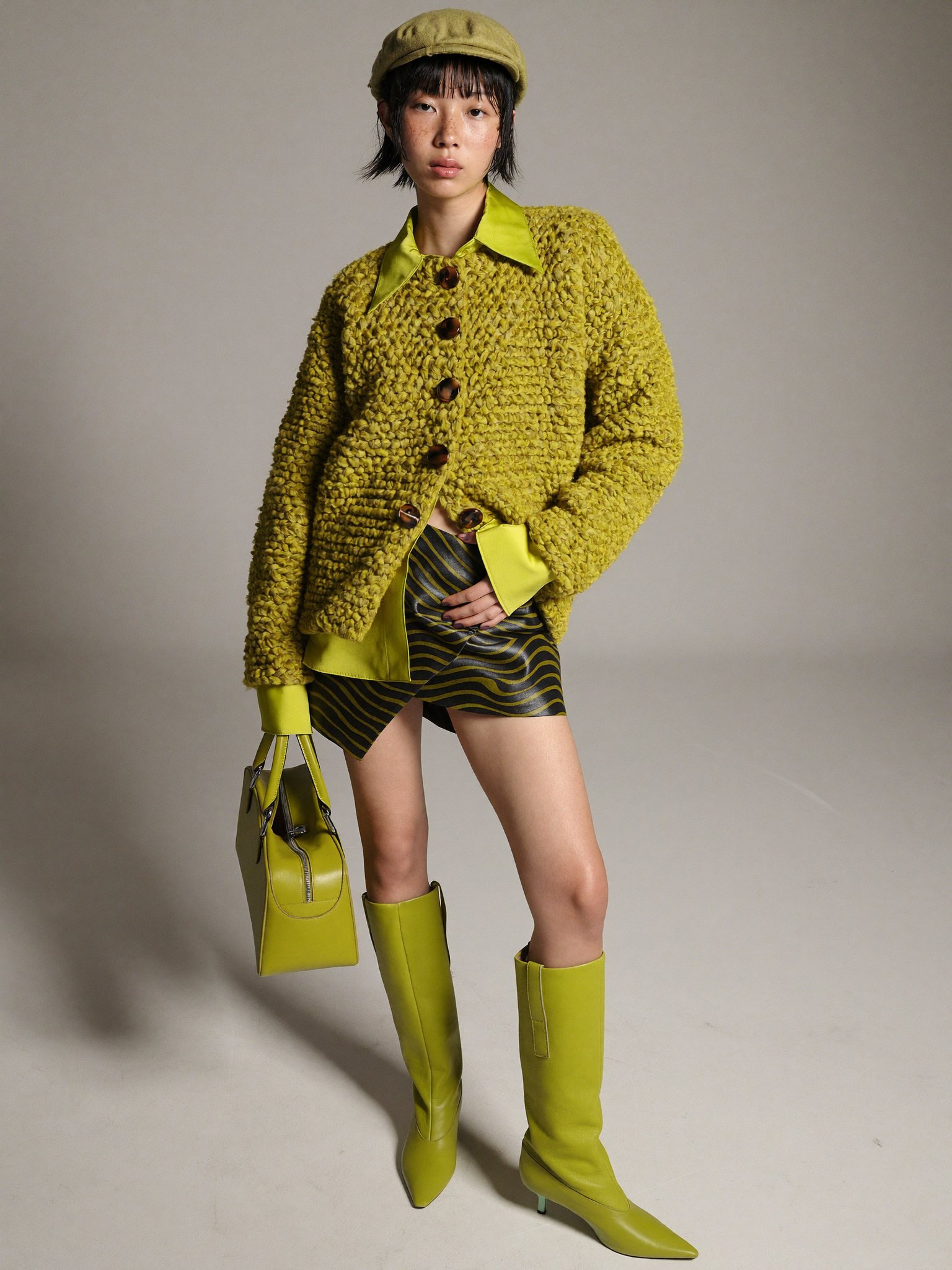
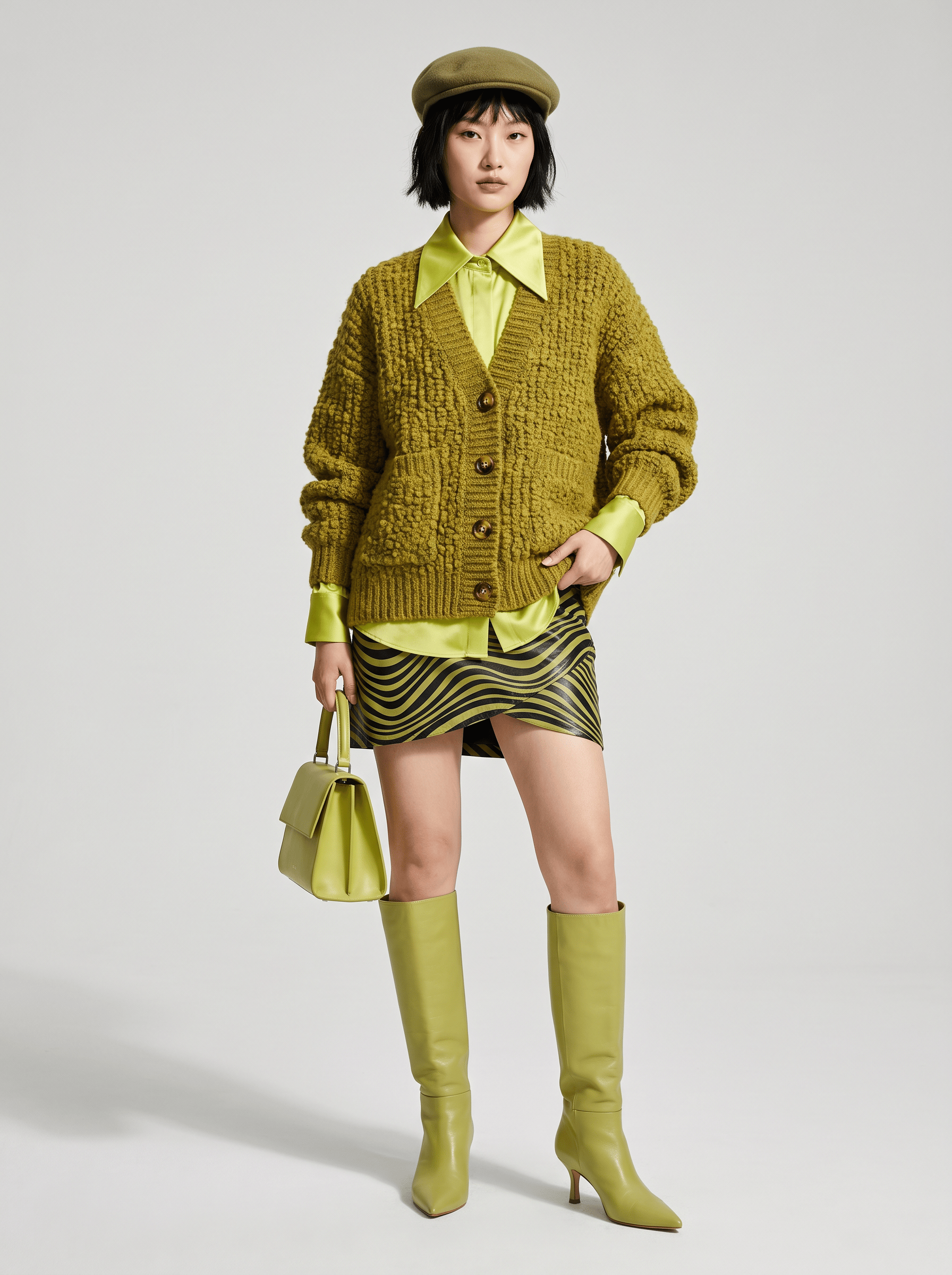
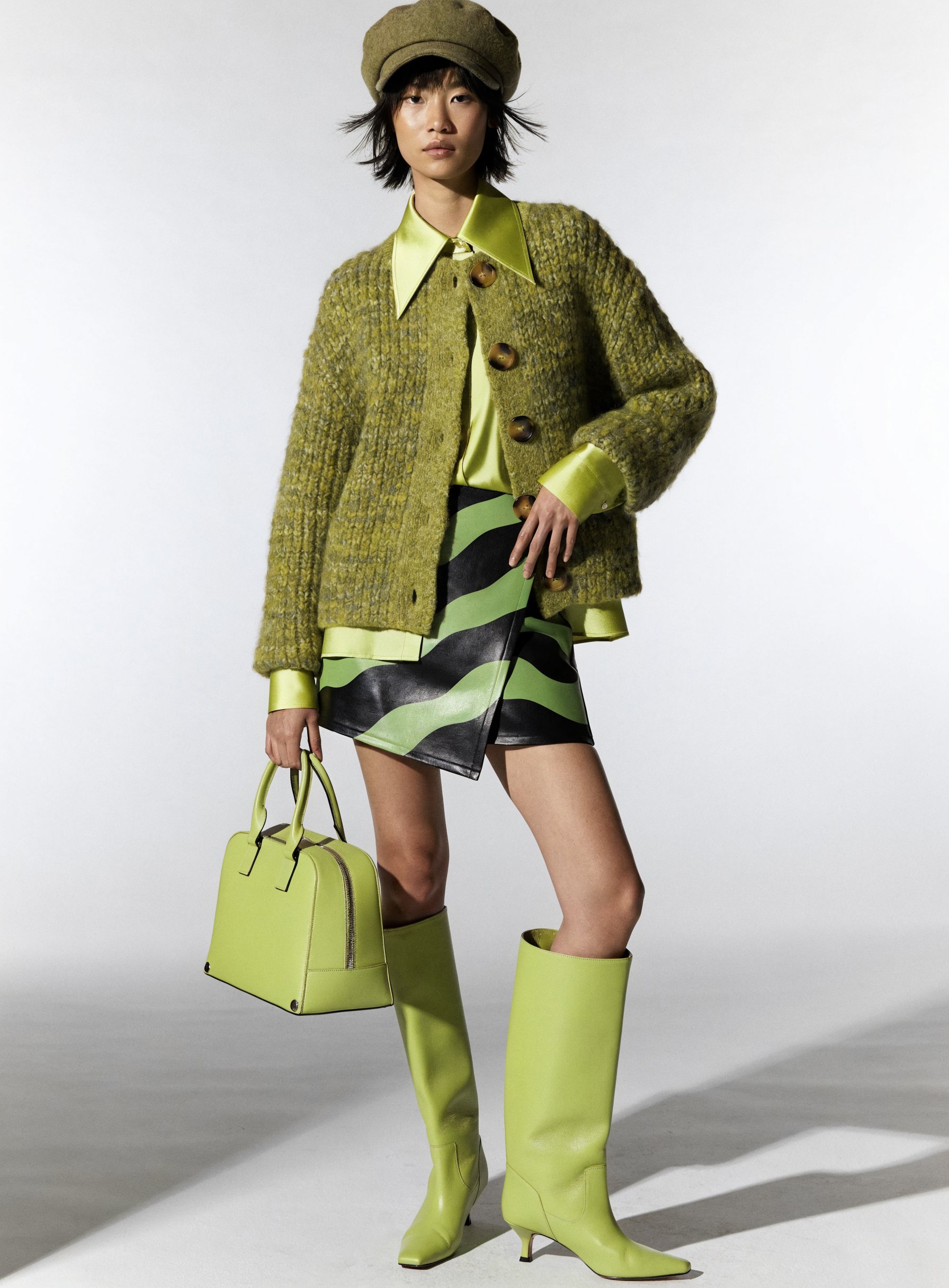
A full-length fashion lookbook photograph of a young East Asian woman in her mid-twenties standing on a seamless light-grey studio backdrop, framed from the top of her head to the toes of her boots, her face and both hands clearly visible. She wears an oversized chunky bouclé knit cardigan in olive-chartreuse with dropped shoulders and long sleeves, buttoned with five large round tortoiseshell buttons, the looped wool texture clearly visible; underneath, an acid-lime silk satin shirt whose pointed collar lies over the cardigan neckline and whose cuffs and shirttail peek out at the sleeves and hem; a black and chartreuse wavy-striped leather mini skirt with an asymmetric wrap hem; lime-green knee-high leather boots with pointed toes and slim heels; a soft olive wool flat cap. Her left hand holds a structured lime-green leather top-handle bag at her side; her right hand rests lightly on the cardigan hem, fingers relaxed and natural. Short choppy black bob with wispy bangs, natural skin with visible texture, minimal makeup, calm confident expression, looking straight into the camera, relaxed stance with her weight on one leg. Lighting: one large soft key light from the left at a grazing side angle with gentle fill from the right, so the knit loops, the satin sheen and the leather grain all read clearly; a soft shadow on the floor. Camera at chest height with an 85mm lens, the whole outfit in sharp focus, true-to-life colors, clean editorial lookbook style. No logos, no text.
How We Tested the Models on One Outfit

Setting

Value

Aspect ratio

3:4

Resolution

2K

GPT Image 2.5

Flare, quality High

Recraft V4.1

Pro tier, Vector mode off

The table below shows what each picked image kept from the prompt and where it changed it. Four of the seven images have five buttons in the right place, and four keep the wavy stripes. The details that changed most often were the button count and the stripe shape.

Best AI Image Models for Fashion and Brand Content in 2026

Model

Buttons

Stripes

Other details

Higgsfield Soul 2.0

Six instead of five

Wavy, as prompted

Collar over the cardigan, cuffs and shirttail visible, wrap hem, pointed boots with slim heels, flat cap

Nano Banana Pro

Four instead of five

Wavy, as prompted

Collar and cuffs visible, wrap hem, pointed boots; beret instead of a flat cap; patch pockets not in the prompt

Kling O1

Five, top two off the button band

Zigzag instead of wavy

Collar and cuffs visible, wrap hem; block heels instead of slim heels

Seedream 5.0 Pro

Five, as prompted

Straight diagonal instead of wavy

Collar over the cardigan, cuffs visible, wrap hem, pointed boots; soft bag instead of a structured one

FLUX 3

Five, as prompted

Straight diagonal instead of wavy

Collar and cuffs visible, structured top-handle bag, pointed boots with slim heels, flat cap

GPT Image 2.5

Five, as prompted

Wavy, as prompted

Collar and cuffs visible, wrap hem, pointed boots with slim heels, flat cap

Recraft V4.1

Five, as prompted

Wavy, light mint instead of chartreuse

Collar over the cardigan, cuffs visible, wrap hem, pointed boots; hard light stripes on the floor instead of a soft shadow

Higgsfield Soul 2.0: Best for Editorials With One Recurring Model

Higgsfield Soul 2.0 is Higgsfield’s own image model, described as “built for creative, fashion-aware, culture-native generation.” It understands fashion terms and works with Soul ID, so the same person can appear across a whole lookbook.

Best for: a small brand shooting a seasonal lookbook with one recurring face.

What you get:

  • Soul ID: a character trained on 20 to 80 photos of one person, then reused in new scenes
  • Curated style presets for a fixed look across a series
  • Color Transfer: ready-made color palettes or a palette built from your own reference image
  • Output in 1.5K or 2K, in seven aspect ratios, including 3:4 and 9:16

Limits that remain:

  • One reference image per generation
  • No 4:5 aspect ratio

In our test: Six buttons instead of five. The satin collar over the cardigan, visible cuffs and shirttail, wavy-striped wrap skirt, pointed boots with slim heels and flat cap match the prompt.

Nano Banana Pro: Best for Combining a Garment and a Model From Photos

Nano Banana Pro is Google’s image model built on Gemini 3 Pro. Google says it can combine up to 14 images and keep up to 5 people consistent, and its launch post shows a dress moved onto a mannequin from a reference photo.

Best for: a content manager who has a product photo and a model photo and needs them in one frame.

What you get:

  • Up to 14 input images and up to 5 consistent people, per Google
  • Localized edits, plus changes to camera angle, focus and color grading
  • Legible text inside the image, a strength Google highlights
  • Output in 1K, 2K or 4K on Higgsfield, including 4:5

Limits that remain:

  • No style preset library: the look comes from the prompt and references
  • No HEX palette setting on Higgsfield

In our test: Four buttons instead of five, a beret instead of a flat cap and patch pockets that are not in the prompt. The satin collar and cuffs, wavy-striped wrap skirt and pointed boots match.

Kling O1: Best for Series Built From Reference Images

Kling O1 is Kuaishou’s image model, called Omni Image 1.0 in Kling’s guide. It takes features from up to 10 reference images and, according to Kling, keeps main elements stable “even when generating across images or in series.”

Best for: a photographer turning one set of references into several social posts.

What you get:

  • Up to 10 reference images, per Kling
  • Text instructions to add, remove or change objects and people
  • Prompt edits to camera angle, shot size, expression, lighting and color tone
  • Style control from reference images

Limits that remain:

  • Output up to 2K on Higgsfield
  • No 4:5 aspect ratio on Higgsfield
  • No HEX palette setting on Higgsfield

In our test: Five buttons, but the top two sit off the button band. Block heels instead of slim heels, zigzag stripes instead of wavy ones and a light stand in the frame. The satin collar, cuffs and wrap skirt match.

Seedream 5.0 Pro: Best for Recoloring and Material Swaps

Seedream 5.0 Pro is ByteDance’s image model, launched on July 8, 2026. It edits by point and lasso selection, replaces color and material, splits an image into more than 10 layers and accepts HEX color codes.

Best for: a brand showing one jacket in several colorways without new shoots.

What you get:

  • Color and material replacement on a selected area
  • HEX codes or an external color swatch as color input
  • Layer separation into more than 10 layers
  • Multi-image fusion that keeps each person’s facial features, per ByteDance

Limits that remain:

  • ByteDance says there is “still room to improve in finer-grained text rendering and pixel-level editing consistency”
  • Output up to 2K on Higgsfield
  • No 4:5 aspect ratio on Higgsfield

In our test: Five buttons, the satin collar over the cardigan, visible cuffs, a wrap skirt and pointed boots match. The stripes are straight diagonal instead of wavy, and the bag is soft rather than structured.

FLUX 3: Best for One Garment From Several Reference Angles

FLUX 3 Image is Black Forest Labs’ image model for generation and editing. On Higgsfield it accepts up to 10 reference images and outputs up to 4K. Black Forest Labs pitches it as precise: “Everything you didn’t touch stays exactly where it was.”

Best for: an e-commerce team with front, back and detail shots of one garment.

What you get:

  • Up to 10 reference images
  • Edits limited to a selected box, with the rest of the image unchanged, per Black Forest Labs
  • Output from 768 px square to 4K, including 4:5
  • Up to 4 images per run

Limits that remain:

  • No HEX palette setting on Higgsfield

In our test: Five buttons, the satin collar and cuffs, a structured top-handle bag, pointed boots with slim heels and a flat cap match. The stripes are straight diagonal instead of wavy.

GPT Image 2.5: Best for Campaign Graphics With Text

GPT Image 2.5 is OpenAI’s image model, released on September 8, 2026, in two versions. Flare is the faster one, and Sunburst adds precision for detailed work. OpenAI highlights consistent details across multiple edits and edits that change only what you ask.

Best for: a social editor making a sale banner with the campaign name on it.

What you get:

  • Two versions: Flare for speed, Sunburst for detail
  • Consistent details across several rounds of edits, per OpenAI
  • Five quality levels on Higgsfield, from Low to Max
  • Output in 1K, 2K or 4K, with a transparent background option on Higgsfield

Limits that remain:

  • Sunburst takes longer to generate, per OpenAI
  • No HEX palette setting on Higgsfield

In our test: Five buttons, a flat cap, the satin collar and cuffs, a wavy-striped wrap skirt and pointed boots with slim heels match the prompt. We found no differences in the details we checked. GPT Image 2.6 launched on November 4, 2026. It is a

lso on Higgsfield, in Flare and Sunburst versions, and adds GIF and SVG output.

Recraft V4.1: Best for Product Mockups in a Set Palette

Recraft V4.1 is Recraft’s image model, released on May 14, 2026. It has a Utility mode that Recraft recommends for mockups and product listing photos, and on Higgsfield it takes a palette of up to 10 HEX colors.

Best for: a brand keeping flat lays and social graphics in its own colors.

What you get:

  • A palette of up to 10 HEX colors, a set background color and Color Transfer palettes
  • Four modes: Standard, Vector, Utility and Utility Vector
  • Utility mode for cleaner, front-facing product shots
  • Vector output for logos and lettering

Limits that remain:

  • No reference image input on Higgsfield
  • Output up to 2K on Higgsfield

In our test: Five buttons, the satin collar and cuffs, a wavy-striped wrap skirt and pointed boots match. The stripes are light mint instead of chartreuse, and the floor shows hard light stripes instead of a soft shadow.

How Do You Keep a Fashion Series in One Style?

Fix three things before you generate: the references, the person and the colors. Reuse the same reference images, keep one trained character or the same face reference, and pass brand colors as HEX codes where the model accepts them. Then keep one prompt structure and change only the scene.

How Do You Keep a Fashion Series in One Style?

Model

Reference images

Same person across images

Color control

Higgsfield Soul 2.0

1

Soul ID

Color Transfer palettes

Nano Banana Pro

Up to 14

Up to 5 people, per Google

Prompt and references

Kling O1

Up to 10

Feature retention across a series, per Kling

Prompt and references

Seedream 5.0 Pro

Supported, limit not published

Keeps facial features when fusing images

HEX codes or a swatch

FLUX 3

Up to 10

From references

Prompt and references

GPT Image 2.5

Supported, limit not published

Consistent details across edits

Prompt and references

Recraft V4.1

Not on Higgsfield

Not a stated feature

Up to 10 HEX colors or Color Transfer palettes

Use the Same References

Save one folder of approved references for the season: the garment from several angles, the model, the location and one mood image. Use the same files for every image in the series. Models that accept more references, such as Nano Banana Pro, Kling O1 and FLUX 3, can take the garment and the person in one run.

Keep One Model Across the Series

A recurring face is what makes a set of images read as one campaign. On Higgsfield, Soul ID trains a character on 20 to 80 photos of one person, with one person per photo, a clear face and several angles. Only train a character on photos of a person who has agreed to it.

If you would rather not write a prompt for every image, Fashion Factory on Higgsfield is an alternative. It builds a photo set around a character in five steps: choose a template, pick a character, generate the first shots, add the clothing and get the photo set.

Keep One Color Story

Write brand colors as HEX codes, not as “warm beige” or “deep green,” where the model accepts them. Recraft V4.1 and Seedream 5.0 Pro take HEX codes directly. On Higgsfield, Soul 2.0 and Recraft V4.1 also have Color Transfer: pick a ready-made palette or upload a reference image to create your own color signature, then apply it to each image in the series. For other models, keep one color reference image in every run.

Keep One Prompt Structure

Keep the same order in every prompt: subject, garment, setting, light, lens, style. Change one block at a time. For example, keep the garment and light lines, and change only “studio backdrop” to “city street.”

Can AI Recreate Your Real Garment?

Not from a text prompt alone. Without photos of the actual piece, a model makes a similar garment, not yours. With clear product photos as references, results get closer, but buttons, print scale, logos and stitching still need a check before you publish.

What to check against the original photo:

  • Number and placement of buttons, zips and pockets
  • Print scale and direction
  • Logo shape and spelling
  • Seams and stitching
  • Color under the new light

Keep the original product photo next to each generated image during review. For product pages, where buyers expect the exact item, use generated images only after this check.

Which Model Should You Choose?

Pick by the job you do most often. For lookbooks with one face, start with Higgsfield Soul 2.0. For work from product and model photos, use Nano Banana Pro or Kling O1. For colorways, use Seedream 5.0 Pro. For multi-angle product references, use FLUX 3. For text on images, use GPT Image 2.5. For brand-colored mockups, use Recraft V4.1.

Which Model Should You Choose?

If you are

Choose

Why

A small brand shooting a seasonal lookbook

Higgsfield Soul 2.0

Soul ID keeps one model across the series

A content manager with product and model photos

Nano Banana Pro

Up to 14 input images and up to 5 consistent people

A photographer building posts from one reference set

Kling O1

Up to 10 references and retention across a series

A brand showing one item in several colors

Seedream 5.0 Pro

Color and material replacement with HEX input

An e-commerce team with multi-angle product shots

FLUX 3

Up to 10 references and boxed edits

A social editor making banners with copy

GPT Image 2.5

Text rendering and consistent details across edits

A brand designer making flat lays and graphics

Recraft V4.1

Palette of up to 10 HEX colors, Utility mode

The right model depends on the task. Match the model to the job, then keep the references, the person and the colors the same across the series.

  • Lookbooks with one face: Higgsfield Soul 2.0 with Soul ID
  • Garment and model from photos: Nano Banana Pro or Kling O1
  • Colorways and material swaps: Seedream 5.0 Pro
  • Multi-angle product references: FLUX 3
  • Banners with text: GPT Image 2.5
  • Brand-colored mockups: Recraft V4.1

All seven models from this test run on Higgsfield, a generative platform for creative production, with 35+ frontier models for generating images and turning them into video scenes.

Best AI Image Models for Fashion and Brand Content in 2026

Try Higgsfield Soul 2.0

Got any questions left?

by Higgsfield