Higgsfield
  • Explore
  • Image
  • Video
  • Audio
  • SupercomputerNew
  • MCP & CLINew
  • Cinema Studio
  • Marketing Studio
  • Shorts StudioNew
  • ExplainerNew
  • Originals
  • Canvas
  • AI Influencer
  • Apps

THE ULTIMATE AI-POWERED CAMERA CONTROL FOR FILMMAKERS & CREATORS

Higgsfield AI

  • About
  • Trust
  • Careers
  • Contact
  • Pricing
  • Apps
  • Supercomputer
  • Cinema Studio
  • Marketing Studio
  • Higgsfield Canvas
  • Higgsfield Collab
  • Higgsfield MCP
  • Higgsfield Games
  • AI Influencer
  • Community
  • Enterprise
  • Team
  • Copilot
  • Reference Extension
  • Blog
  • Contests
  • Discord

Image

  • AI Image
  • Soul ID Character
  • Draw to Edit
  • Fashion Factory
  • Edit Image
  • Image Upscale
  • Photodump Studio
  • Higgsfield Popcorn
  • Nano Banana
  • Prompt Guide
  • Flux 2
  • Seedream 5
  • GPT Image 2
  • Inpaint
  • Soul 2.0
  • Soul Cinema
  • Soul Cast

Video

  • AI Video
  • Mixed media
  • Sora 2 Introduction
  • Veo 3.1 Introduction
  • Create Video
  • Lipsync Studio
  • Talking Avatar
  • Draw to Video
  • UGC Factory
  • Video Upscale
  • Kling 3.0
  • WAN 2.6
  • Seedance 2.0
  • Grok Imagine 1.5
  • Gemini Omni Flash

Edit

  • Banana Placement
  • Product Placement
  • Edit Image
  • Multi Reference
  • Upscale
  • Sora 2 Upscale
  • About
  • Trust
  • Careers
  • Contact
  • Pricing
  • Apps
  • Supercomputer
  • Cinema Studio
  • Marketing Studio
  • Higgsfield Canvas
  • Higgsfield Collab
  • Higgsfield MCP
  • Higgsfield Games
  • AI Influencer
  • Community
  • Enterprise
  • Team
  • Copilot
  • Reference Extension
  • Blog
  • Contests
  • Discord
  • X / Twitter
  • Youtube
  • Instagram
  • LinkedIn
  • Tiktok

535 Mission St, 14th floor, San Francisco, CA, 94105

  • X / Twitter
  • Youtube
  • Instagram
  • LinkedIn
  • Tiktok

© 2026 Higgsfield AI™. All rights reserved.

  • Press
  • Privacy
  • Terms
  • Cookie Notice
  1. Blog
  2. /
  3. Fresh Release
  4. /
  5. Sketch-to-Video

How to Create Cinematic AI Videos From Your Sketches?

Mariam Barova

Mariam Barova

·

Oct 12, 2025

·

5 minutes

How to Create Cinematic AI Videos From Your Sketches?

Higgsfield’s Sketch-to-Video feature powered by Sora 2 represents the biggest leap yet in making every artist a filmmaker. Now static drawings can come to life with 1080p cinematic videos, full motion, and AI-driven sound, effectively turning your rough sketch into the final scene.

Let’s see what’s new in this feature. 

  • No Prompt Needed: offering a pure sketch-to-video generation where the AI reads your lines and generates motion directly from your artwork. 

  • 1080p Cinematic Quality: delivers true cinematic sharpness at full resolution, powered by Sora 2’s advanced motion understanding.

  • A Built-in Drawing Canvas: allows you to draw your idea directly inside the Higgsfield interface if you don't have a sketch ready.

  • Five Motion Style Presets: offer a range of pre-configured animation styles, from smooth and cinematic to dynamic and energetic, to instantly set the tone of your video.

  • Intelligent Motion AI: an engine that reads the weight, momentum, and emotion from your lines to create realistic and nuanced movement.

  • Multi-Scene Narrative Coherence: maintains character and style consistency across entire sequences, from single doodles to full storyboards.

  • Preset-Based Audio: a feature that automatically generates or selects a soundtrack that perfectly matches the mood and style of your visual.

  • Flexible Aspect Ratios: enabling you to generate content in either vertical 9:16 for social media or horizontal 16:9 for film workflows.

How to Use Sketch-to-Video to its Full Potential

1. Go to Sketch-to-Video 

Go to Sketch-to-Video model & Select Sora 2.

2. Create or Upload Your Sketch

You can either use the built-in canvas to draw your scene directly within the platform or upload an existing image, such as a photo of a napkin sketch or a PNG from your tablet.
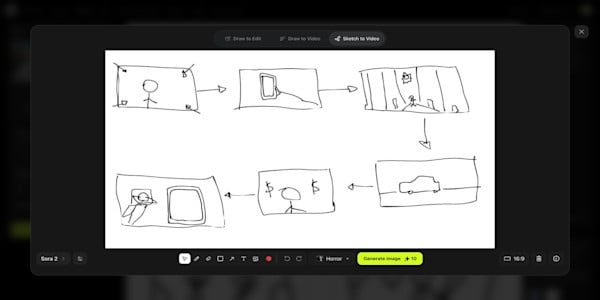
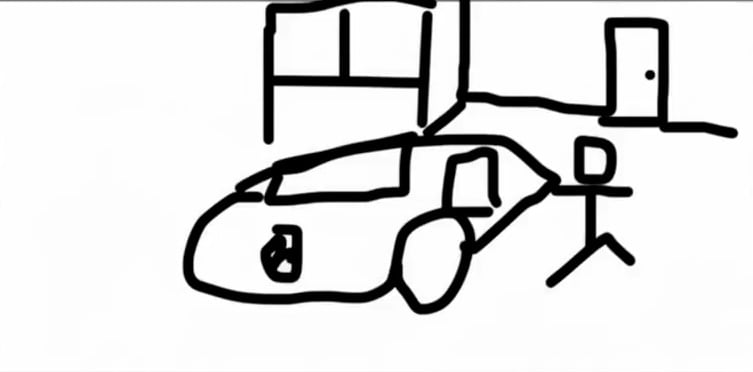
Sora 2 Input Image
Sora 2 Input Image

3. Optional: Refine Your Scene

While no text prompt is needed to generate motion, you have the option to add text on your sketch to refine details like the background, color palette, or specific character features.

4. Choose One of 5 Peresets

Realistic, Cinematic, Anime, Commercial, Horror - what fits you the best.

5. Generate & Share 

After rendering your video in seconds, you can export the 1080p file and share it instantly across TikTok, Reels, YouTube, or use it in your campaign assets.

Your browser does not support the video.
Sora 2 Video output

Tips for Best Results

Although no text prompt is required for motion generation, how you draw significantly influences the final video's outcome.

  • For Dynamic Motion: Utilize bold, sweeping lines and directional "whooshes," as the AI reads the energy of your drawing.

  • For Character Emotion: Focus on creating simple yet exaggerated facial expressions and clear body language.

  • For Narrative Flow: To create a multi-scene story, upload a sequence of sketches, relying on the AI's design to maintain character and style coherence.

  • For Clarity: Employ simple, clean lines, because a clear subject with an uncluttered background often produces the most powerful and predictable results.

Input Sketch:

Sora 2 Sketch-to-video input

Output:

sketch-to-video Sora 2 output

Higgsfield's Sketch-to-Video is Perfect For

  • Storyboard artists and directors who need to pre-visualize scenes without the time and expense of shooting a single frame.

  • Animators and comic creators seeking to bring their static sketches to life with fluid, cinematic motion.

  • Product designers who can now turn their concept sketches into compelling video prototypes for important pitches.

  • Creative agencies aiming to visualize client concepts instantly, transforming ideas from a napkin sketch into a boardroom-ready presentation.

  • Independent filmmakers who need to plan sequences and test creative ideas long before production begins.

  • Content creators who think visually and want to convert their rough ideas into viral video content.

  • Anyone with an idea and a pencil, eliminating the need for animation skills or video editing knowledge by allowing you to simply sketch and ship.

Start today by uploading a sketch, picking a style, and directing your animated scene in seconds. 

Generate With Sketch-to-Video

Try Now

Got any questions left?

No, a text prompt is not required to generate motion. Sketch-to-Video is designed to analyze the lines, weight, and implied energy of your drawing to create movement automatically.
Not at all. While it's powerful enough for professional directors and animators, Sketch-to-Video is built to be intuitive for everyone. If you can draw a simple sketch, you can direct an animated scene.
You can choose from one of five pre-configured motion style presets, which range from smooth and cinematic to dynamic and energetic, to instantly set the tone of your video.
Videos allow generations in high-definition 1080p. You can also choose between 16:9 (horizontal) and 9:16 (vertical) aspect ratios to fit any platform.
Mariam Barova

by Mariam Barova

Share article

Discover more

post preview

SORA 2 Prompt Guide: How to Create Viral Videos Like a Pro

post preview

Sora 2: A Breakdown of Core Strengths