Blog

Meet MiniMax H3 on Higgsfield: How It Works and What You Get

HiggsfieldAug 16, 202610 min
Meet MiniMax H3 on Higgsfield: How It Works and What You Get

MiniMax Hailuo 3.0 is now available on Higgsfield. It's a major step up from Hailuo 2.3, with higher resolution, longer clips, and native sound built into the generation. The model takes images, video, and audio, all feed into the same shot. This guide covers what changed, how to access it, and what it costs.

What Is MiniMax Hailuo 3.0

Hailuo 3.0 is MiniMax's third-generation video model.The biggest change is not only resolution or clip length. H3 can work with text, images, video, and audio together in the same context.

That matters most in what a single generation can actually pull together. A face comes from a reference photo, a camera move comes from a reference video, a voice comes from a reference audio clip, and all three combine into one shot. Sound comes out of that same generation as well, dialogue, sound effects, and ambience built in alongside the picture from the start, not layered on in a separate audio step once the video is already finished.

Hailuo 3.0 vs Hailuo 2.3

Four things changed between versions. Resolution goes from 1080p to 2K, clip length from 10 seconds up to 15-seconds, and audio goes from silent to native stereo generated in the same pass as the video. On Higgsfield, you can add up to 9 images, 3 videos, and 3 audio references to one H3 generation, plus Start/End Frame control on Higgsfield.

Hailuo 3.0 vs Hailuo 2.3

Setting

Hailuo 2.3

Hailuo 3.0

Resolution

768p, 1080p

2K

Clip length

768p up to 10 seconds 1080p up to 6 seconds

Up to 15 seconds

Frame rate

Not specified

24FPS

Audio

Silent, no native sound

Native stereo, dialogue, SFX, and ambience

Input

One image+prompt

Up to 9 images, 3 videos, and 3 audio clips in one generation + prompt

Aspect ratio

Fixed

21:9, 16:9, 4:3, 1:1, 3:4, 9:16, or adaptive

Editing

Not available

Instruction-based editing on a finished clip

Frame control

Not available

Start/End Frame supported on Higgsfield

How to Access Hailuo 3.0

MiniMax H3 runs inside Higgsfield, so there is no separate MiniMax account or subscription to manage. Access depends on your Higgsfield plan. It sits alongside Seedance and the rest of the platform's generation models, so switching to H3 for a specific shot is a model selection, not a different account or a new bill.

Full Workflow: Step by Step

Step 1: Open Higgsfield and select Hailuo 3.0 from the model list. It's available in the same generation interface as every other model on the platform.

Step 2: Choose text-to-video or image-to-video, and add your references. Upload up to 9 images, 3 videos, and 3 audio clips, whatever combination the shot needs, a face from a photo, a camera move from a video, a voice from an audio clip.

Step 3: Set Start/End Frame if the shot needs it. This locks the opening and closing frame of the clip directly, available specifically through Higgsfield's implementation of the model.

Step 4: Write the prompt. Describe what happens in the scene, and tell H3 what each reference is for. For example: use Video 1 for the camera movement, Image 2 for the character, and Audio 3 for the voice. Naming the camera move in professional shot language, a slow orbit, a handheld tracking shot, gives a more consistent camera path than describing the scene alone.
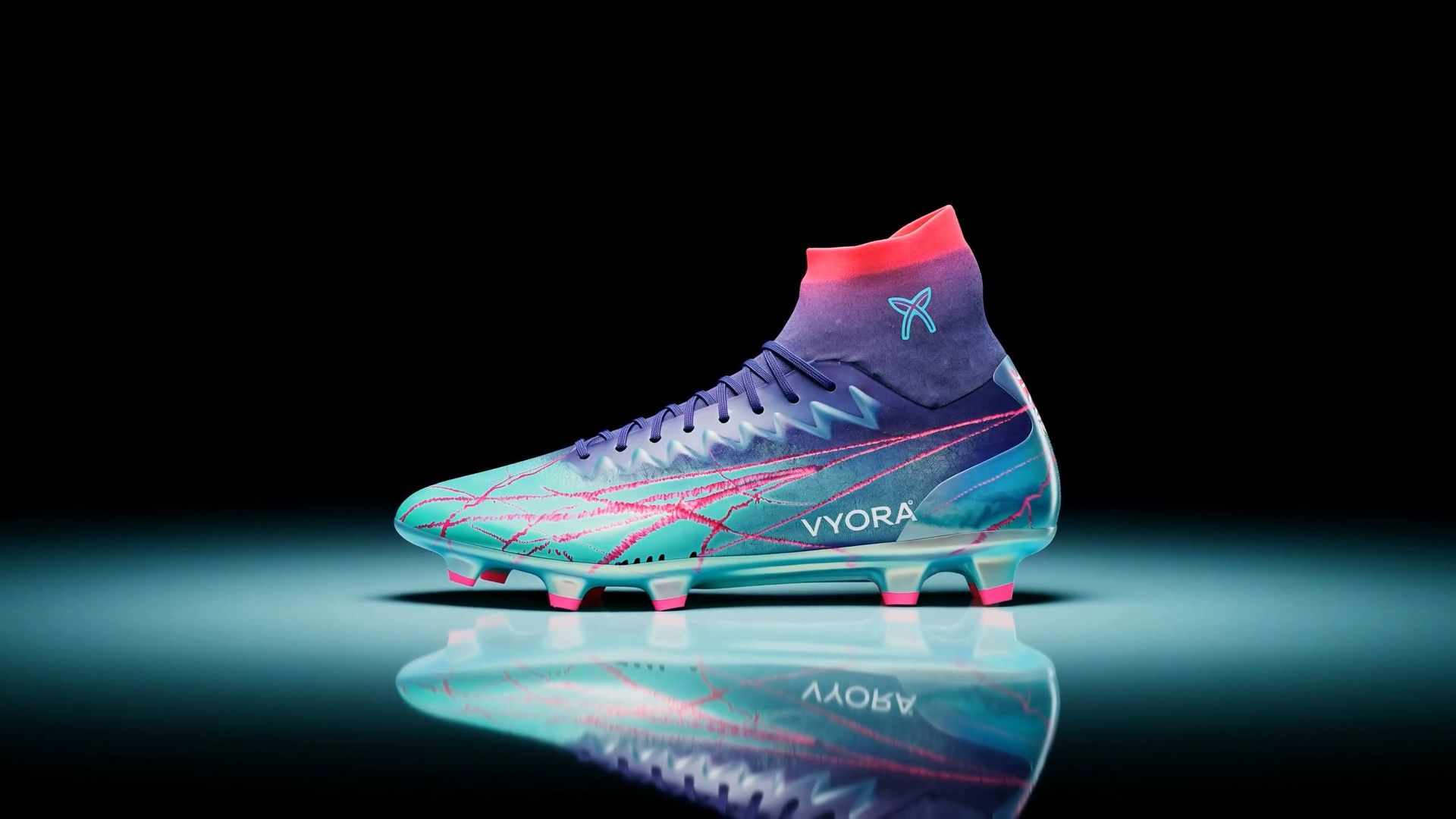
The hero product: a real, physical high-top football boot "VYORA" — turquoise-to-deep-purple gradient upper with hot-pink lightning-crack graphics, dark purple laces, knitted sock collar fading from purple to bright red-pink, cyan brand emblem on the collar, white "VYORA" wordmark on the lateral side, translucent iridescent soleplate with hot-pink studs. Keep the boot shape, graphics, wordmark, and colors identical in every shot. PHOTOREALISM IS CRITICAL: this is real product photography footage, not CGI. The boot must look like a real manufactured shoe — visible knit fibers and loop texture on the collar, real stitching seams, micro-scratches and natural imperfections on the soleplate, fabric grain on the laces, matte and gloss zones exactly like real synthetic leather and TPU, physically accurate soft shadows and contact shadows, natural lens depth of field and subtle film grain. No plastic-toy look, no smooth 3D-render surfaces, no exaggerated glow on the shoe itself. Hyper-dynamic macro football boot commercial, 16:9, 10 seconds, aggressive rhythmic editing with hard cuts and constant speed-ramping — shots snap from ultra-slow-motion to sudden fast-forward bursts and back. Background: a bright, luminous cyan studio world with absolutely no black and no gray anywhere — a seamless vivid cyan-to-turquoise gradient sweep, evenly lit and hyper-saturated, with soft violet and hot-pink glow spots drifting across it in parallax and gentle light waves rippling through the cyan like light underwater; the glossy floor is bright cyan too, reflective like polished colored glass; the palette mirrors the boot itself — cyan, turquoise, violet, hot pink — fresh, electric, premium. Shot 1 (0.0–1.2s): extreme close-up of the knitted collar and cyan emblem; the camera whips in fast from off-frame and ramps into extreme slow motion, raking key light revealing every individual knit loop and fiber, soft violet-pink glow drifting in the bright cyan background bokeh. Shot 2 (1.2–2.4s): crash zoom straight into the iridescent soleplate held toward camera; speed-ramp — violently fast, then a near-freeze on the hot-pink studs, sharp specular reflections sliding across the glossy translucent plate exactly like real molded TPU, the plate picking up turquoise reflections from the set. Shot 3 (2.4–4.0s): low-angle FPV-style camera swing arcing under and around the boot standing on a low glossy cyan plinth — one continuous accelerating swoop from heel to toe that ramps down to slow motion exactly as the white "VYORA" wordmark crosses center frame, violet and pink rim light flaring along the silhouette, fine synthetic-leather texture and pink lightning cracks clearly visible, a real soft contact shadow anchoring the boot. Shot 4 (4.0–5.8s): the boot slams down onto the glossy bright-cyan floor in extreme slow motion — a burst of fine white mist erupts from under the studs on impact, real physics, weight and a slight settle-bounce; the camera does a tight accelerating 180° orbit around it as the mist hangs frozen, glowing turquoise in the light, then rushes away. Shot 5 (5.8–10.0s): single continuous closing shot — one single VYORA boot standing alone in perfect side profile on the glossy cyan mirror floor, toe pointing screen-left; the camera performs a fast pull-back that ramps down into a slow, smooth orbital drift and finally settles to a locked static hero framing with the boot centered; behind it the cyan-to-turquoise gradient glows brightly with slow waves of violet and hot-pink light sweeping across like silk, their reflections rippling over the mirror floor around the boot; thin wisps of white mist drift low, a soft overhead light pools gently on the boot; in the last second the camera is dead still, the mist settles, the background gives one gentle bright pink-violet wave. Exactly one boot in the frame — never two or three, no duplicates in reflections other than the natural floor mirror. Color grade: bright, airy, hyper-saturated cyan-turquoise base with violet and hot-pink accents, luminous shadows tinted cyan (no black, no gray anywhere in the frame), crisp whites on the wordmark, strong micro-contrast, premium athletic editorial finish with a photographic film-like texture. Audio: no melody — a deep pulsing drone underneath, punchy impact hits on every cut, time-stretch "vacuum" sound design on each speed-ramp, tactile knit and stud-click foley on macro shots, a big boom with mist hiss on the floor slam, airy whooshes on camera moves, then sudden dead silence on the final locked frame.

Step 5: Generate. Sound generates in the same pass as the video, so there's no separate audio step to run afterward.

Step 6: Refine with an edit instruction if needed. Send an instruction describing only what should change.

Pricing

Pricing

Length

Resolution

Cost

5 sec

2K

20 credits ($1)

10 sec

2K

40 credits ($2)

15 sec

2K

60 credits ($3)

What to Keep in Mind

  • For a recurring character, use reference images with even lighting, a direct face angle, and nothing covering the features, plus a clean audio clip for the voice, a profile shot or a noisy recording gives the model less to hold onto.

  • Multi-shot storytelling generates a connected sequence instead of one isolated clip, useful for anything that needs more than a single beat.

  • Instruction-based editing works on a finished clip, so a wrong detail doesn't mean regenerating everything from the original prompt.

  • Aspect ratio can be set explicitly or left adaptive, letting the model choose the framing that fits the prompt.

  • It runs inside the standard Higgsfield subscription alongside 30+ other models, not as a separate paid add-on.

When to Use MiniMax H3 on Higgsfield

H3 earns its place on a shot when more than one kind of reference needs to combine in the same generation, a character's face, a motion reference from an existing clip, a specific voice, all feeding into one output instead of three separate passes stitched together afterward. That's the gap most other models on Higgsfield don't close on their own.

It's also the model to reach for when native audio matters, dialogue, sound effects, and ambience generated in the same pass as the picture, and when a finished clip needs a targeted fix instead of a full regeneration. Instruction-based editing handles that directly: describe what should change and it applies to the existing footage.

Meet MiniMax H3 on Higgsfield: How It Works and What You Get

Try MiniMax H3

Got any questions left?

Yes. H3 is the short name for MiniMax Hailuo 3.0, the third generation of the Hailuo line.
Kling goes up to 4K and is built around multi-shot storyboarding. H3 tops out at 2K but takes far richer input, up to 9 images, 3 videos, and 3 audio clips, and edits existing footage directly. Both run on Higgsfield.
Yes. Reference images, video, and audio combine with Start/End Frame in a single generation, the references shape what's in the shot, Start/End Frame locks where it begins and ends.
Reach for H3 to carry a face, voice, or motion reference into a new shot, or to edit a finished clip without redoing it. For higher resolution or a storyboarded sequence, another model fits better.
Yes, on Higgsfield specifically. It lets you lock the opening and closing frame of a clip directly.
No. It runs inside the standard Higgsfield subscription alongside 30+ other models.

by Higgsfield

Share article