Blog

How to Make Faceless YouTube Videos and UGC Ads with Higgsfield Skills in 2026

HiggsfieldAug 17, 202610 min
How to Make Faceless YouTube Videos and UGC Ads with Higgsfield Skills in 2026

Two new skills are now available in Higgsfield MCP and Supercomputer. Type a topic or a product idea into the chat, and a finished video comes back without leaving the conversation. Faceless Content Factory turns a topic into an animated YouTube video up to 10 minutes long. UGC Factory turns a product idea into a creator-led ad with the same avatar carried through the whole clip. This guide covers how to set up MCP for both, a full workflow for each skill, and what it costs to run them.

What is Faceless Content Factory?

Faceless Content Factory takes a topic, a historical event, a how-something-works explainer, a story, and turns it into a full animated video for YouTube, up to 10 minutes long. You pick one of 13 ready visual styles, Stickman Cartoon, Editorial Motion Graphics, Claymotion, and more, then describe the topic. The skill writes the script, generates the narration, builds the animation, adds music, and drops in subtitles, all without you touching a script editor, a voice tool, or an animation program separately.

What is UGC Factory?

UGC Factory does the same kind of thing for product ads. Give it a product idea, a photo of the product, and a creator reference if you have one. It writes an ad concept and a script, then generates a vertical video. The same creator avatar appears consistently from the first frame to the last, across 6 ready templates: Unboxing UGC, Product Review UGC, SaaS UGC, Try-On UGC, Tutorial UGC, and Localization, which keeps the same voice and pacing when the ad needs to run in another language.

Both skills live inside Higgsfield MCP, which means they run right inside a normal ChatGPT or Claude conversation. They're also available directly in Supercomputer on Higgsfield.

  • In Claude: Copy the connector URL → https://mcp.higgsfield.ai/mcp

    → Claude, then Customize → Connectors → name it Higgsfield, paste the URL → connect, sign in, and start.

  • In ChatGPT: Find Higgsfield in the Plugins Directory → Add → sign in → connect and start creating.

You type what you want in plain language, the same way you'd ask either assistant a question, and a finished video comes back in the same chat.

What is UGC Factory?

Skill

Input

Output

Faceless Content Factory

A topic and a visual style

Animated explainer video, up to 10 minutes, with script, narration, music, and subtitles

UGC Factory

A product idea and references

Unboxing, Product Review, SaaS, Try-On, Tutorial, and Localization

Full Workflow: Step by Step

Workflow A: Faceless Content Factory via MCP (Claude or ChatGPT)

Step 1: Connect Higgsfield MCP if it isn't already. The same one-time setup covered above, for whichever assistant you're using.

Step 2: Pick a style and describe the topic. "Create a faceless history video in the Paper Diorama style about the Battle of Gaugamela, how Alexander the Great tore a gap in the battlefield Darius had flattened for himself, sent the king running, and rode into Babylon's open gates twenty days later." is enough to start. If you want more control over the result, you can write out the full prompt in detail instead, covering the exact beats, pacing, and tone you want the video to hit.
"THE BATTLE OF GAUGAMELA — ALEXANDER VS DARIUS" Duration: 58s · Aspect: 16:9 · No on-screen text (printed newsprint texture on surfaces only) STYLE (applies to every shot): Historical stop-motion papercraft diorama animation. Every element — figures, horses, elephants, chariots, terrain, city walls — is built from aged sepia newsprint, kraft paper and cardboard with visible printed text, torn edges and corrugated-cardboard bases under the figures. Warm muted palette of sand, beige and old-paper brown; ONE accent color — deep crimson (Macedonian capes, flags, Darius's paper crown). Soft cinematic tungsten light with deep shadows, miniature-diorama feel, macro lens with shallow depth of field (backgrounds softly blurred), floating paper dust. No CGI smoothness, no plastic look — tactile paper and cardboard only. CHARACTERS (consistent across shots): — Darius III: newsprint cutout figure of a heavyset robed king, deep crimson paper crown (the only color on him), face lost in shadow, imperious gestures. — Alexander the Great: lean newsprint cutout commander, crested paper helmet shading the face, deep crimson paper cape, riding a halftone-print horse. — Persian army: ranks of anonymous newsprint spearmen with round shields, plus cardboard scythed chariots and a war elephant. — Macedonian army: tight cardboard phalanx blocks with long sarissa pikes, companion cavalry under a crimson flag. AUDIO: Deep male documentary narrator, epic hushed chronicle tone, English. Low ambient drone with sparse percussion hits building tension. Paper-rustle and dry cardboard foley on every movement: rustling ranks, cracking ground, flat slaps of falling cutout soldiers, creaking paper gates. SHOT LIST: 1. (0:00–0:03) Medium shot. Darius III in his crimson crown stands on a flat cardboard platform before torn newsprint walls; he sweeps his arm across the ground, preparing the battlefield. VO: "Darius chose the ground and flattened it." 2. (0:03–0:05) Fast aerial fly-over. Paper stones and grass tufts lift and fly off a ruled newsprint plain, leaving it scraped bare. VO: "On a plain scraped bare near Gaugamela…" 3. (0:05–0:10) Slow lateral pan. Ranks of Persian spearmen with round shields; a scythed chariot rolls past, then a cardboard war elephant strides through frame. VO: "…he lined up a front so wide it overlapped the Macedonians on both flanks." 4. (0:10–0:13) Wide static shot of the battlefield. Left — the massive Persian host with elephants and chariots; right — the smaller Macedonian army under a crimson flag 5. (0:13–0:20) Medium push-in, then overhead. Alexander in helmet and crimson cape points forward; his formation assembles — pike phalanx in the center, companion cavalry right, Thessalian horse left, a second line facing backwards. VO: "Alexander answered with a shorter, angled front: the pike phalanx in the center, his companion cavalry on the right, Thessalian horse on the left, a second line facing backwards." 6. (0:20–0:30) Dynamic cuts. Darius signals from his chariot; scythed chariots charge; Macedonian javelin men hurl darts and drivers fold flat; the phalanx opens neat lanes and the chariots roll harmlessly through empty corridors into waiting grooms. VO: "Darius opened with two hundred scythed chariots. Javelin men shot the drivers, the phalanx opened lanes, and the chariots rolled through empty corridors into the grooms waiting behind." 7. (0:30–0:40) Sweeping aerial. Alexander slides his whole right wing sideways; Persian cavalry peels away chasing him — and the cardboard battlefield itself CRACKS, a jagged seam tearing open a gap in the Persian center, just left of Darius. VO: "Then Alexander slid his whole right wing sideways. Persian cavalry chased him outward, and as they peeled away, a gap tore open just left of Darius himself." 8. (0:40–0:47) Low fast tracking shot. Alexander wheels his cavalry wedge into the gap, phalanx surging behind, riding straight at the king. VO: "Alexander wheeled his cavalry into that gap, with the phalanx behind him, and rode at the king already inside the Macedonian camp." 9. (0:47–0:52) Medium shot, then overhead. Darius glances back, throws down his crimson paper crown and runs; the Persian ranks collapse flat rank by rank like folding paper dominoes. VO: "Darius turned first and ran. The whole line dissolved behind him." 10. (0:52–0:57) Close-up of the fallen crimson crown rocking in paper dust — then the cardboard gates of Babylon creak open and Alexander rides through at the head of his column. Slow settle to a still final frame. VO: "And twenty days later, Babylon opened its gates to the man who had beaten him."

Step 3: Let the skill run. Claude or ChatGPT shows each stage, generating the video, adding narration, then montage and subtitles.

Step 4: Review the finished video. Script, narration, animation, music, and subtitles all arrive combined in one file.

Workflow B: UGC Factory via Supercomputer

Step 1: Open Supercomputer and attach references. A creator photo and a product photo both go into the same request.

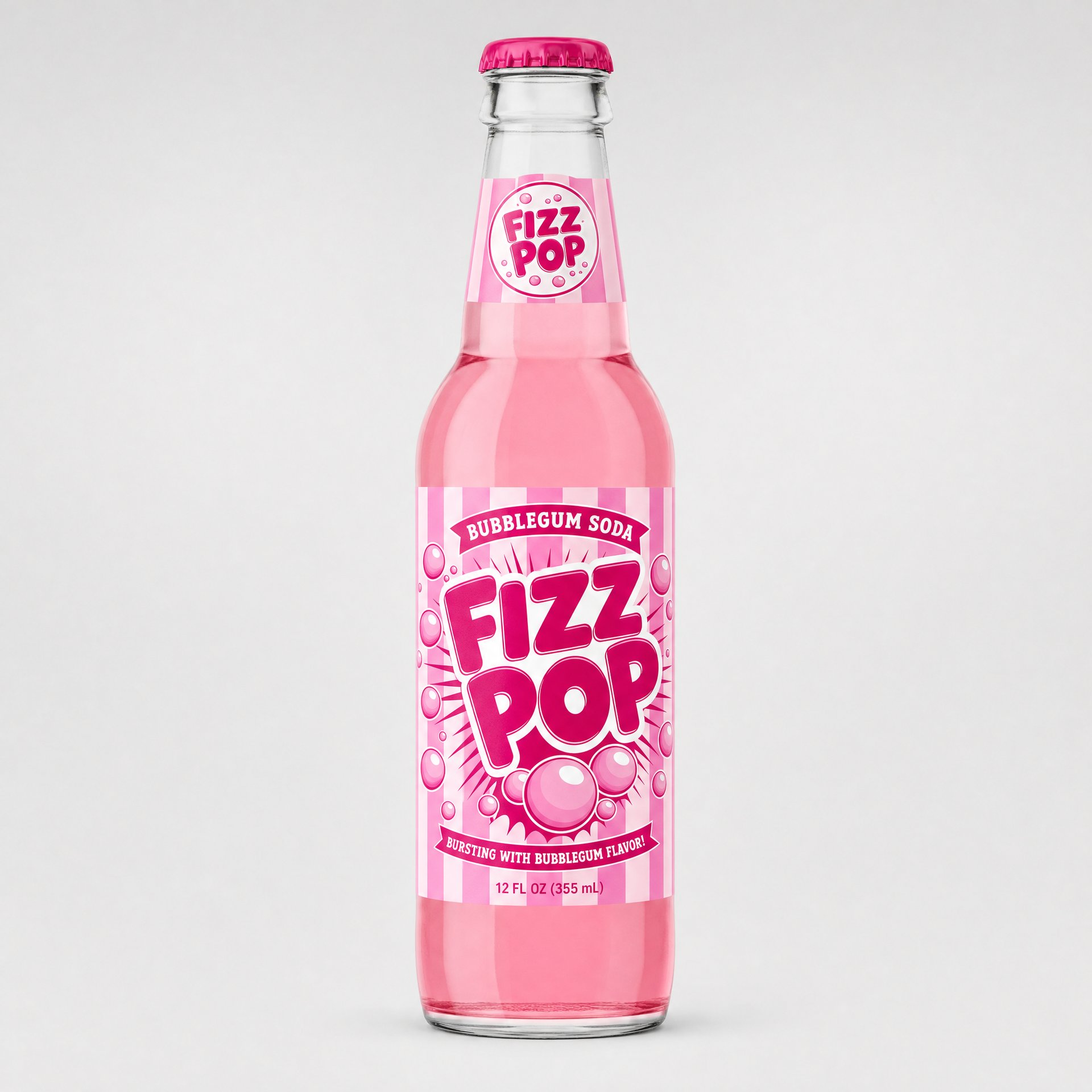
Step 2: Describe the ad. "Create a complete 15-second product review UGC for my FIZZ POP bubblegum soda with this blonde creator: she talks to camera in a cozy kitchen, starts skeptical, pops the cap with a bottle opener on camera, takes a sip, shows the pink up close and ends with 'okay, I'm sold" is enough, the skill fills in the concept and script from there.

Step 3: Let the skill run. Supercomputer shows the stages as they happen, generating the video, adding audio, then montage and subtitles.

Step 4: Review the finished video. One complete vertical clip, the same avatar and product consistent from the first frame to the last.

Pricing

Both skills run on the same Higgsfield credit pricing as generating directly on the website, there's no extra charge for running them through MCP or Supercomputer instead. Here's what each workflow actually cost.

Pricing

Item

Faceless Content Factory Video (1 minute, 1080p)

Reference images (style key + 3-4 asset images)

12 credits (4 × 3)

Video (6 blocks)

180 credits (6 × 30)

Narration (11 takes incl. 5 rewrites)

12 credits

1080p upscale

17.5 credits

Total

221.5 credits ($11.08)

How to Make Faceless YouTube Videos and UGC Ads with Higgsfield Skills in 2026

Item

UGC Video (15s, 1080р)

Creator reference (6 gens while dialing in the prompt)

0.72 credits

Storyboard (3 charges)

21 credits

De-slop pass (3 charges)

9 credits

Video (15s single clip)

135 credits

Total

165.72 credits ($8.30)

Which Faceless and UGC Styles to Start With

For Faceless Content Factory, the style you pick sets the tone before a single word of the topic gets written.

  • Stickman Cartoon, for a topic that should feel simple and approachable, something a kid could follow along with.

  • Editorial Motion Graphics, best suited to a topic that needs to read more like a documentary or a news breakdown, something with a bit of authority to it.

  • Watercolor Chronicle, a good fit when the story calls for something softer and more illustrative, a historical moment or a quieter narrative.

  • Fairy Tale & Myth, built specifically for a myth, a legend, or anything that plays like a fairy tale.

  • Claymotion, worth reaching for when the story benefits from something tactile and playful, characters that feel handmade instead of flat.

The same logic applies to UGC Factory.

  • Unboxing UGC, built around that reveal moment, useful when you're launching a new product and want to show it off in detail.

  • Product Review UGC, for a creator-style product review or demonstration.

  • Try-On UGC, the right choice when the product needs to be shown worn or used, a piece of clothing, a wearable, anything you'd want on camera instead of just held up.

What to Keep in Mind

  • MCP/plugin setup is only needed when using the skills through a connected agent. Supercomputer workflows run directly inside Higgsfield and do not need MCP setup

  • The 13 templates in Faceless Content Factory set the visual style, the topic itself only needs a single sentence.

  • UGC Factory keeps one avatar consistent across the whole clip, the same reference carries through concept, script, and final video.

  • UGC Factory covers 6 ready templates: Unboxing, Product Review, SaaS, Try-On, Tutorial, and Localization.

  • Pricing matches the website exactly, running a skill through MCP or Supercomputer costs the same as generating the same output directly on Higgsfield.

  • The UGC Factory skill inside Claude, ChatGPT, and Supercomputer runs on the same underlying product as the standalone UGC Factory on Higgsfield, just through a conversational, agent-driven front end instead of the full interface with Image Stage and keyframe control.

  • The finished video runs well past the 15-second limit on a single MCP generation because the skill builds it from multiple generated segments assembled into one output, rather than a single continuous render.

How to Make Faceless YouTube Videos and UGC Ads with Higgsfield Skills in 2026

Try Higgsfield MCP

Got any questions left?

Yes, Higgsfield MCP needs to be connected first, a one-time setup shared across every skill on the platform.
Up to 10 minutes, built from a chosen style and a topic.
Yes, 6 ready templates: Unboxing, Product Review, SaaS, Try-On, Tutorial, and Localization.
The same voice and timing carry across languages instead of generating each localized version from scratch.
No. Pricing matches the website exactly, there's no extra charge for running it through either.
It's available through the same MCP connection in Claude and ChatGPT, alongside Faceless Content Factory and UGC Factory.
Yes. AI itself doesn't block monetization, the video just needs to meet YouTube's originality and monetization policies.

by Higgsfield

Share article