How to Build an AI-Powered TikTok Content Pipeline in 2026 (Step by Step)
Higgsfield
·
Jul 4, 2026
·
9 min
To make a consistent, high-volume TikTok content pipeline with AI, you need the right tools for each stage: from ideation to posting. We put together this step-by-step guide covering the full workflow, the platforms that can actually support daily posting at scale, and compared Higgsfield with InVideo to help you pick the right one.
What a TikTok Content Pipeline Needs
A TikTok pipeline has five stages, and AI can handle most of the work in each one:
Ideation. Finding angles that work for your niche, trending sounds, and hooks that stop the scroll.
Script. A 15 to 60 second script written for vertical video: hook in the first two seconds, one clear point, a payoff or call to action at the end.
Visual generation. The clip itself: a spokesperson, a product scene, a lifestyle moment, or a text-on-screen explainer.
Captions and audio. Auto-generated captions, a voiceover or spoken video layer, background music.
Formatting and posting. 9:16 vertical output, the right resolution, uploaded to TikTok with hashtags and a description.
The bottleneck is not usually the idea. It is the production: turning an idea into a finished, formatted, posted video without spending two hours per clip.
Step 1: Build Your Content Calendar in One Prompt
Start with a weekly content calendar, not individual videos. Trying to ideate one video at a time is the fastest way to burn out on a posting schedule.
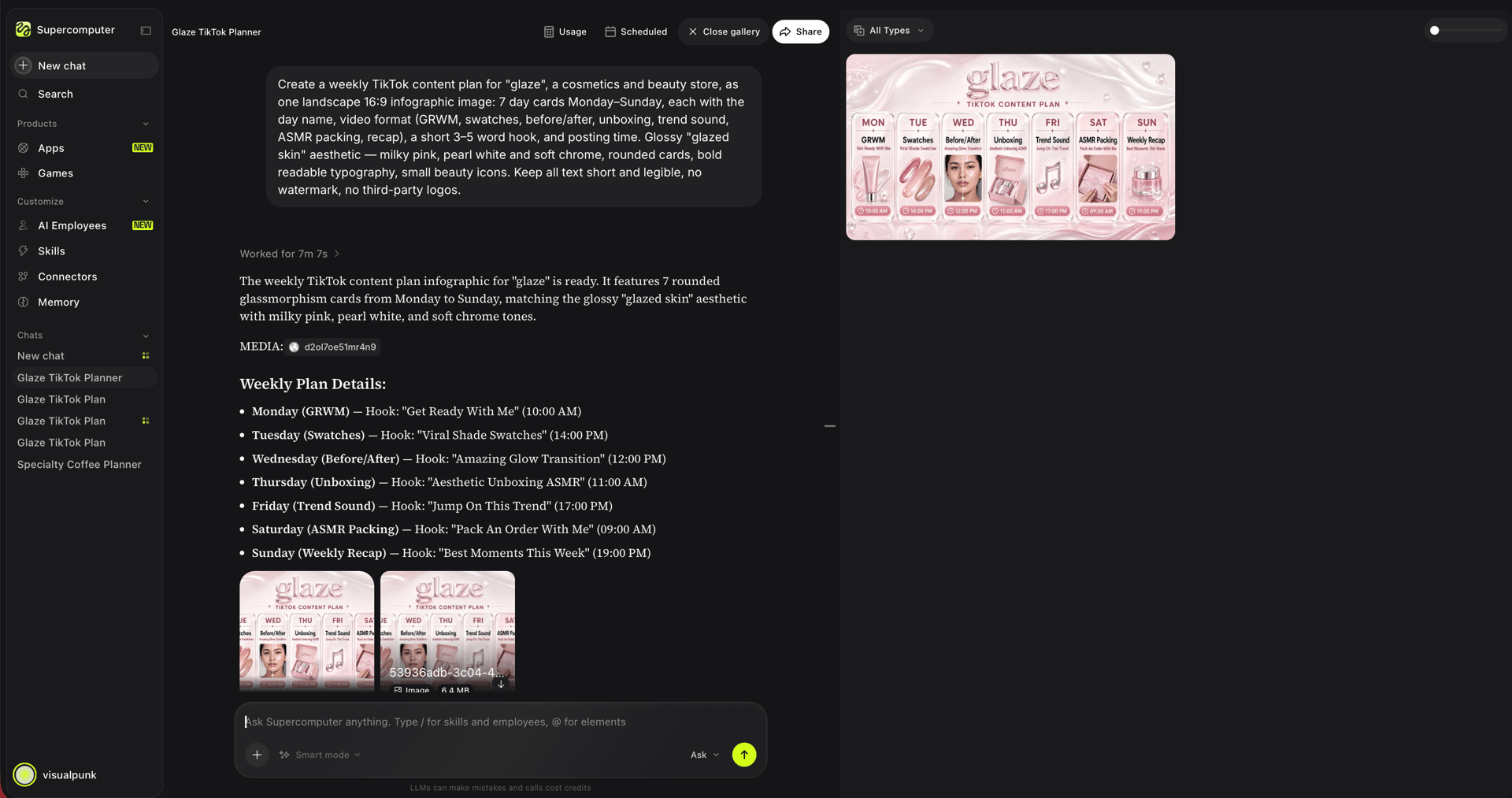
Open Higgsfield Supercomputer and describe the week in one message: your niche, your posting frequency, the formats you want to use (talking head, product showcase, trend-based, educational), and any themes or campaigns running that week. The agent plans the full week, assigns formats to each day, and suggests hooks for each piece.
This takes one prompt and about five minutes. You review, adjust if needed, and approve. The calendar is the brief for everything that follows.
Step 2: Generate Your Spokesperson or Character Once
If your TikTok content features a consistent face, generate it once and use it across every video. This is where the production math changes significantly.
On Higgsfield, Soul ID trains a persistent character identity from 20+ reference photos. Upload the photos, train the identity in a few minutes, and every generation after that applies the same face automatically across every model on the platform. No re-uploading per clip. No drift between videos.
For a brand spokesperson or personal brand creator who wants to appear consistently without filming every day, this removes the camera from the pipeline entirely. Generate the character once. Use it across every video in the calendar.
For generated characters that are not based on a real person, Cinema Studio's Cast feature generates a full character sheet with front, side, and back views that hold across every shot.
Step 3: Generate Each Clip
With the calendar planned and the character ready, generate the clips. On Higgsfield, this runs through the generation models depending on what the clip needs:
For spokesperson and talking-head content:Kling 3.0 at approximately $1.25 per 10-second clip handles realistic human subjects with accurate skin tones, body movement, and native lip sync.
For product showcase and lifestyle content:Seedance 2.0 at approximately $4 per 10-second clip accepts up to 9 simultaneous reference inputs: the character, the product, the location, the style reference, and the audio track all in one call.
For fast draft validation: Hailuo 2.3 at approximately $0.60 per 10-second 1080p clip runs a draft version in seconds. Validate the hook and pacing at low cost before committing to a full-quality generation.
For cinematic product reveals:WAN 2.6 at approximately $2.00 per 10-second 1080p clip executes precise camera moves, dollies, orbital shots, and depth of field shifts, baked into the generation rather than added in post.
A single generation produces up to 10 seconds of footage. For a 15 to 60-second TikTok, you chain multiple clips together. Generate each scene as a separate clip, then combine them in any video editor or inside Higgsfield's timeline tools. For a 30-second TikTok, that typically means three 10-second clips: an opening hook shot, a middle demonstration or story beat, and a closing call to action. Supercomputer can plan the shot list across multiple clips in one brief, so each generation is already part of a coherent sequence rather than a standalone asset.
Step 4: Add Audio and Captions
TikToks with audio outperform silent clips significantly on the algorithm. Two paths depending on the content type:
For spoken video with lip sync:LipSync Studio on Higgsfield generates spoken video with native lip sync from the same credit balance. For brands distributing content across global markets, the same clip generates with different audio tracks in 8+ languages without re-filming.
For background music: Include an audio reference in the generation prompt. The model incorporates it into the output.
For captions: TikTok auto-generates captions on upload. For captions that appear as visual elements within the clip itself rather than TikTok's native layer, include caption placement and text in the generation prompt. This is especially useful for hooks and key points that need to hit even when the sound is off.
Step 5: Format and Post
Higgsfield's Shorts Studio takes existing video and applies a visual style preset for vertical social output. Upload the generated clip, pick from 40+ presets (Bold Urban, Green Contrast, Warm Glow, and 35+ others), and generate a formatted 9:16 output ready for TikTok.
Cost: 33 credits (~$1.65) per 8-second clip at 720p. Maximum input: 2 minutes per upload.
For Marketing Studio: paste a product URL and generate campaign-ready TikTok assets directly, formatted for the platform without a separate workflow.
Upload to TikTok directly. Add the title, description, and 3 to 5 relevant hashtags. Post.
Step 6: Batch and Schedule for Volume
Daily posting at quality requires batch production, not individual clip generation.
Batch by day: Generate all Monday clips in one Supercomputer session, all Tuesday clips in a second session. Parallel chats let these run simultaneously.
Batch by format: Generate all spokesperson clips in one session using the same Soul ID character and the same prompt structure. Switch to product showcase clips in a second session.
Schedule: Supercomputer's CronJobs (available on Plus and above) run recurring production workflows automatically. Set daily ad variations, weekly themed content, or monthly campaign assets on a schedule without manually triggering each run.
Credit math for daily posting:
Format
Model
Cost per clip
Spokesperson / talking-head
Kling 3.0
~$1.25
Product showcase
Seedance 2.0
~$4
Fast draft
Hailuo 2.3
~$0.60
Cinematic product reveal
WAN 2.6
~$2
Higgsfield vs CapCut vs InVideo for TikTok Content: Plans, Pricing and Value
If you're evaluating where to run a TikTok content pipeline at volume, three platforms cover most of the ground: Higgsfield for generation-first teams who need consistent characters and a full creative suite, CapCut for creators who already have footage and want the most frictionless path to a posted TikTok inside ByteDance's own ecosystem, and InVideo for script-to-video automation. This comparison breaks down what each gives you and where each one fits.
Quick Overview
Higgsfield's strengths for TikTok production:
15+ generation models under one credit balance, including Seedance 2.0, Kling 3.0, WAN 2.6, Veo 3.1, Hailuo 2.3, and Gemini Omni Flash
Marketing Studio for URL-to-TikTok-asset production without a separate brief-writing step
Shorts Studio with 40+ visual style presets applied to uploaded footage
LipSync Studio for spoken video from the same credit balance
CapCut's strengths for TikTok production:
Native ByteDance product: direct TikTok upload, trending sounds library, and TikTok-native templates built in
Free tier with full timeline editing, 1080p export, and auto-captions with no watermark on standard content
The simplest possible path from filmed footage to posted TikTok: edit, caption, upload, done
Most widely used TikTok editing tool globally, largest library of trending templates synced to the platform
InVideo's strengths for TikTok production:
Three input modes: generate from a text prompt, upload your own footage and edit in Studio, or start from 100+ templates in 9:16 portrait format
Agent mode for step-by-step guided generation, Autopilot for fully automated output from a single prompt
Upload limit of 200MB per file for footage editing
Plus plan at $20/mo as the entry point for the core script-to-video workflow
Entry-Level Plans: Different Approaches to Getting Started
Higgsfield Basic: from $9/mo
Higgsfield's entry plan covers core generation models, Soul ID character consistency, Shorts Studio, LipSync Studio, and Marketing Studio from the first dollar. Credits range from 120 to 270 per month. At 120 credits and a standard rate of 20 credits = $1, the Basic plan covers approximately 10 Hailuo 2.3 draft clips or 4 to 5 Kling 3.0 quality clips per month.
CapCut: Free / Pro from $8/mo
CapCut's free tier is the most functional free editing tool for TikTok content available in 2026: full timeline editing, 1080p export, auto-captions, and no watermark on standard content. For most creators editing existing footage, the free tier covers the full workflow without paying anything. Pro from $8/mo adds 4K export and expanded AI tools.
InVideo Plus: $20/mo
InVideo's Plus plan covers the core script-to-video workflow: generate a clip from a prompt, edit footage you upload, or start from a template. The Studio editor gives you a full timeline for footage-based editing. Agent mode and Autopilot handle different levels of generation automation.
Entry-tier comparison
Higgsfield Basic
CapCut Pro
InVideo Plus
Monthly price
From $9
From $8/mo
$20
Input type
Text prompt / image references
Upload footage / template
Text prompt, upload footage, or template
Preset formatting for TikTok
Shorts Studio (40+ presets)
100+ TikTok-native templates
100+ templates in 9:16
Spoken video
LipSync Studio included
AI voiceover
AI voiceover included
Direct TikTok upload
No
Yes
No
Prices verified July 2026. Check each platform before committing.
Who Should Choose Which Platform
Choose Higgsfield if you want to generate consistent characters across 30+ TikToks per month without filming, need character consistency, preset formatting, and ad production tools inside one subscription, and want Supercomputer pipeline automation for scheduled content production.
Choose CapCut if you have footage and want the simplest possible pipeline: edit, add captions, upload directly to TikTok. CapCut is the native editing tool of the TikTok ecosystem.
Choose InVideo if your primary workflow is script-to-video: type a topic or script, get a narrated TikTok with stock footage, captions, and music, or if you want a full Studio editor with a timeline for editing uploaded footage.
How to Build an AI-Powered TikTok Content Pipeline in 2026 (Step by Step)
Basic ($9/mo, 120 credits) covers roughly 4 to 5 Kling 3.0 clips or 10 Hailuo 2.3 drafts. Plus ($49/mo, 1,000 credits) covers more volume.
No. Soul ID generates a consistent character from reference photos. Every clip after training produces the same face without filming. For brand characters not based on a real person, Cast generates a character sheet that holds across every shot.
Not directly. Export the clip and upload through the TikTok app or TikTok Studio. For native upload, CapCut connects directly and is free to use.
Hailuo 2.3 at approximately $0.60 per clip. Run the hook and pacing check at draft quality before committing to a full Marketing Studio, Kling 3.0 or Seedance 2.0 generation.
Train Soul ID once from 20+ reference photos. Every generation on any Higgsfield model after that applies the same face automatically without re-uploading.
Yes, through Supercomputer. Describe the week, the formats, and the themes in one message. The agent plans the full calendar, shows the credit cost per piece before generating, and executes on approval.