In digital photography, lighting is one of the most defining factors of image quality. Historically, correcting poor lighting required complex studio setups or hours of skilled post-production work. Today, Higgsfield is changing that paradigm.
Introducing Relight, a sophisticated AI-driven tool now available on the Higgsfield platform. Designed to give you complete control over image illumination, Relight leverages advanced generative AI and depth-mapping technology to manipulate light sources in a 3D space. It allows you to adjust angle, intensity, and temperature with precision essentially reconstructing how light interacts with your subject.

Created for the Wide Range of Practical Applications
Relight isn't just a standard "add brightness" filter, it understands the 3D geometry of your image and perfectly adjusts the lightning angle.
What is it best for?
1. Save "Ruined" Portraits
Did you take a selfie with the sun behind you? Use Relight to cast a Front light on your face. The AI smartly balances the exposure on the subject without washing out the background.
2. Professional Product Photography
Flat lighting makes products look cheap. Add a Top or Side light to create depth and texture, making your product pop off the screen.
3. Creative & Artistic Effects
Want a cyberpunk look? Change the Light Color to neon pink or blue. Want a moody noir vibe? Switch the light setting to Hard and cast deep shadows from the side.

Focus on Precision & Workflow
Relight was invented to control the panel - to eliminate the guesswork typically associated with post-production lighting. Every element, from the granular brightness slider to the specific hex-code color input, is built for precision. Whether you are making subtle adjustments to color temperature or completely redefining the light source with the 3D directional pad, the interface provides a streamlined workflow that places professional-grade studio controls directly at your fingertips.
Key features:
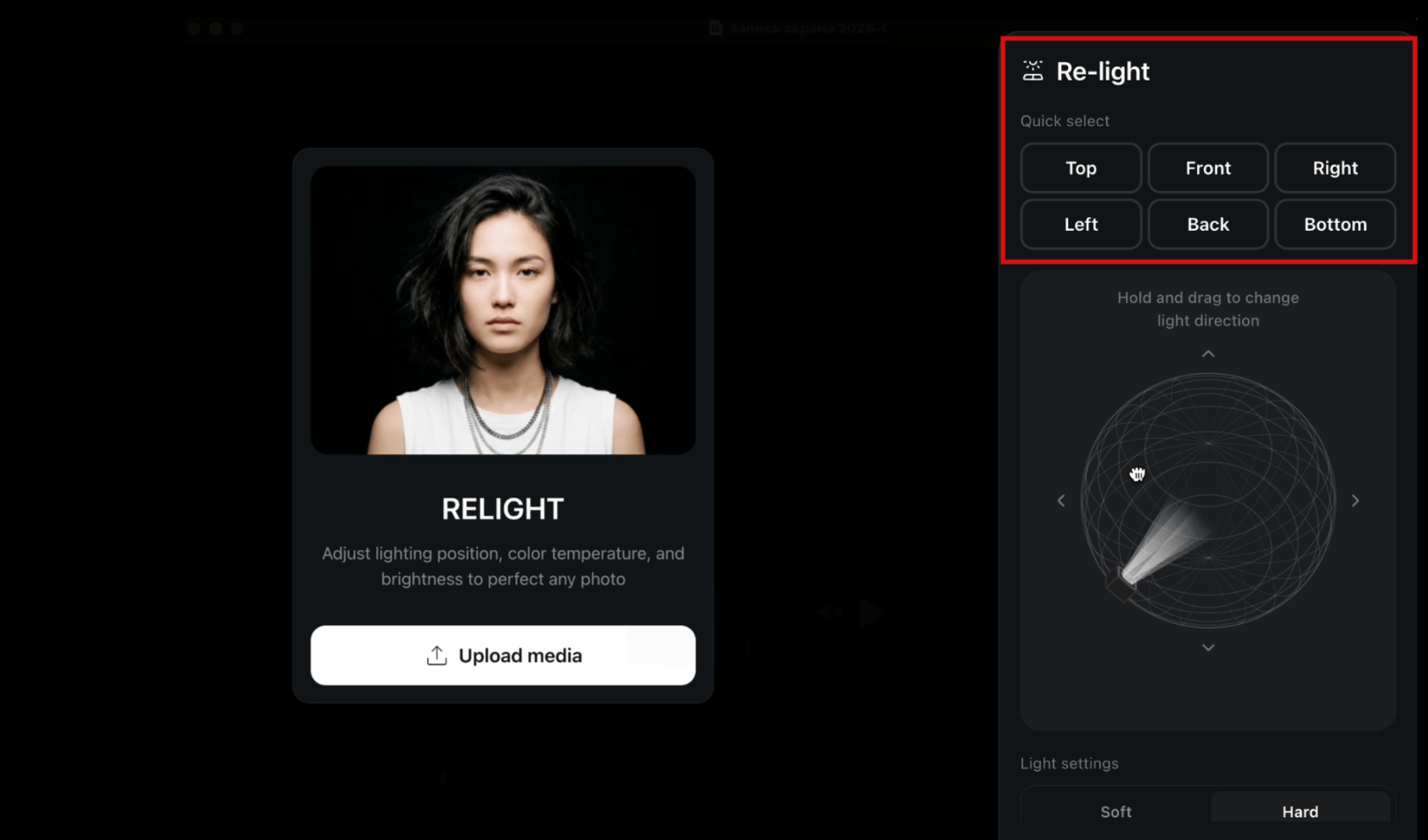
1. The Quick Select Grid
At the very top, you’ll find six rapid-fire presets: Top, Front, Right, Left, Back, and Bottom.

What it does: Instantly snaps the light source to a standard studio position.
Pro Tip: Use "Front" for standard beauty lighting or "Back" to create a dramatic "rim light" or halo effect around your subject’s silhouette.
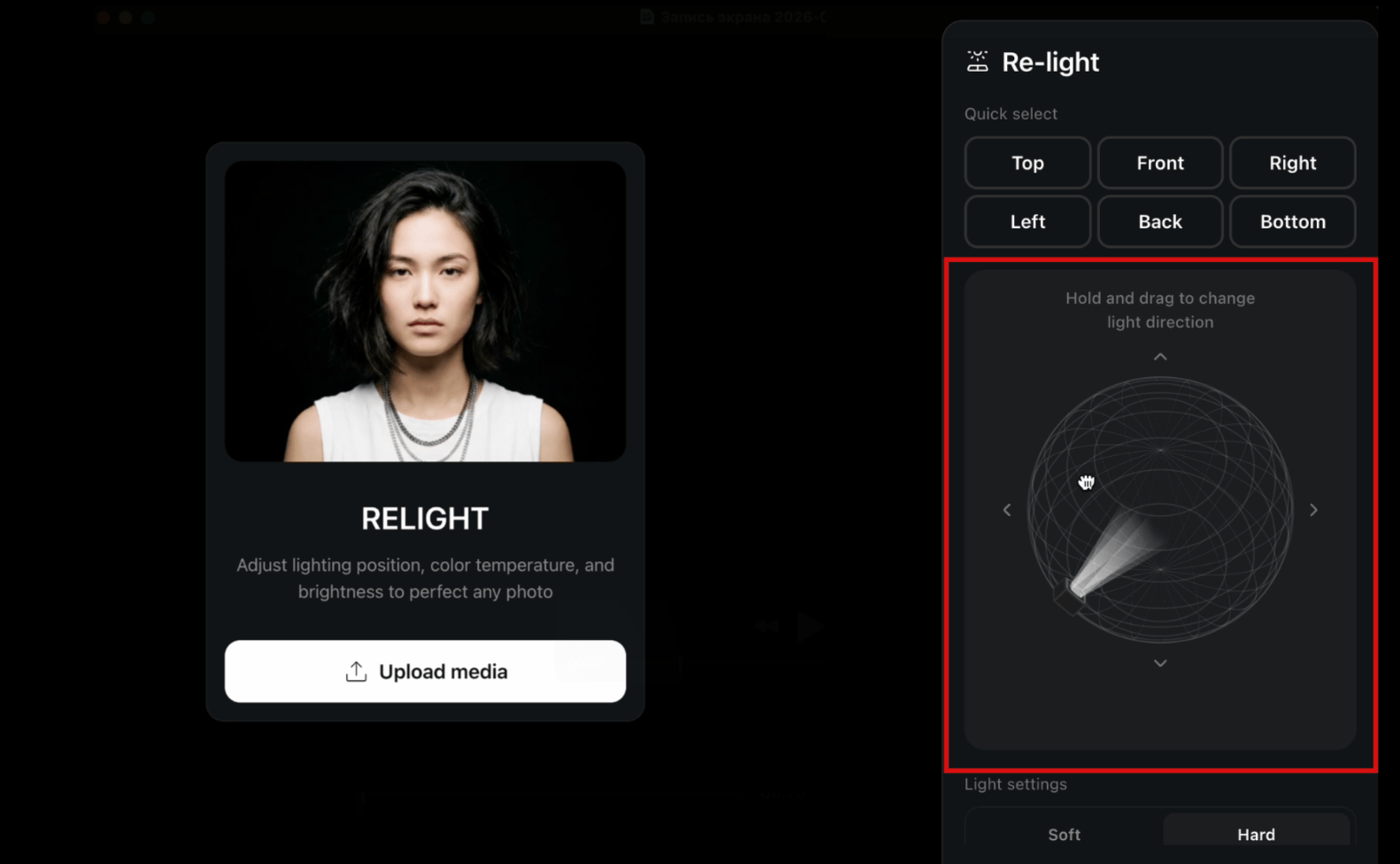
2. The Interactive Light Direction Pad
This is the heart of the Relight feature. In the center of the panel is a dark control pad featuring a 3D light cone icon.

How to use it: simply click, hold, and drag anywhere in this box.
Visual Feedback: As you move your mouse, the light cone rotates in real-time, giving you immediate visual feedback on the angle and direction of your new light source. This allows for precise "off-axis" lighting that presets can't capture - like placing a light slightly above and to the left for a classic "Rembrandt" look.
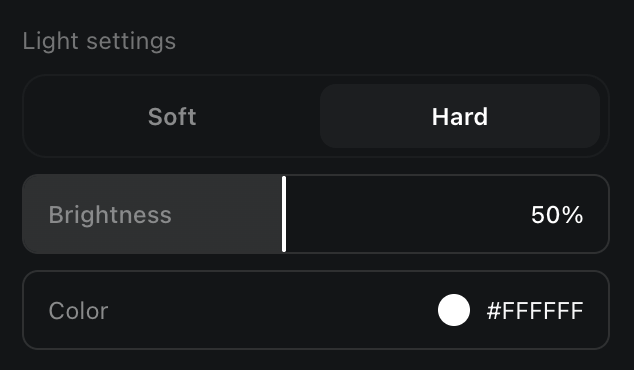
3. Light Quality: Soft vs. Hard
Directly below the pad, a toggle switch lets you define the texture of the light.
Soft Mode: Simulates a large light source (like a softbox or window light). It wraps around the subject gently, smoothing out skin textures and creating gradual shadow transitions.
Hard Mode: Simulates a small, intense light source (like the sun or a flash). It creates crisp, defined shadows and high contrast, perfect for edgy fashion shots or dramatic storytelling.
4. Fine-Tuning: Brightness & Color
Once the position is set, you can refine the atmosphere with two precision controls:
Brightness Slider: A granular slider (0–100%) that controls light intensity. It defaults to 50%, giving you room to either dim the light for a subtle effect or boost it to completely illuminate a dark scene.
Color Input: By default, the light is neutral white (#FFFFFF). However, clicking the color swatch allows you to introduce creative lighting. You can manually enter a Hex code or pick a color to simulate environmental lights—like the orange glow of a streetlamp or the cool blue of a TV screen.

How to Use Relight: A Step-by-Step Guide
Ready to try it out? Follow these simple steps inside Higgsfield:
Upload your image: Open Relight and load the photo you want to enhance.
Navigate through the Relight tab: Notice the control panel on the sidebar.
Set your direction: Start by clicking Front to illuminate the subject, or drag the manually control the pad to find a unique angle.
Refine the mood: Toggle between Soft and Hard light depending on the vibe you want.
Generate: Once you are happy with the settings, click the yellow Generate button. In just a few seconds, Higgsfield’s AI will re-render your image with your new lighting setup.
Conclusion: Professional Director Tools are Now Available to Everyone
Relight turns lighting from a limitation into a creative control, because instead of settling for whatever illumination you captured in the moment, you can rebuild the light as if you were working in a studio and make intentional choices about direction, softness, intensity, and color.
Whether you are rescuing a backlit portrait, giving a product image the depth it needs to feel premium, or pushing an artistic look with bold colored light, the workflow stays fast and precise, since you can start with a preset for speed and then fine-tune the result with the directional pad and detailed controls. The end result is a cleaner, more professional image that matches the mood you actually want to deliver, without the time cost of complex retouching or the constraints of a physical lighting setup.
Try Relight on Higgsfield Now
Lighting is the difference between a snapshot and a photograph. With Relight, you don’t need to be a professional photographer to get professional results you just need the right AI tools.