Higgsfield
  • Explore
  • Image
  • Video
  • Audio
  • SupercomputerNew
  • MCP & CLINew
  • Cinema Studio
  • Marketing Studio
  • Shorts StudioNew
  • ExplainerNew
  • Originals
  • Canvas
  • AI Influencer
  • Apps

THE ULTIMATE AI-POWERED CAMERA CONTROL FOR FILMMAKERS & CREATORS

Higgsfield AI

  • About
  • Trust
  • Careers
  • Contact
  • Pricing
  • Apps
  • Supercomputer
  • Cinema Studio
  • Marketing Studio
  • Higgsfield Canvas
  • Higgsfield Collab
  • Higgsfield MCP
  • Higgsfield Games
  • AI Influencer
  • Community
  • Enterprise
  • Team
  • Copilot
  • Reference Extension
  • Blog
  • Contests
  • Discord

Image

  • AI Image
  • Soul ID Character
  • Draw to Edit
  • Fashion Factory
  • Edit Image
  • Image Upscale
  • Photodump Studio
  • Higgsfield Popcorn
  • Nano Banana
  • Prompt Guide
  • Flux 2
  • Seedream 5
  • GPT Image 2
  • Inpaint
  • Soul 2.0
  • Soul Cinema
  • Soul Cast

Video

  • AI Video
  • Mixed media
  • Sora 2 Introduction
  • Veo 3.1 Introduction
  • Create Video
  • Lipsync Studio
  • Talking Avatar
  • Draw to Video
  • UGC Factory
  • Video Upscale
  • Kling 3.0
  • WAN 2.6
  • Seedance 2.0
  • Grok Imagine 1.5
  • Gemini Omni Flash

Edit

  • Banana Placement
  • Product Placement
  • Edit Image
  • Multi Reference
  • Upscale
  • Sora 2 Upscale
  • About
  • Trust
  • Careers
  • Contact
  • Pricing
  • Apps
  • Supercomputer
  • Cinema Studio
  • Marketing Studio
  • Higgsfield Canvas
  • Higgsfield Collab
  • Higgsfield MCP
  • Higgsfield Games
  • AI Influencer
  • Community
  • Enterprise
  • Team
  • Copilot
  • Reference Extension
  • Blog
  • Contests
  • Discord
  • X / Twitter
  • Youtube
  • Instagram
  • LinkedIn
  • Tiktok

535 Mission St, 14th floor, San Francisco, CA, 94105

  • X / Twitter
  • Youtube
  • Instagram
  • LinkedIn
  • Tiktok

© 2026 Higgsfield AI™. All rights reserved.

  • Press
  • Privacy
  • Terms
  • Cookie Notice
  1. Blog
  2. /
  3. Fresh Release
  4. /
  5. UNLIMITED KLING MOTION CONTROL: Best User Guide to Go Viral

UNLIMITED KLING MOTION CONTROL: Best User Guide to Go Viral

Mariam Barova

Mariam Barova

·

Dec 20, 2025

·

12 minutes

UNLIMITED KLING MOTION CONTROL: Best User Guide to Go Viral

Welcome To The UNLIMITED Controllable AI Video Generation

Experience true creative freedom with Unlimited Kling Motion Control. Generate as much content as you want with precise, dynamic camera movements and object animations - whether you're crafting cinematic sequences, product demos, or social media content, you have complete freedom to iterate endlessly, experiment boldly, and refine until it's perfect.

Kling Motion Control is a specialized multimodal model that understands the physics of the human body and the nuances of cinematic camera movement - this means the ability to create consistent, high-fidelity marketing assets that were previously only possible with a full camera crew and weeks of post-production.


What is Motion Control?

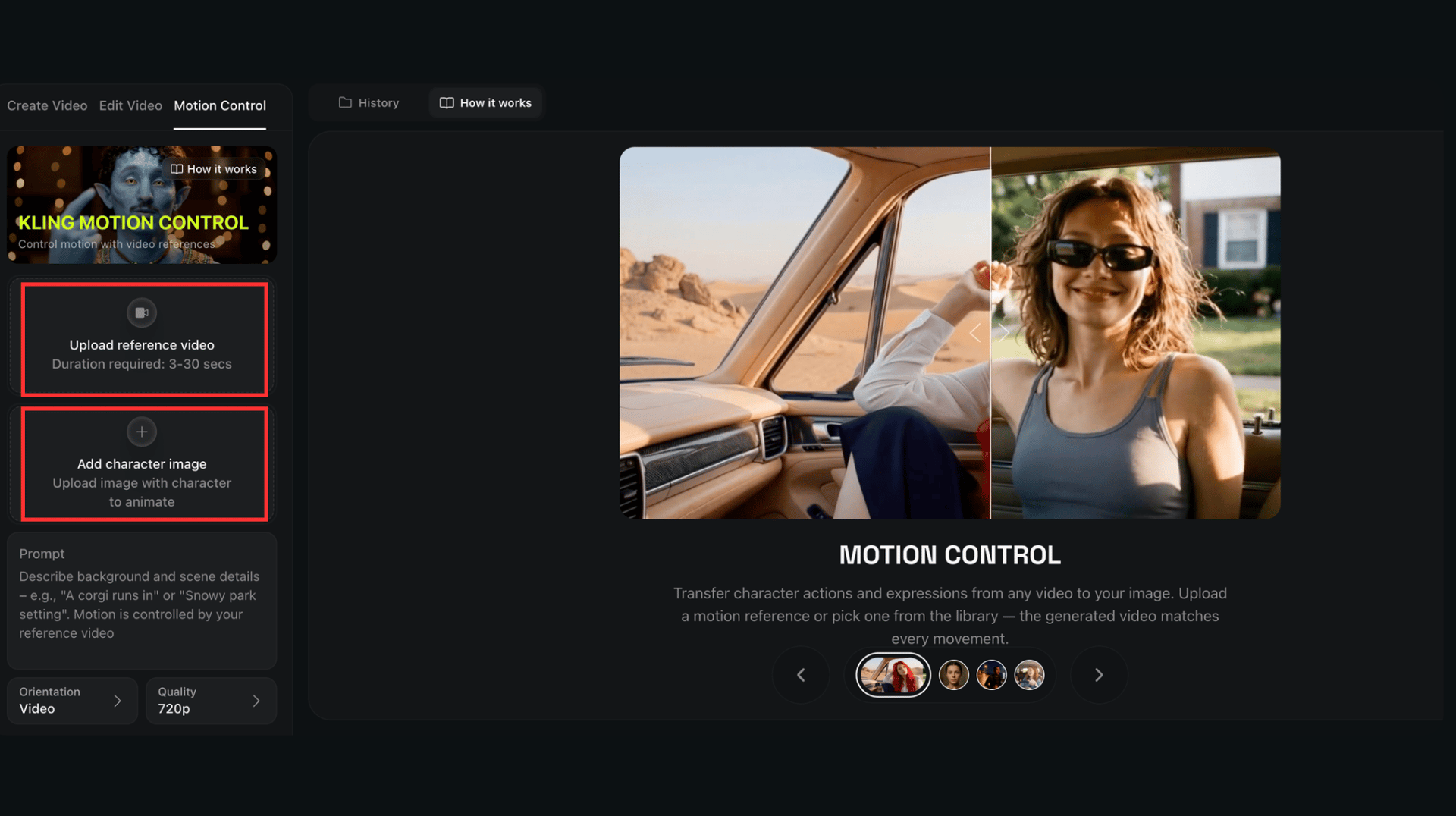
At its core, Motion Control allows you to take a Reference Image (your character) and a Motion Reference Video (the action) and fuse them together. The AI Video Generator applies the movement, expression, and pacing of the video to your static character while maintaining their identity.

Unlike previous "image-to-video", Kling Motion Control allows for granular direction. Whether it is a subtle hand gesture or a high-octane martial arts kick, the model acts as a digital puppeteer.
Your browser does not support the video.
kling

The Kling Motion Control feature represents a significant leap forward in generative video:

1.1 Complex Motion Handling & Athletics

It can execute complicated sequences like dance routines or martial arts without losing character coherence. The model understands weight transfer and momentum, meaning if your reference video shows a heavy stomp or a high jump, the generated character will reflect that physical impact realistically.

Your browser does not support the video.
kling

1.2 Precision Hand & Finger Performance

Hands have notoriously been a weak point for AI video. This feature specifically improves finger articulation and hand movements by mimicking real footage.

1.3 Scene & Environment Flexibility

You aren't just stuck with the reference video's background. You can use text prompts to change the environment (e.g., "A corgi runs in, circling around a girl's feet") while the character continues their referenced motion.

1.4 Advanced Camera & Perspective Modes

Kling Motion Control gives you granular control over how the camera interprets your reference. It offers distinct orientation modes that dictate how strictly the AI should follow the reference video's camera moves versus the original image's framing.

Your browser does not support the video.
kling 2.6 motion control

2. How to Use Motion Control: A Step-by-Step Guide 2.1 Preparing the Perfect Source Image

Your output is only as good as your starting point. When preparing an image in Higgsfield for Kling Motion Control:

  • Limbs and Obstructions: Ensure the character's limbs are visible. If a character has their hands in their pockets in the image, but the motion reference requires them to wave, the AI will have to "hallucinate" the hands, which often leads to 6-fingered glitches or blurry textures.

  • Negative Space: Leave "breathing room" around the subject. If the character is going to dance or move their arms wide, they need space within the frame to do so without clipping.

kling motion control

2.2 Selecting a Motion Reference Video

The reference video (the "driving" video) acts as the skeleton for your generation.

  • Simplicity is King: Choose videos with a clear subject and a clean background. High-contrast videos where the actor's silhouette is distinct work best.

  • Framing Alignment: If you want a close-up of a face talking, use a close-up reference. If you use a full-body walking reference for a portrait-shot image, the AI will struggle to map the scale, resulting in a "shaking" or "warped" face.

2.3 Simply Generate

Simply hit Generate to transform your assets into broadcast-quality animations. The result is a downloadable masterpiece optimized for TikTok, Instagram, or YouTube


Practical Use Cases with Higgsfield

  1. Virtual Influencers: Create a consistent brand mascot. Use your own team members as motion references to give the mascot a "human" and "relatable" personality without needing a studio.

  2. Product Demos: Use Motion Control to show a hand interacting with a digital interface or a physical product.

  3. Localizing Content: Take a single "Hero Video" and use different character images (diverse ethnicities, different age groups) while keeping the exact same motion. This allows for global campaign localization at zero extra filming cost.

Maximize Your Generations with UNLIMITED Kling Motion Control

Try Now!
Mariam Barova

by Mariam Barova

Share article

Discover more

post preview

GPT Image 1.5 by OpenAI is on Higgsfield: A Complete Guide

post preview

Kling 2.6 is Here: What’s New in AI Video Generation?

post preview

Meet KlingAI Avatar 2.0: AI Talking Avatars Have Never Been This Good