Higgsfield
  • Explore
  • Image
  • Video
  • Audio
  • SupercomputerNew
  • MCP & CLINew
  • Cinema Studio
  • Marketing Studio
  • Shorts StudioNew
  • ExplainerNew
  • Originals
  • Canvas
  • AI Influencer
  • Apps

THE ULTIMATE AI-POWERED CAMERA CONTROL FOR FILMMAKERS & CREATORS

Higgsfield AI

  • About
  • Trust
  • Careers
  • Contact
  • Pricing
  • Apps
  • Supercomputer
  • Cinema Studio
  • Marketing Studio
  • Higgsfield Canvas
  • Higgsfield Collab
  • Higgsfield MCP
  • Higgsfield Games
  • AI Influencer
  • Community
  • Enterprise
  • Team
  • Copilot
  • Reference Extension
  • Blog
  • Contests
  • Discord

Image

  • AI Image
  • Soul ID Character
  • Draw to Edit
  • Fashion Factory
  • Edit Image
  • Image Upscale
  • Photodump Studio
  • Higgsfield Popcorn
  • Nano Banana
  • Prompt Guide
  • Flux 2
  • Seedream 5
  • GPT Image 2
  • Inpaint
  • Soul 2.0
  • Soul Cinema
  • Soul Cast

Video

  • AI Video
  • Mixed media
  • Sora 2 Introduction
  • Veo 3.1 Introduction
  • Create Video
  • Lipsync Studio
  • Talking Avatar
  • Draw to Video
  • UGC Factory
  • Video Upscale
  • Kling 3.0
  • WAN 2.6
  • Seedance 2.0
  • Grok Imagine 1.5
  • Gemini Omni Flash

Edit

  • Banana Placement
  • Product Placement
  • Edit Image
  • Multi Reference
  • Upscale
  • Sora 2 Upscale
  • About
  • Trust
  • Careers
  • Contact
  • Pricing
  • Apps
  • Supercomputer
  • Cinema Studio
  • Marketing Studio
  • Higgsfield Canvas
  • Higgsfield Collab
  • Higgsfield MCP
  • Higgsfield Games
  • AI Influencer
  • Community
  • Enterprise
  • Team
  • Copilot
  • Reference Extension
  • Blog
  • Contests
  • Discord
  • X / Twitter
  • Youtube
  • Instagram
  • LinkedIn
  • Tiktok

535 Mission St, 14th floor, San Francisco, CA, 94105

  • X / Twitter
  • Youtube
  • Instagram
  • LinkedIn
  • Tiktok

© 2026 Higgsfield AI™. All rights reserved.

  • Press
  • Privacy
  • Terms
  • Cookie Notice
  1. Blog
  2. /
  3. Fresh Release
  4. /
  5. The AI Storyboard Generator That Feels Like Directing: Meet Higgsfield Popcorn

The AI Storyboard Generator That Feels Like Directing: Meet Higgsfield Popcorn

Mariam Barova

Mariam Barova

·

Oct 23, 2025

·

13 minutes

The AI Storyboard Generator That Feels Like Directing: Meet Higgsfield Popcorn

Every creative process begins with a story - an idea that grows scene by scene, evolving through visual rhythm and emotional logic. But until now, building that story required long workflows, fragmented tools, and dozens of attempts to keep characters and settings consistent. Higgsfield Popcorn changes that completely.

Higgsfield Popcorn is the first AI storyboard generator inside Higgsfield, designed to let creators build cinematic sequences, multi-image stories, or visual campaigns from one intuitive interface. It merges the imagination of prompt-based generation with the precision of shot-by-shot control. Whether you are creating concept art, campaign frames, or an entire illustrated story, Higgsfield Popcorn gives you a studio’s worth of visual direction within a single feature.


What Higgsfield Popcorn Does

Higgsfield Popcorn generates connected visual stories - multiple frames that share the same characters, style, and atmosphere. You can build them manually, one frame at a time, or let the AI expand your idea automatically.

There are two main modes:

  • Manual Mode - you describe and guide each output individually, shaping every frame like a director planning their storyboard.

  • Auto Mode - you write a single prompt and decide how many scenes you want generated. The AI then builds a consistent sequence for you, following your description with adaptive logic.

Every output is cohesive, detailed, and emotionally continuous. If the first frame shows a man standing in a desert, the next can show him walking into a city, and the third can reveal his reflection in a mirror - all with the same face, the same light, and the same tone. Higgsfield Popcorn remembers what matters visually.
Your browser does not support the video.
ai storyboard

Inputs: Where Your Story Begins

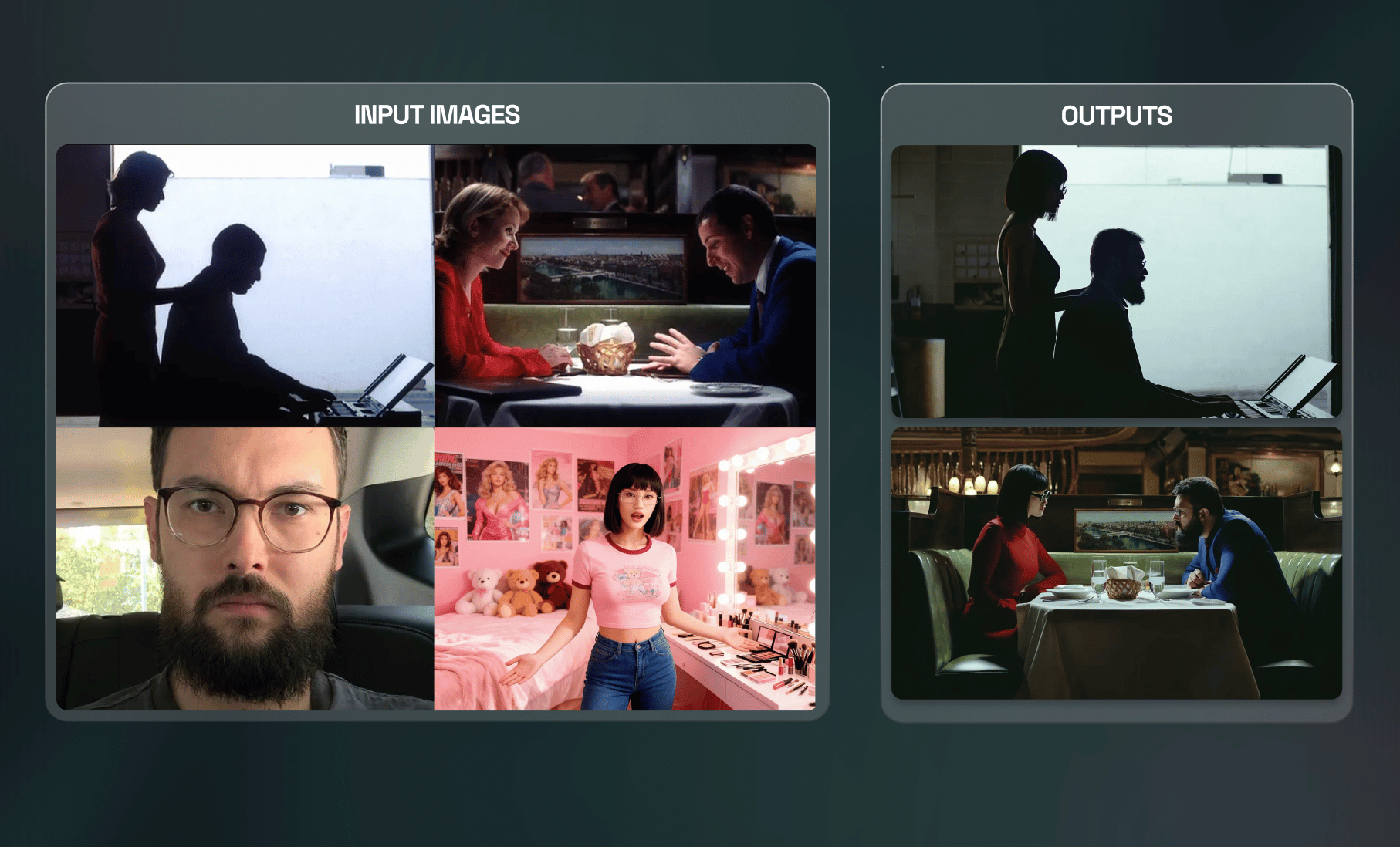
Each sequence starts with an input, which can be either a written prompt or an image reference. The system accepts up to four input images at once, giving you full creative control over who appears, where they are placed, and what defines the mood.

When using image inputs, text is always attached - Higgsfield Popcorn interprets it through your written direction.

You can mix and match inputs creatively:

  • A portrait of a person.

  • A photo of a location.

  • A specific object or prop.

  • A visual reference for lighting or costume.

The AI combines them to form a single, consistent cinematic world.

For example:

“Man from image one in the location from image three wearing the outfit from image four.”

This simple sentence links multiple ideas into a coherent visual concept, allowing the system to understand relationships between people, places, and props.


How to Structure Your Prompt

Higgsfield Popcorn rewards precision - the more clearly you describe your story, the more cinematic your results will look. The model understands complex sequences and long-form direction, so take advantage of its freedom.

When building prompts:

  • Start with the main subject - always mention the person or character first.

  • Then describe the setting or scene - specify where the action happens.

  • Include style early - cinematic, Ghibli-inspired, realistic, documentary, or concept art.

  • Detail the action - describe exactly what happens: movement, interaction, or mood.

  • End with atmosphere - mention lighting, emotion, or pacing cues.

Example:

“Cinematic style. A woman from image one walking through a neon-lit Tokyo street from image three, holding the umbrella from image two, slow rain, reflections on asphalt, shallow depth of field.”

The system processes this as a film director would - linking character, environment, and props into one shot.


Auto Mode: Write Once, Generate a World

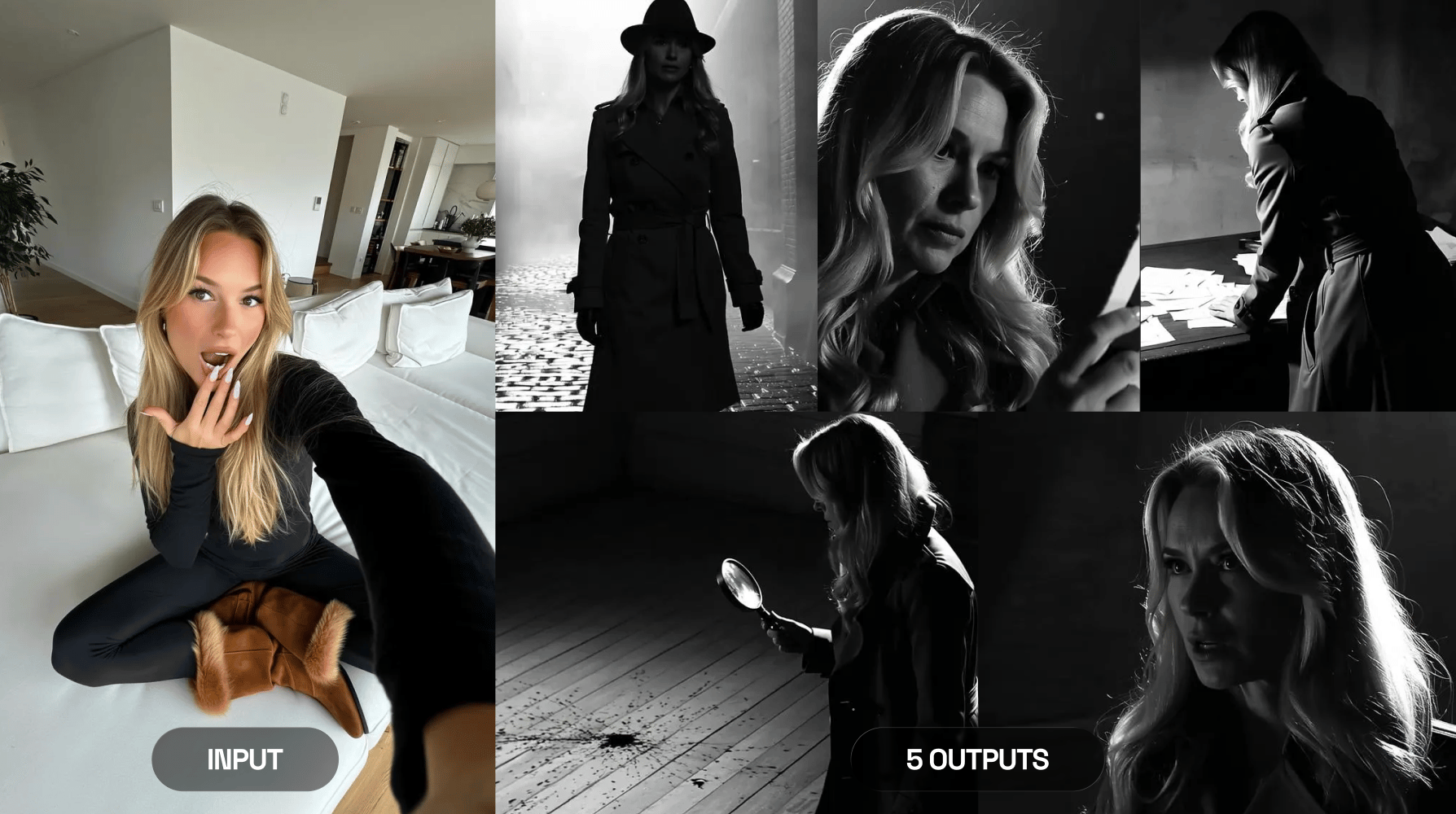
If you prefer speed, Auto Mode turns a single prompt into an entire storyboard. You describe the world once, choose how many outputs you want - for instance, four, six, or eight frames - and Higgsfield Popcorn expands your text into a full visual sequence.

It interprets your narrative across multiple angles and actions, similar to how a cinematographer plans a scene from one description.

Example:

ai photo ai video
ai photo ai video

Prompt: The woman detective searches for the clues in an unsolved murder case. Film noir, vintage cinema in black and white style.

Manual Mode: Direct Every Frame

In Manual Mode, you have full control over the story structure. Each output is its own frame, and you describe every one separately. This approach works best when you already know the rhythm of your story - for example, when planning a campaign storyboard, an illustrated comic, or a short animation sequence.

You can build a full storyboard by describing scenes such as:

  1. A close-up of the main character’s face under morning light.

  2. A medium shot of them walking through the market.

  3. A wide shot showing the city skyline behind them.

  4. A final frame showing the character turning toward the horizon.

Each output becomes a visual paragraph in your story. Higgsfield Popcorn aligns their lighting, composition, and mood automatically, keeping everything coherent.

Example 1:

ai photo ai video
ai photo ai video

Prompt 1: Put a man with a woman in the setting from IMG1 with similar poses

Prompt 2: Put a man with a woman in the setting from IMG2 with similar poses

Aspect Ratios and Frame Layouts

Higgsfield Popcorn supports multiple aspect ratios and layout combinations, each useful for different storytelling formats.

Flexible:

  • 3:4 - Ideal for portraits and story-focused visuals.

  • 2:3 - Balanced frame for cinematic shots.

  • 3:2 - Works for editorial and landscape emphasis.

  • 1:1 - Perfect for social feed visuals.

  • 9:16 - Optimized for Reels, TikTok, and Shorts.

When using visual references, keeping your input aspect ratio similar to your target output improves realism and structural alignment. If your reference image is vertical, stay vertical. If it’s landscape, keep that format to preserve spatial consistency.

The Most Optimized Tool for Image Editing:

Overview

  • Generate or edit any image with multiple inputs.

  • Maintain perfect continuity between characters, clothing, lighting, and environment.

  • Works seamlessly with both: prompt-based and reference-based edits.

  • Higgsfield Popcorn aesthetics and realism across all generations

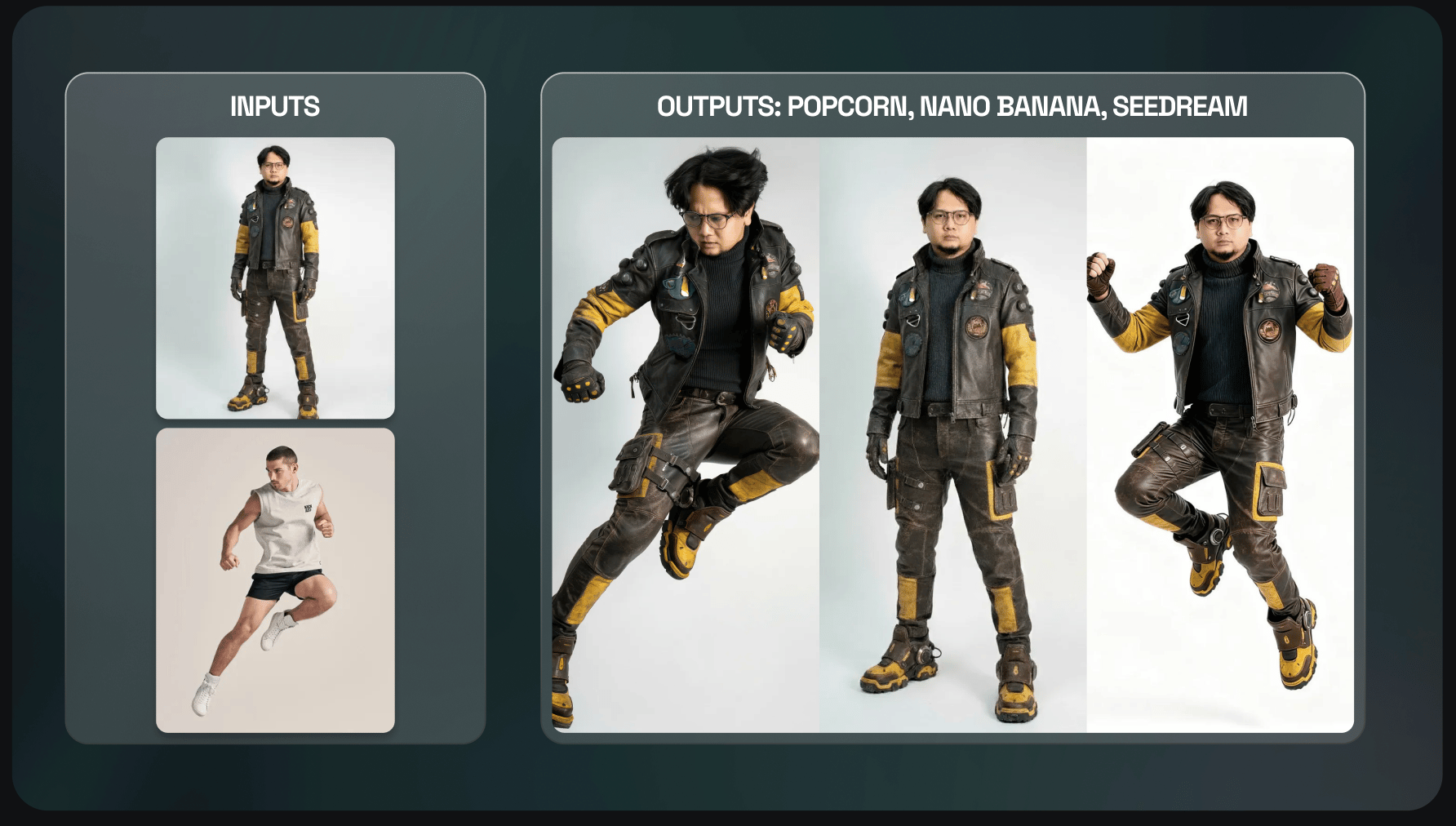
Example: 2 input images + Prompt → 1 Output Image

Higgsfield Popcorn keeps the character consistent, follows the prompt about the pose & keeps the setting.

Prompt: Do the same action pose as in the IMG2 for the character in IMG1, the background is plain white.

ai video ai photo
ai video ai photo

Advanced Tips for Best Results

  • Always lead with style: start your prompt with “cinematic,” “animated,” “concept art,” or “photorealistic.” This helps the AI choose visual depth before content.

  • Describe action instead of categories: instead of writing “I’m in a Marvel movie,” write “a man in futuristic armor walks through fire as the city collapses behind him.”

  • Include emotion: mention tone and light behavior.

  • Keep characters stable: the model holds identity across frames automatically, but clear phrasing reinforces that connection.

  • Use reference scenes wisely: matching the aspect ratio of your reference improves generation quality.

  • Mix real and AI: you can use real photos as reference and let Higgsfield Popcorn extend them into fictional scenes.


What Higgsfield Popcorn Can Do

  • Insert characters into any location - combine portraits, props, and settings naturally.

  • Create visual campaigns - generate multiple brand shots that share lighting and composition logic.

  • Build illustrated stories or comics - describe each scene manually or through Auto Mode.

  • Develop film storyboards - visualize ideas with cinematic continuity before production.

  • Generate concept art sequences - explore ideas for films, games, or ads in cohesive style.

Each generation feels intentional, like a directed scene.


Restrictions and Recommendations

While Higgsfield Popcorn is flexible, there are still a few limitations worth remembering:

  • Celebrity references work only if you upload their photo - the model may not recognize names alone.

  • Avoid extremely low-resolution inputs - details matter for realism, so start with clean, high-quality images.

If something looks inconsistent, adjust scene descriptions instead of reuploading inputs. The system improves coherence when narrative direction is explicit.


Why Higgsfield Popcorn Changes the Creative Workflow

Before Higgsfield Popcorn, creators had to jump between generators, editors, and upscalers just to build one sequence. Each frame had to be aligned manually, and character consistency was difficult to maintain - now, Popcorn eliminates this fragmentation.

You can start with an idea, build the entire storyboard, refine details, and export without leaving Higgsfield. It’s the first time that narrative logic, image generation, and editing live in one cohesive process.

Creators can now:

  • Write entire ad campaigns in visual form.

  • Design animated shorts frame by frame.

  • Build brand lookbooks and product stories.

  • Prototype films or games visually before production.

It is visual thinking made tangible - and it works in real time.


A Note on Quality

Higgsfield Popcorn’s cinematic quality comes from Higgsfield’s core model architecture. It understands structure, spatial continuity, and light behavior like a camera system would. Every image carries depth and texture, every reflection follows logic, and every subject remains consistent.

Even without presets, the model captures realistic skin tone, fabric response, and environmental light diffusion. For maximum realism, treat prompts like screenplay directions, not captions. The more you think in shots, the more the system behaves like a cinematographer.


Final Thoughts

Higgsfield Popcorn is the first true bridge between imagination and direction. It lets anyone, from storytellers to marketers, build full visual narratives with emotional clarity and technical precision. Each sequence feels cinematic, each frame feels alive, and every story becomes easier to visualize before it is ever produced.

The age of AI-generated storyboards has begun, try first with Higgsfield Popcorn.

Create Your Storyboard Now

Generate!

Got any questions left?

Higgsfield Popcorn is an advanced AI storyboarding tool that creates visually consistent scenes from text prompts and reference images. It maintains full narrative control over characters & objects.
Yes! You can sign up and start creating right away. We provide all users with free daily credits. These credits allow you to test all of Popcorn's features, from generating consistent characters to creating full storyboards.
You can generate up to 8 images in a single sequence. However, the process is theoretically limitless. You can take the last image of your sequence and use it as the new reference input to continue the story, allowing you to build narratives of any length.
Once your storyboard is finalized and approved, you can use our built-in option to easily export the sequence to Sora 2. This seamlessly turns your static storyboard into a dynamic, generated video, taking you from concept to final video much faster.
Mariam Barova

by Mariam Barova

Share article

Discover more

post preview

Can an AI Video Generator Replace a Full Production Team?

post preview

5 AI Video Generator Tools Rated Best for High-Quality Results on Higgsfield

post preview

Jailbreak Higgsfield: Hidden Cheatcodes to Use AI Video Generator to the Max