Before You Start: Build Your App UI with GPT Image 2.0
Every great app ad starts with a great-looking interface. Before generating any videos, create your app's UI screens so they can be displayed on phone screens throughout your content.
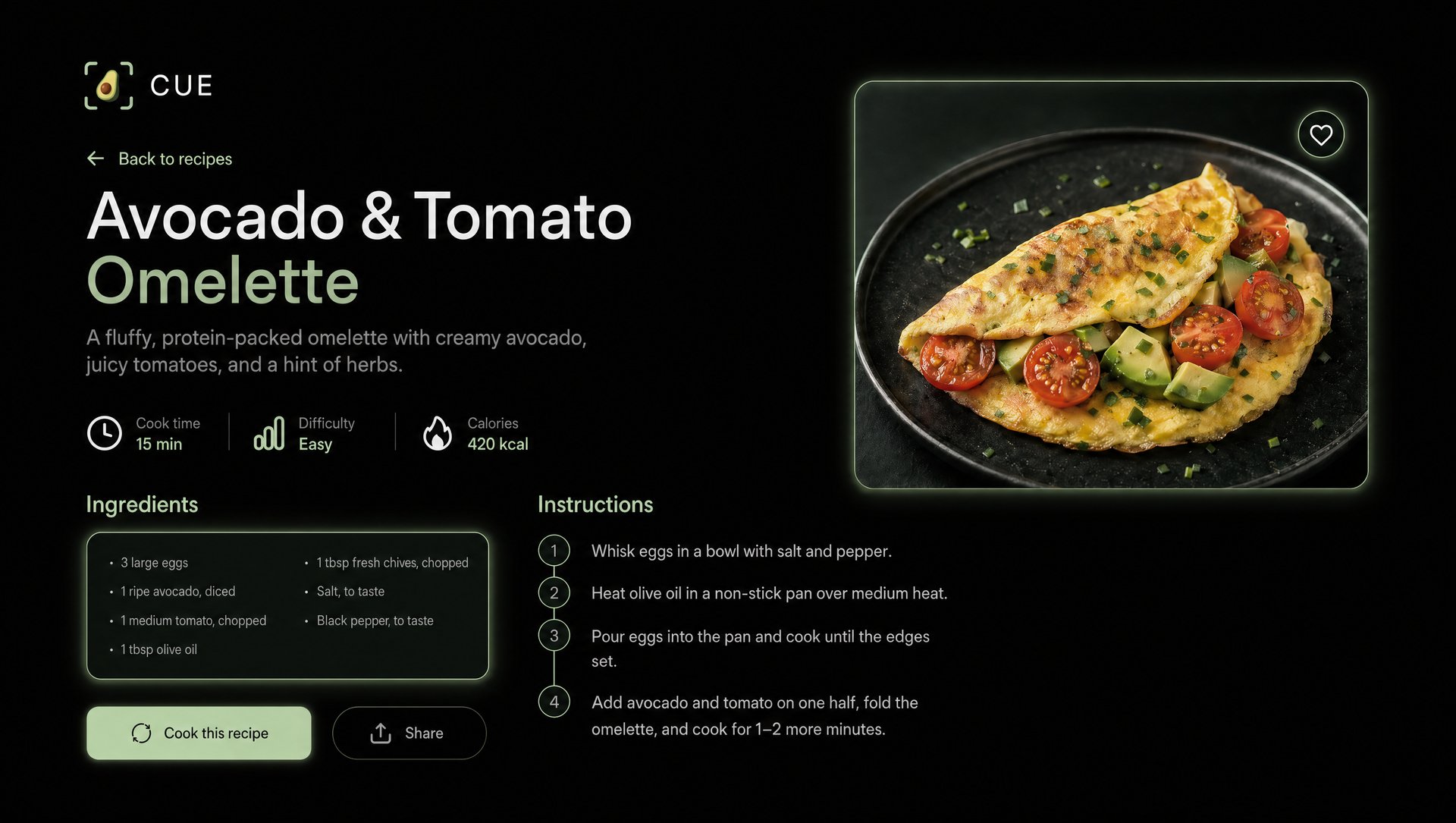
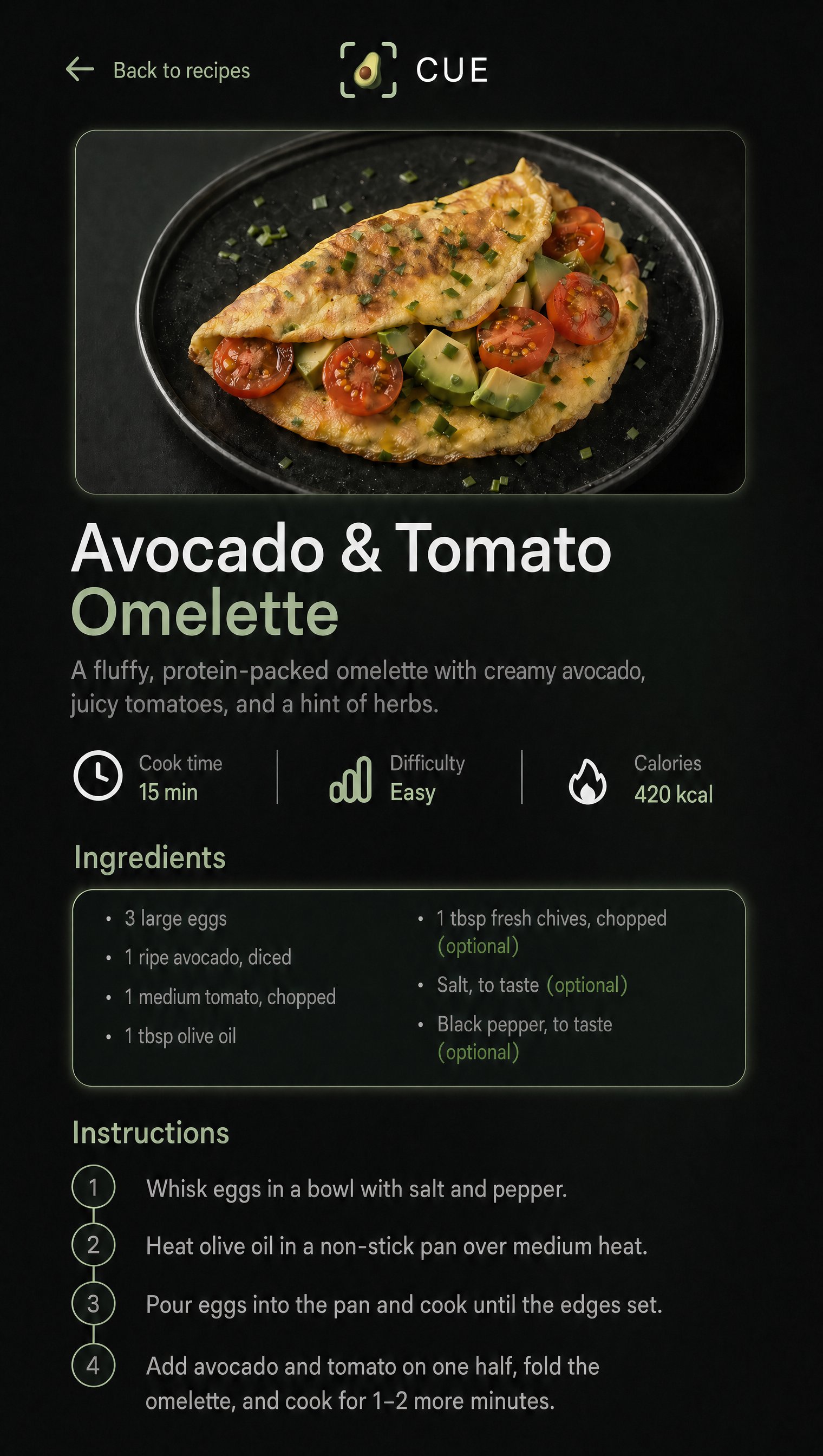
The entire CUE interface was generated — not designed — using GPT Image 2.0 on Higgsfield.
Step 1: Design the Main Landing Page
What it does:
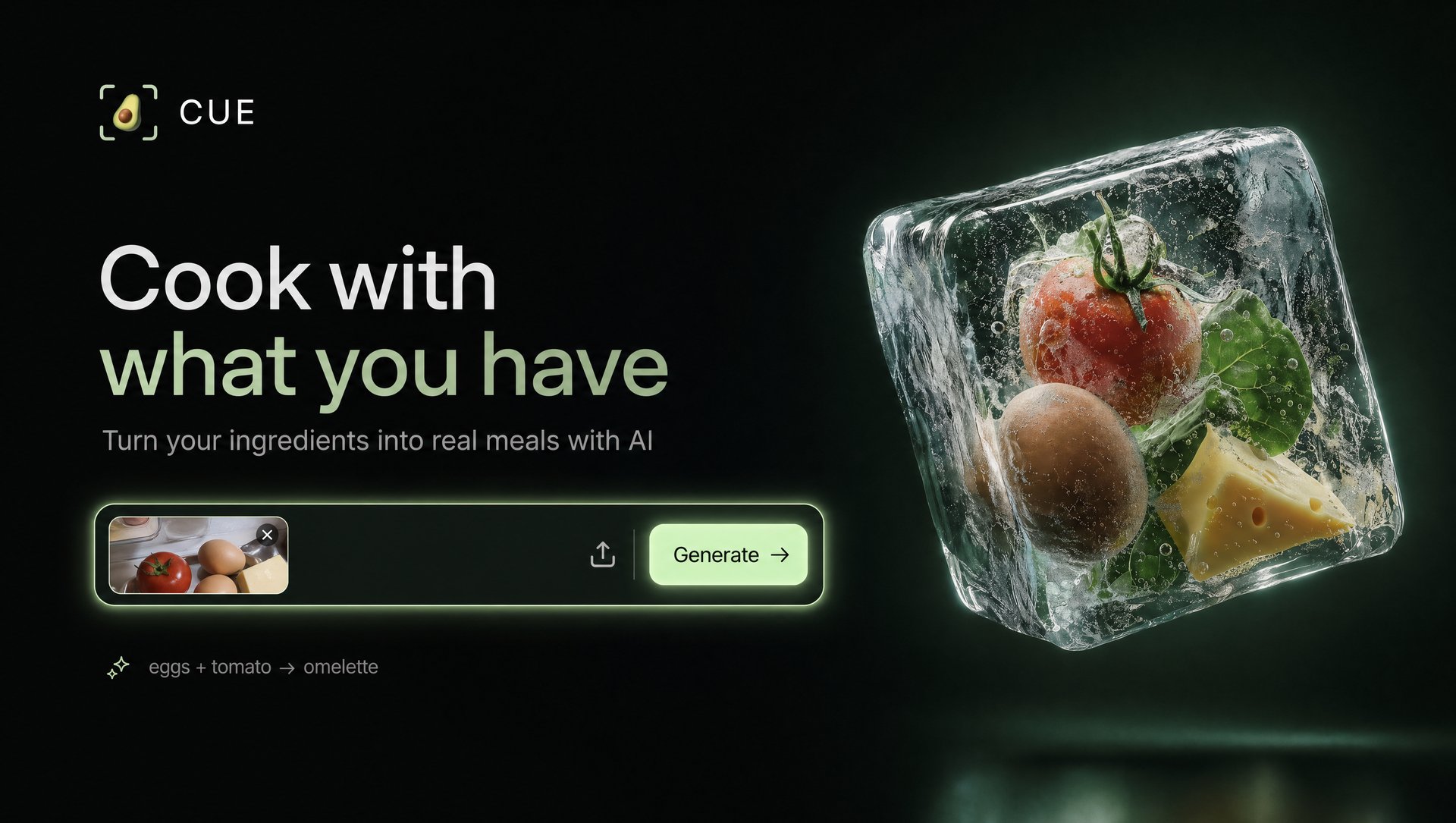
Generates a polished, premium app landing page with accurate text rendering. GPT Image 2.0 is used here specifically because every other AI image model scrambles text inside UI — GPT Image 2.0 renders it accurately down to the smallest detail.
The Prompt:
"Modern dark minimal landing page for "CUE" — AI-powered recipe generator. Style: premium, minimal, dark green aesthetic, clean SaaS, Apple-level design Layout: Centered hero: - Clean input box (ChatGPT-style) - Placeholder: "Type ingredients or upload a photo..." - Upload icon inside input - Minimal generate button Top: - Small logo (avocado inside scan frame) - "CUE" wordmark Headline: "Cook with what you have" Subheadline: "Turn your ingredients into real meals with AI" Right side visual: - Large transparent ice cube floating in space - Inside the ice cube: frozen ingredients (tomato, egg, greens, cheese) - Ingredients slightly suspended, visible through ice - Realistic ice texture: cracks, air bubbles, frost edges - Soft light reflections and subtle glow - Clean composition, no clutter Background: - Deep dark green to black gradient - Subtle vignette Below input: - Small example text: "eggs + tomato → omelette" Design: - lots of whitespace - soft glow on input - modern sans-serif typography (Inter / SF Pro) - minimal, refined Mood: calm, premium, slightly futuristic, unique visual metaphor (frozen ingredients → potential meal)"
Try it in GPT Image 2.0 on Higgsfield
Generate the Mobile Version
What it does:
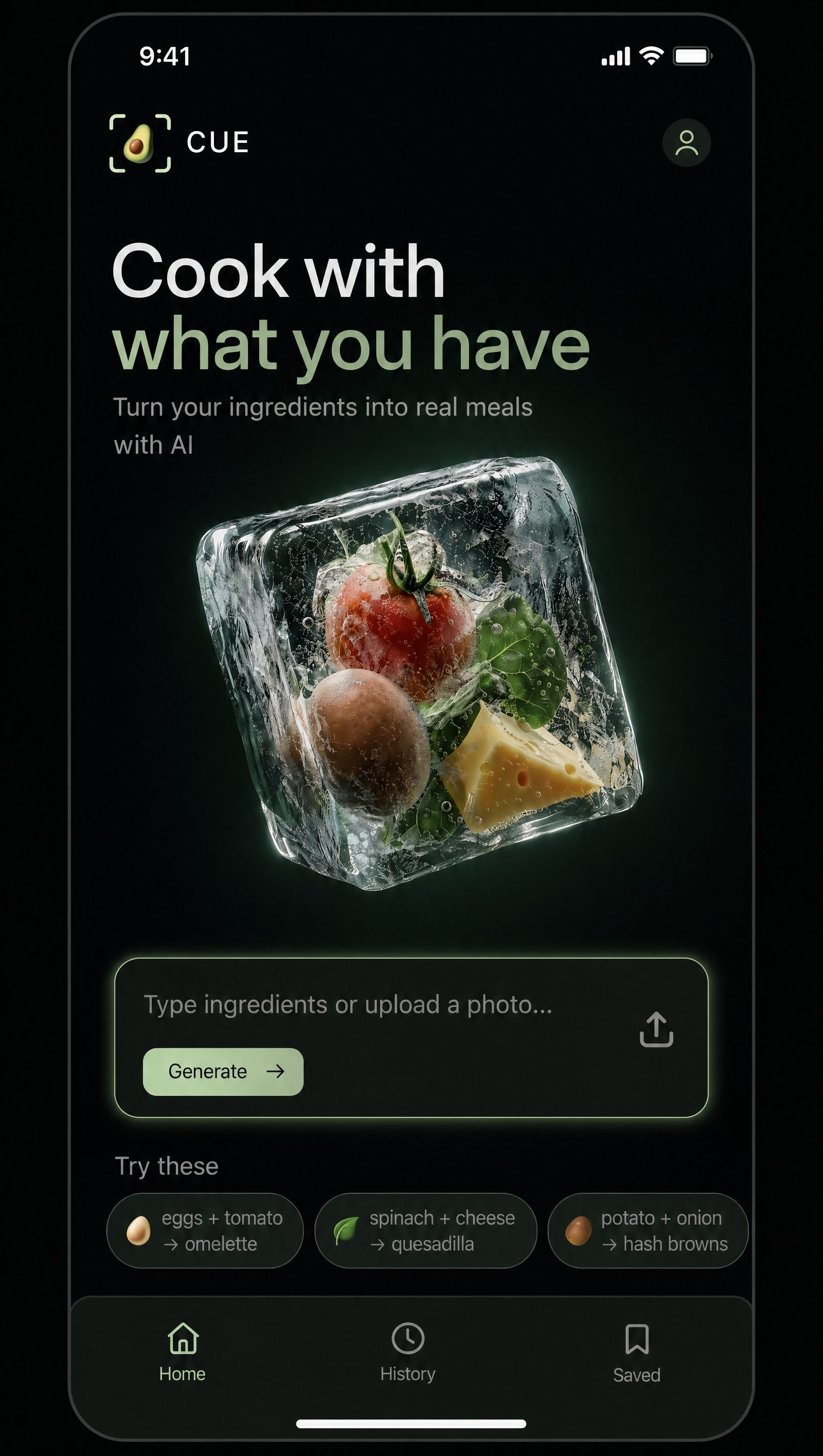
Converts the desktop landing page to a 9:16 mobile layout while preserving the design system.
Drag the desktop version as a reference image, set the ratio to 9:16, and hit generate. No new prompt needed.

Try it in GPT Image 2.0 on Higgsfield
Step 2: Create the Recipe Result Screen
What it does:
Generates the in-app recipe detail page using the main landing page as a design system reference — keeping fonts, colors, and aesthetic fully consistent.
The Prompt:
"@image_1 — visual style and design system reference for CUE app. Same design system as @image_1. Recipe result screen — title, cook time, ingredients, step-by-step instructions, food photo. Keep the same dark premium aesthetic."

For the mobile version, drag the result image, set to 9:16, and generate.

Try it in GPT Image 2.0 on Higgsfield
Format 1 — UGC
UGC is one of the highest-converting ad formats on social media right now. A real person, iPhone camera, casual setting, talking directly to camera about something they discovered. It feels like a recommendation from a friend — and that's exactly why it works.
Pro tip: Before writing your prompt, open Claude and add the Marketing Studio Skill from the youtube video description. This lets Claude write optimized Marketing Studio prompts for you automatically. Describe your concept, attach your product link, and Claude handles the rest.
UGC Video 1 — The Exhausted Home Cook
What it does:
Targets the core user persona: someone who comes home tired with no idea what to cook. The video shows the full product journey — problem, scan, recipe, cook, result.
The Prompt:
"@image_1 is the CUE app scan screen — display it statically on the phone screen when scanning ingredients. @image_2 is the CUE app result screen — display it statically on the phone screen after scanning. Do not animate any app interface. A woman stands in a bright modern kitchen facing the counter. Spread across the counter in front of her: eggs, tomatoes, spinach, cheese, onion — random, loosely arranged. She stares at them. Arms loosely crossed. Thinking. She says out loud in English: "What should I cook?" A beat of silence. Then her face shifts — eyes widen slightly, one finger raises straight up in the air. The idea has arrived. She grabs her smartphone off the counter. She holds the phone out and aims it directly at the ingredients laid out on the counter in front of her — phone screen shows @image_1 static CUE scan UI, a scanning frame locking onto the ingredients below. A brief pause — then @image_2 static CUE result screen appears on the phone. A recipe. She reads it, nods slowly, one corner of her mouth pulls into a small smile. She sets the phone down. She turns to the counter with new purpose. Fast cuts: hands sorting ingredients into clean groups — eggs to one side, tomatoes grouped, spinach stacked, cheese pulled out. Deliberate, efficient, energized. The counter goes from random to organized in seconds. Cooking begins — knife through tomatoes, eggs cracking into a pan, spinach wilting in butter, cheese grated over the top. Steam rises. Sizzle fills the frame. She moves with calm confidence, referencing the phone screen once mid-cook with a quick glance. Final shot: She picks up the plate with both hands, turns to face the camera directly. Quiet satisfaction on her face. She looks at the dish, then back at the lens. Says "Use CUE" Camera: mix of medium shots, close-ups of hands and ingredients, over-the-shoulder during phone scan, fast cuts during prep, slow final hold on her face and plate. Lighting: bright soft natural kitchen light, warm tones, clean shadows, golden steam on final plate shot. Sound design: ambient kitchen — ingredients placed on counter, phone tap, shutter click, soft notification chime, fast knife cuts, pan sizzle, butter pop, steam.
Process: Head to Marketing Studio, select App (not product), paste the prompt, attach the CUE website link — Marketing Studio will automatically pull the UI and all necessary product info. Set app type to mobile, duration to 15 seconds, pick an avatar, and generate."
Try it in Higgsfield Marketing Studio
UGC Video 2 — The Gym Bro
What it does:
Targets a second customer archetype — a fitness-focused user who needs high-protein meals but doesn't know how to cook. Different energy, different hook, same product.
The Prompt:
"A fit muscular young man in @image_1 in a plain black gym stringer, completely blank fabric, no logos, no brand marks, no prints, no text, no graphics on clothing whatsoever. Sweaty after workout, opens a messy fridge packed with random scattered ingredients — chicken, eggs, random vegetables, sauce bottles, everything chaotic and unorganized. He looks confused, scratches his head. He pulls out the ingredients one by one — chicken breast, eggs, bell pepper, avocado — and places them on the kitchen counter in a messy pile. He pulls out his phone, holds it above the ingredients and takes a photo — camera shows the phone screen capturing the food from above, the app interface appears on screen with the scanned ingredients @image_2 — app screen reference, static, no tapping). The phone screen fills the frame showing a complete recipe with macros generated automatically by the app. He nods confidently. Fast-paced cooking montage: overhead knife chopping with precision, oil hitting a hot pan in slow motion, chicken sizzling perfectly, vegetables tossed in the air and caught in the pan. Final shot: he sits at the counter with a perfect plated high-protein meal, takes a bite, gives a chef's kiss to camera, phone with the app propped up next to the plate @image_2 — app screen visible in background). A bold white caption text overlay appears centered in the lower third of the frame reading "POV: You're a gym bro who doesn't know how to cook..." in a clean sans-serif font, white text with subtle drop shadow against the video."
Process: Same workflow — enhanced prompt, website link, interface images. This time, upload a custom character created in Soul Cinema instead of using a preset avatar.
Try it in Higgsfield Marketing Studio
UGC Video 3 — Cinematic 360° Angle
What it does:
A more cinematic take on UGC — same product story, same format, but with a continuous slow 360-degree orbital camera that compresses the entire cook into an elegant lifestyle commercial.
The Prompt:
"@image_1 is the phone camera UI — display it statically on the phone screen when the character photographs the ingredients. @image_2 is the CUE app screen — display it statically on the phone screen after uploading the photo. Do not animate any app interface. A man stands in a bright, modern kitchen with white countertops, warm natural light, and clean minimalist decor. 0–3s: Slow 360-degree orbital camera begins moving around the kitchen — smooth, cinematic, continuous rotation. The man opens the refrigerator door. He reaches in and pulls out ingredients one by one: tomatoes, eggs, a block of cheese, fresh greens. 3–6s: Orbital camera continues its slow rotation around him. He places each ingredient neatly onto the counter, arranging them with calm intention. Ingredients clearly visible, neatly spaced on white countertop. He steps back, looks at the spread. 6–8s: He picks up his smartphone. Over-the-shoulder angle — he points the phone DIRECTLY DOWN at the ingredients on the counter. Phone screen shows @image_1 — static camera UI. He taps. Shutter click sound. Then phone screen switches to @image_2 — static CUE app screen. He glances at it, nods once. 8–12s: Timelapse sequence — the orbital camera keeps its slow 360 rotation while cooking happens in accelerated time: knife slicing tomatoes, eggs cracking into a hot pan, cheese grated, greens tossed in. Steam rising. Pan sizzling. Hands moving efficiently. The kitchen fills with warmth and motion. The orbital shot compresses the full cook into a few elegant seconds. 12–14s: Timelapse ends. Camera slows to real time. He plates the dish — one clean, confident motion onto a white plate. 14–15s: He turns directly toward camera, holds the beautifully plated dish up with both hands, smiles wide, and says out loud: "Use CUE." Camera: continuous slow 360-degree orbital rotation throughout — smooth, steady, cinematic dolly movement around the subject. Never stops moving until the final direct-to-camera hold. Lighting: bright soft natural daylight, warm kitchen tones, clean shadows, golden highlights on food. Sound design: original groovy instrumental hip-hop beat — upbeat, warm, rhythmic. Sound effects: fridge door open, ingredients placed on counter, phone shutter click, soft chime, knife chopping, pan sizzle, timelapse whoosh transition. Spoken words at end: "Use CUE." No voiceover, no background song from existing artists. IMPORTANT: CUE is a digital mobile app only — on phone screen only, no physical product. App interfaces are displayed as static screens — no animation, no UI transitions. Phone always aimed at ingredients on counter, never at floor or empty space. Style: super realistic, cinematic, lifestyle commercial, warm tones, smooth orbital cinematography, 4K."
Process: Same as above, but switch the preset to Pro Virtual Try On. Attach the interface images — no website link needed for this one — and select your avatar.
Some prompts need a couple of iterations to land. If something feels off, bring the prompt back to Claude and ask it to edit that specific part. And once you get the video you like, batch that prompt across a bunch of different avatars and get hundreds of ads in less than an hour. UGC creators charge anywhere from $150 to $600 per 15-second video — you do the math."
Try it in Higgsfield Marketing Studio
Format 2 — Hyper Motion
Hyper Motion is Marketing Studio's cinematic production mode. CGI-grade visuals. 3D environments. Camera movement with actual physics behind it. Think Apple product reveal or luxury brand launch video.
For Hyper Motion, your prompt needs to be more specific — the more detail you give it, the more control you get over the final output.
Hyper Motion
What it does:
Creates a premium CGI-grade product reveal: the phone crashes into a void, an ice cube shatters to reveal the ingredients, and they transform into a finished dish — all tied back to the CUE UI. In traditional production, this would easily cost thousands of dollars.
The Prompt:
"Vertical 9:16 cinematic shot. A modern smartphone floats in pitch-black void with subtle dark green gradient, displaying the CUE app interface — dark UI with glowing mint-green accents, "Cook with what you have" headline visible, suggestion chip "eggs + tomato → omelette" highlighted. A finger taps the screen and camera crash-zooms forward THROUGH the phone display into deep space. A translucent ice cube emerges from the darkness, mint-green rim light pulsing along its edges — trapped inside: a fresh egg and a cherry tomato with green spinach leaves. Sudden hyper-speed shatter: the cube explodes outward in extreme slow motion, crystalline shards flying past the camera with mint-green light streaks and frozen mist. Mid-air transformation in slow motion: the egg cracks open and golden yolk pours, the tomato splits into perfect dices, butter cubes melt, fresh herbs scatter, all spiraling through dark void with motion-blur trails. Camera orbits as ingredients converge and snap into a perfect golden folded omelette on matte black ceramic plate, glossy and gently steaming, garnished with diced tomato and a basil leaf, soft mint-green underglow. Smooth pull-back reveals the smartphone again, now showing the finished omelette photo on screen with the glowing mint-green "Cook with what you have" headline. Cinematic premium aesthetic, deep blacks, hyperrealistic detail, fast-paced ad editing energy, multiple dynamic camera moves, 9:16 vertical."
Process: Switch the preset to Hyper Motion, attach the interface image, and generate. It nails all the text on the interface — those who've worked with AI know that's not an easy task for AI video — and the final dish comes out accurate.
Try it in Higgsfield Marketing Studio
Format 3 — TV Spot + Wild Card
Everything so far has been vertical content — built for TikTok, Reels, social feeds. But there's a whole other world of content that lives on websites, YouTube ads, and billboards. The kind that makes someone stop and think: wait, this brand is serious. That's what TV Spot is for.
TV Spot
What it does:
A full lifestyle commercial, 16:9, with a character who carries the whole narrative — from fridge to plate. The tone is warm, relatable, and cinematic. This is the kind of ad you'd see running on YouTube or on a brand's homepage.
The Prompt:
"@image_1 — recipe detail screen reference: vertical dark-themed app showing the full Chicken Avocado Wrap page — dish photo at top, title, cook time 15 min, difficulty Easy, calories 480 kcal, ingredients list, step-by-step instructions. @image_2 — final dish reference: two halved chicken avocado wraps stacked on a dark ceramic plate, cross-section showing chicken, avocado, rice, spinach, tomato filling, lime wedges on the side. @image_3 - kitchen location reference: teal-green cabinets, large stainless steel fridge on the left, warm evening window light, dark stone countertops. She carries the ingredients from the fridge to the kitchen counter — container in one hand, avocado and spinach tucked against the other arm, walking calmly toward the counter. Easy, natural, no fuss. She sets everything down. The phone is propped vertically on a small stand showing @image_1 — ingredients list and numbered instructions visible on screen. She glances at the phone, then turns to the camera with that easy playful look and says: "The instructions are so detailed, even I can't mess this up." A beat — she gives the camera a slow smirk, reaches over, picks up a small piece of diced tomato from the cutting board and pops it in her mouth. Completely unbothered. Quick intimate cuts of the cooking process: tortilla laid flat, chicken strips placed, spinach and avocado layered in, tomato added, wrap rolled tightly, pressed down, sliced cleanly in half. The finished wrap on a dark ceramic plate exactly as in @image_2. She sets the plate down, looks at it, then back at the camera. Small satisfied pause. She picks up one half, holds it slightly toward the camera and says with a light grin: "Cue said fifteen minutes. It was fifteen minutes." She takes a bite. Handheld, warm kitchen light throughout, phone screen with @image_1 slightly visible in background during cooking. Cinematic TV commercial, 16:9, realistic. Sound: soft chopping and prep sounds during cooking, warm music holds through the cooking sequence and eases into a clean resolve on the final line and bite."
Process: Paste into Marketing Studio, switch to TV Spot preset, set format to 16:9, select Zara as the avatar, and attach a kitchen location image generated in Soul Cinema along with the CUE website link.
To run it longer than 15 seconds like a proper full commercial, batch two separate prompts for two parts of the video and cut them together in post.
Try it in Higgsfield Marketing Studio
Wild Card — 10 Words Prompt
What it does:
Wild Card takes your most creative, freest idea and brings it to life without hand-holding. No detailed breakdown required. It's the mode that proves the real barrier to content isn't time or budget — it's imagination.
The Prompt:
"You scan the fridge, get a recipe, cook a meal."
10 words. The only inputs were the ingredient card and the interface page.
If you don't start doing this for your business in 2026, you're going to have a hard time competing with brands that do.
Try it in Higgsfield Marketing Studio
Ready to Build Your Own Content Factory?
Start with your app's UI screens first — consistency there is what makes every video feel like it belongs to the same brand. Then let Marketing Studio handle the rest.