Video generation has taken a meaningful step forward.
What started as prompt-based video creation has expanded into a broader set of creative tools, covering everything from cinematic visuals to short-form content and social formats.
With the introduction of Vibe Motion, Higgsfield expands its ecosystem even further. This new capability complements our existing AI video generation tools by offering a more structured approach to motion creation - one built specifically for projects that demand clarity, consistency, and seamless iteration.
This addition complements generative AI indusrty by making motion graphics, presentations, and structured visual content easier to create and refine through a conversational interface.

Motion as a Natural Extension of AI Video
While generative video excels at producing rich visuals and scenes, motion graphics focus more on a structure: timing, hierarchy, typography, and flow. These elements benefit from precision and repeatability.
Higgsfield extends AI video workflows into motion-heavy formats where users often need tighter control over how information appears, moves, and evolves on screen. The result is a system where motion feels guided and intentional, while still retaining the speed and flexibility people expect from AI-powered tools.
Instead of working in timelines or manual editors, users interact through chat, refining motion step by step and seeing changes update in real time.
Core Use Cases Where AI Motion Shines
Animated Infographics
Infographics are one of the most natural applications for AI motion. Metrics, numbers, and structured data translate well into animated formats when timing and hierarchy are handled consistently.
With Higgsfield, users can turn raw values into motion graphics where:
Numbers animate smoothly
Sections appear in logical sequence
Emphasis shifts clearly between key points
Because motion remains stable, updating data doesn’t require rebuilding the entire animation, making this useful for recurring reports, marketing assets, and internal updates.
Presentations and Visual Storytelling
Motion-first presentations are another strong fit. Instead of static slides, content becomes more dynamic while staying easy to follow.
Headings, supporting text, charts, and visuals animate with purpose, helping guide attention without overwhelming the viewer. Real-time editing makes it easy to adjust content late in the process, which is especially valuable for fast-moving teams.
This approach works well for:
Investor decks
Sales presentations
Product walkthroughs
Conference and event content
Logo Animations and Brand Elements
Brand motion often needs to be clean, subtle, and consistent rather than expressive. Higgsfield’s Vibe Motion tool allows users to upload logos and brand assets and generate animations that can be reused across formats.
Typography remains sharp, colors stay accurate, and motion can be adjusted to fit different contexts, from presentations to social content, without recreating assets each time.
How the Workflow Feels in Practice
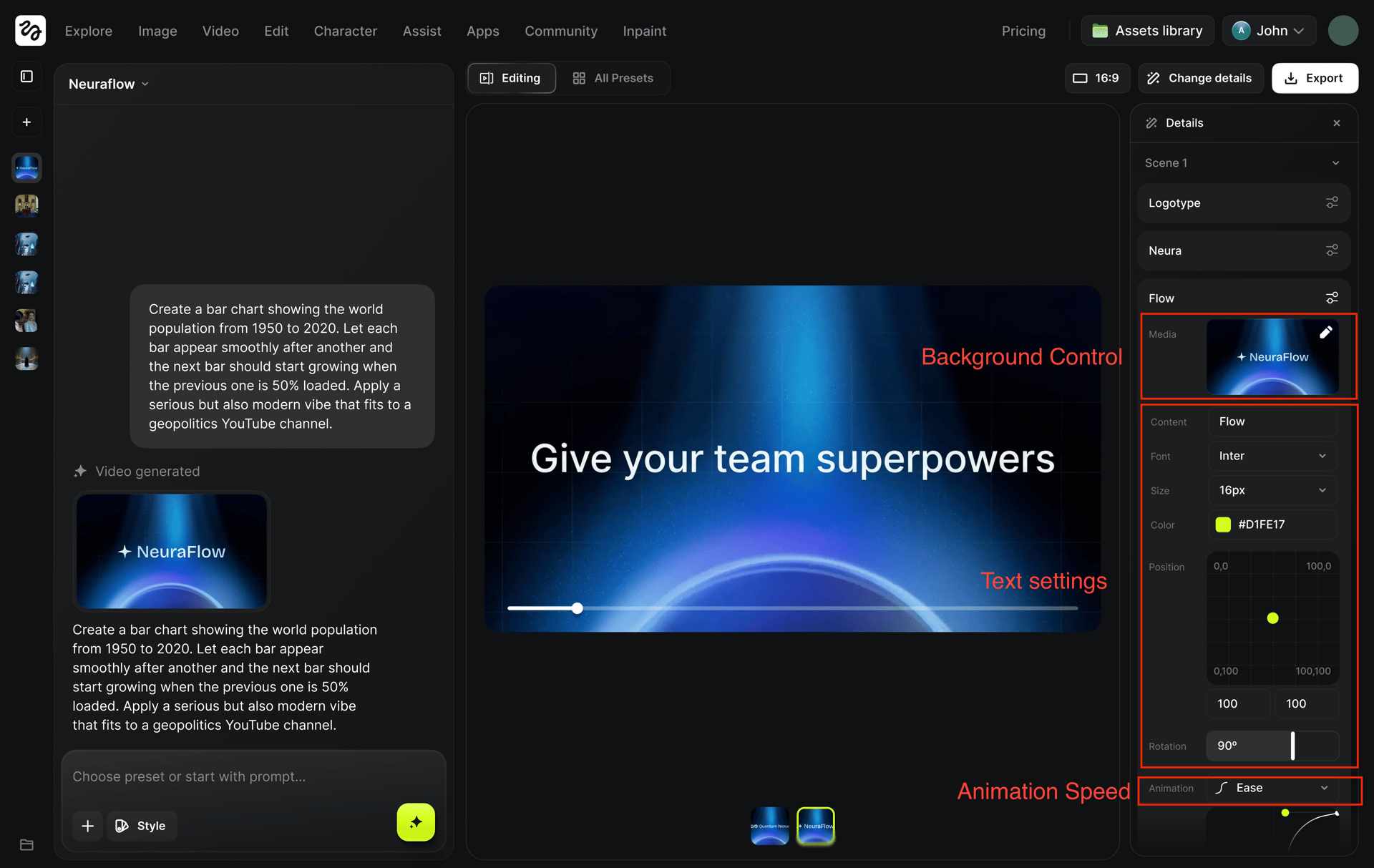
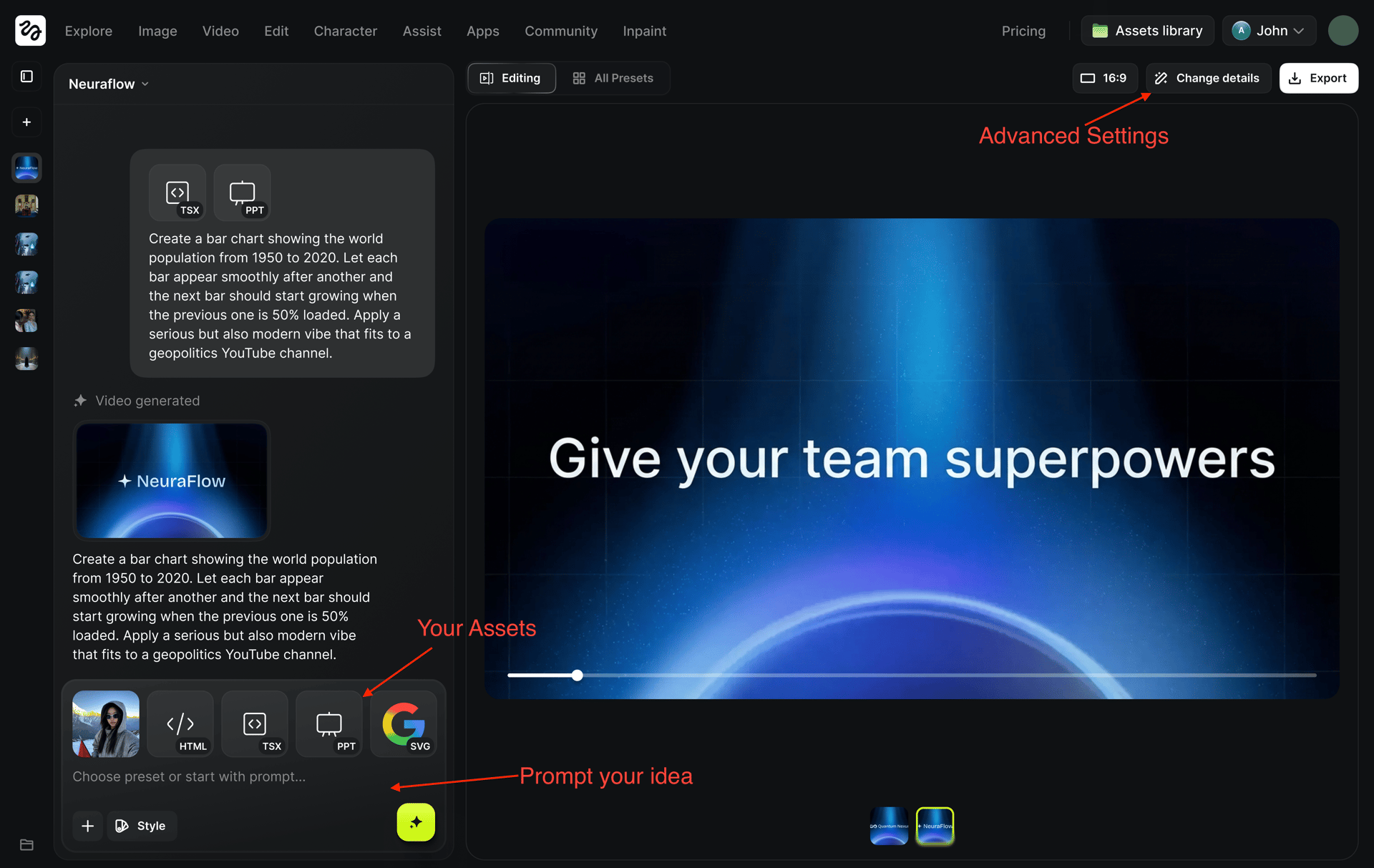
The process starts in a chat-based interface. Users describe the motion idea at a high level and can upload assets such as images, videos, logos, or PDFs. The system builds motion around these files rather than generic placeholders.
Templates are available for common formats, allowing users to start with predefined motion structures and focus on content instead of setup. Once generated, everything remains editable.
Real-time adjustments make experimentation fast. You can tweak text, colors, layout, and overall motion speed and immediately see the result, which encourages iteration instead of hesitation.
Style and Motion Control
Higgsfield's Vibe Motion includes a library of motion presets that define how elements enter, exit, and transition. These presets act as starting points rather than fixed templates, helping users achieve professional-looking motion without needing to design behavior from scratch.
You can preview different styles, apply them instantly, and then refine the details. This makes motion creation approachable for users without formal design backgrounds while still offering flexibility.
Step-by-step guide
1. Choose your idea: presentation, infographics, text animation, posters, or build from scratch!
2. Starting with chat: You describe the motion idea ("Create a kinetic typography intro") and polish the concept with the AI. At this stage, you can also upload your own assets like your actual logo or product images so the animation is built around your files.

3. Apply a template (optional but recommended): for those who don’t want to start from scratch, you can browse and apply project templates. Feels like they come with complex motion logic already baked in, so you just need to swap the content.
4. Refine with UI Controls: Once the video is generated, you can click on any text element to manually tweak the Font Family, Text Color, Font Size, and Background Color.

4. Adjust the Physics: slider for Animation Speed. You can dial it up to make the motion feel sharp and energetic, or slow it down for a smooth look.
Closing Thoughts
AI video generation continues to expand in capability and quality. By adding conversational AI motion creation into the mix, Higgsfield broadens what creators can do within a single platform.
Instead of choosing between speed and control, users can combine generative video with structured motion, using the right approach for the right type of content. That flexibility is what makes this evolution meaningful.
Explore what structured AI motion feels like in practice
Higgsfield lets you combine generative video with guided motion for infographics, presentations, and brand visuals, all in a single workflow. It’s built for teams and creators who need speed without giving up control.