Creator Hub
Atrás

Cómo mantener personajes y ubicaciones consistentes en tomas de IA

Higgsfield
10 min

Para mantener personajes y ubicaciones consistentes en las tomas con IA, dale al modelo las mismas dos referencias cada vez: una para la persona y otra para el lugar. En Cinema Studio 4.0, guardas ambas como Elements y las añades con @ a cada prompt, para que cada nuevo ángulo parta del mismo rostro y el mismo espacio.

  • Los Elements guardan personajes, ubicaciones y utilería una sola vez y funcionan en todos tus proyectos de Cinema Studio.
  • Una generación de Cinema Studio 4.0 acepta hasta 50 referencias.
  • En nuestra prueba, una generación de 20 segundos mantuvo la misma cueva y el mismo personaje en cinco tomas. La versión que conservamos tomó 3 intentos.

Por qué la consistencia de locación es la mitad más difícil

Las ubicaciones son más difíciles de mantener consistentes que los rostros. Un rostro tiene una sola cosa que conservar: la identidad. Una ubicación tiene muchos detalles que deben permanecer fijos a la vez: dónde está el mobiliario, de qué dirección viene la luz, el color y la textura de las paredes, qué se ve por la ventana, la hora del día y los objetos en una repisa. Cada uno de esos detalles tiene que permanecer fijo mientras la cámara se mueve dentro del espacio a lo largo de varias tomas.

Las descripciones de texto manejan esto peor que los rostros, y la razón es estructural. "Una cocina acogedora con luz matutina" le da al modelo casi nada concreto a lo que anclarse, así que inventa una cocina ligeramente distinta en cada generación: la ventana se desplaza un poco, el color de los gabinetes cambia, el material de la encimera es diferente. Nada de eso es lo suficientemente incorrecto como para notarse en un solo shot por sí solo. Todo es lo suficientemente incorrecto como para que, en el momento en que cortas entre dos angles de la misma supuesta habitación, la secuencia se desmorone.

Por qué la consistencia de locación es la mitad más difícil

Criterios

Rostro

Ubicación

Lo que tiene que permanecer fijo

Estructura ósea, tono de piel, geometría facial

Posición del mobiliario, dirección de la luz, color de las paredes, puntos de referencia visibles, hora del día

Lo que un prompt de texto le da al modelo

Una descripción aproximada que el modelo reinterpreta cada vez

Casi nada concreto a lo que anclarse

Cómo se ve el "drift"

Una persona sutilmente diferente shot a shot

Una habitación, ventana o fuente de luz sutilmente diferente shot a shot

Qué lo soluciona

Un elemento de personaje (o un Soul ID) añadido a cada prompt

Un elemento de ubicación creado a partir de un plano de establecimiento

Por qué es más difícil de solucionar

Una sola variable que mantener constante

Muchas variables que tienen que mantenerse constantes a la vez, en cada angle de cámara

¿Qué son los Elements en Cinema Studio?

Los Elements son referencias guardadas en Cinema Studio 4.0. Cada elemento es un personaje, una ubicación o un objeto de utilería creado a partir de tus imágenes o videos. Una vez guardado, recibe su propia etiqueta @, así que lo añades a cualquier prompt en lugar de subir y describir la misma referencia otra vez para cada toma.

El productor musical Oliver Alge trabaja así en sus videos musicales y anuncios de TV: crea personajes y ubicaciones como imágenes fijas y luego los guarda como Elements en Cinema Studio para que se mantengan consistentes entre tomas. Lee la historia de Oliver Alge.

Cinema Studio es el espacio de trabajo cinematográfico de Higgsfield, una plataforma generativa para producción creativa, con más de 35 modelos de frontera para generar imágenes y convertirlas en escenas de video. Los Elements están en My elements, en la barra lateral de Cinema Studio.

¿Qué son los Elements en Cinema Studio?

Campo

Qué hace

Categoría

Auto, Character, Location o Prop. Auto deja que Higgsfield elija.

Archivo multimedia

Una o más imágenes (JPG, PNG, WebP) o videos (MP4, MOV)

Nombre y Element ID

El ID es la etiqueta @ que escribes en un prompt

Descripción

Notas sobre el elemento, por ejemplo “ventana a la izquierda, letrero de neón rojo”

Propiedades personalizadas

Campos adicionales que defines tú mismo

Los Elements no son lo mismo que Soul ID. Soul ID entrena una identidad a partir de 20 a 80 fotos de una persona. Un elemento es una referencia guardada que puede partir de una sola imagen, y puede contener un lugar o un objeto además de una persona.

Referencia, Elements, Popcorn o 3D Jutsu: ¿cuál necesitas?

Una sola imagen de referencia basta para una toma. Popcorn encaja con un storyboard corto de una escena en una sola pasada. Vale la pena configurar Elements cuando una persona o un lugar vuelve en varias sesiones o proyectos. 3D Jutsu encaja cuando la disposición debe coincidir exactamente.

Referencia, Elements, Popcorn o 3D Jutsu: ¿cuál necesitas?

Si

Usar

Por qué

Necesitas una toma de un personaje en un lugar

Una imagen de referencia en el prompt

No hay nada que reutilizar después

Quieres de 1 a 8 fotogramas de una escena a la vez

Popcorn

Hasta 4 imágenes de referencia; modos Auto, Manual e Instadump

Vuelves a la misma ubicación en distintos días o proyectos

Un elemento de ubicación

Se guarda una vez y se añade con @ en cada prompt

Pones varios personajes en un mismo espacio

Elementos de personaje más un elemento de ubicación

Cada persona y el lugar reciben su propia etiqueta

Necesitas que la disposición coincida exactamente desde cualquier ángulo

3D Jutsu

Crea la ubicación como una escena 3D a partir de un prompt; ajustas la utilería y las cámaras y luego conviertes la escena en un video

Necesitas el mismo rostro real en muchas imágenes

Soul ID

Una identidad entrenada creada a partir de 20 a 80 fotos

La elección no es permanente. Un fotograma que te guste de Popcorn o de una sola toma de referencia puede convertirse en la imagen de origen de un nuevo elemento.

Paso 1: crea un plano de establecimiento claro de la ubicación

Comienza con una imagen amplia que muestre todo el espacio: la disposición, de dónde viene la luz y tres o cuatro detalles fáciles de identificar. Si el lugar aún no existe, genéralo primero. Esta imagen se convierte en la referencia con la que se compara cada ángulo posterior.

Qué hace que un plano de establecimiento sea bueno:

  • Se ve el espacio completo, no una esquina.
  • La fuente de luz es clara, por ejemplo una ventana o una lámpara.
  • Los objetos distintivos son fáciles de verificar después: un letrero, una pared de color, un mueble.
  • Nadie aparece en el encuadre, así el elemento guarda solo el lugar.

Paso 2: guarda la ubicación como elemento

Abre My elements en Cinema Studio y haz clic en Add new. Suelta el plano de establecimiento, establece la categoría en Location, dale un nombre corto y haz clic en Create. Higgsfield completa el Element ID a partir de la categoría y el nombre, por ejemplo loc_corner-cafe para una Location llamada Corner Cafe. El Element ID es la etiqueta @ que usas en los prompts. Puedes cambiarlo antes de hacer clic en Create.

  • Puedes añadir varias imágenes o un video del mismo lugar a un elemento.
  • Usa la descripción para enumerar los detalles que no deben cambiar, por ejemplo “ventana a la derecha, paredes verdes, lámpara de latón”.

Paso 3: añade tu personaje

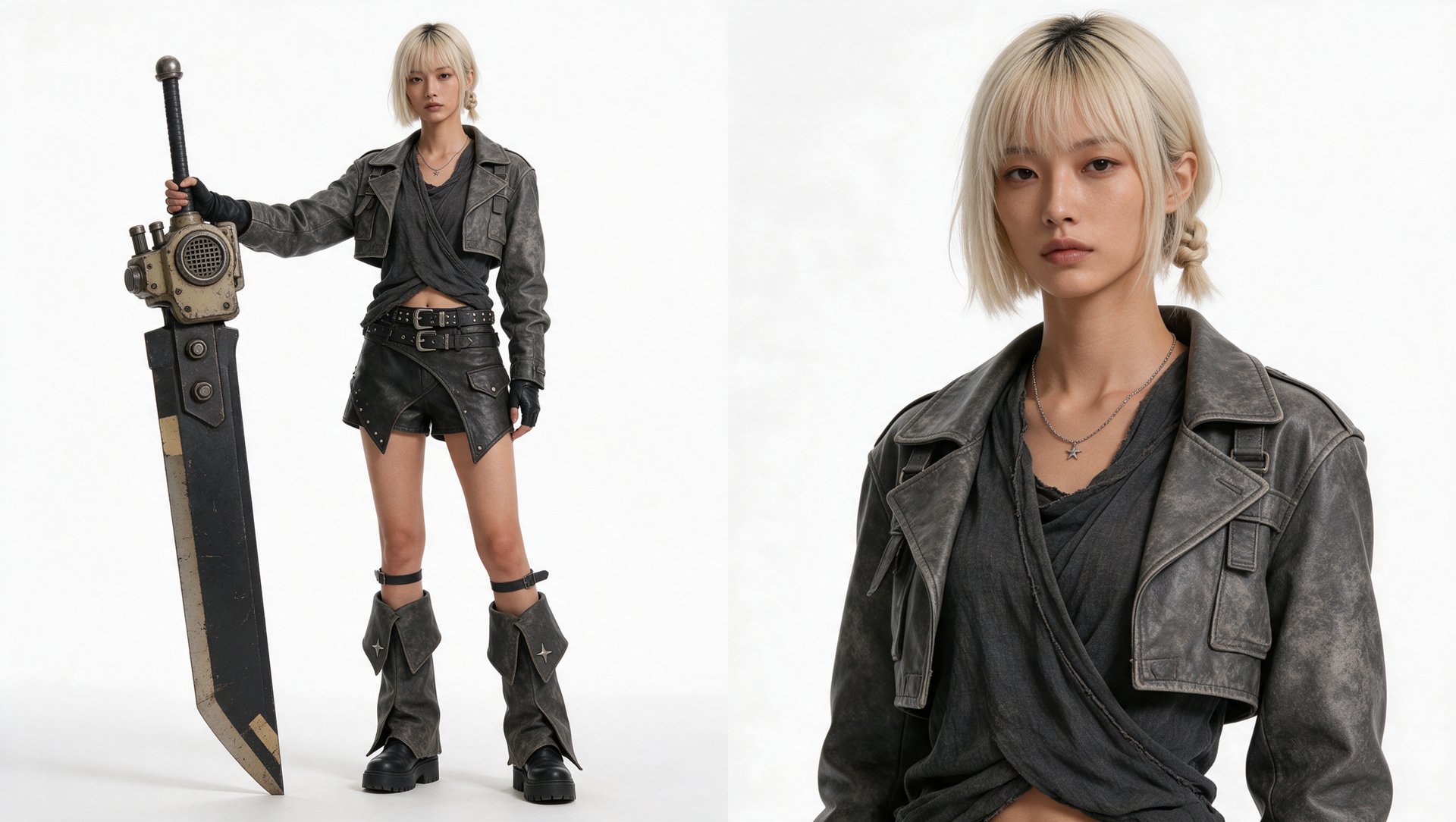
Guarda el personaje de la misma forma, con la categoría configurada en Character. Una hoja de personaje funciona bien como fuente: una vista de cuerpo completo y un retrato en primer plano en una sola imagen. Si tu personaje ya existe como Soul ID, no necesitas guardarlo de nuevo. Los personajes Soul ID entrenados aparecen automáticamente en My elements como elementos de tipo Character.

  • Usa una imagen con el rostro claramente visible y el atuendo completo.
  • Mantén en esa imagen el atuendo y cualquier objeto de utilería que quieras en pantalla.

Double Shots usó el mismo enfoque en videos musicales para la ídolo del pop Ivy: el equipo fotografió a la artista y los objetos clave durante el rodaje, para que las tomas hechas en Cinema Studio llevaran los mismos rostros, vestuario y objetos que el material grabado en vivo. Lee la historia de Double Shots.

En nuestro ejemplo, la hoja de personaje se hizo con Soul 2.0 y se guardó como elemento de personaje.

Paso 4: genera cada ángulo con ambas etiquetas

Abre un proyecto de Cinema Studio. El campo de prompt dice “use @ to add characters & locations”: escribe @, elige el personaje y la ubicación, y luego describe el ángulo y la acción. Puedes generar un ángulo a la vez o describir varias tomas en un solo prompt: un video de Cinema Studio 4.0 dura de 4 a 30 segundos, así que una generación puede contener varios ángulos de la misma escena.

Un prompt puede seguir este patrón:

“@Personaje + acción + @Ubicación + ángulo de cámara + luz, por ejemplo: “@char_mira se sienta en el sillón rojo en @loc_corner-cafe, toma amplia desde la puerta, luz matinal desde la ventana.””

  • Film setup, Camera, Color palette y Lighting están encima del prompt. Mantenlos iguales para cada ángulo de una escena.
  • Cambia solo el ángulo de cámara y la acción entre tomas.
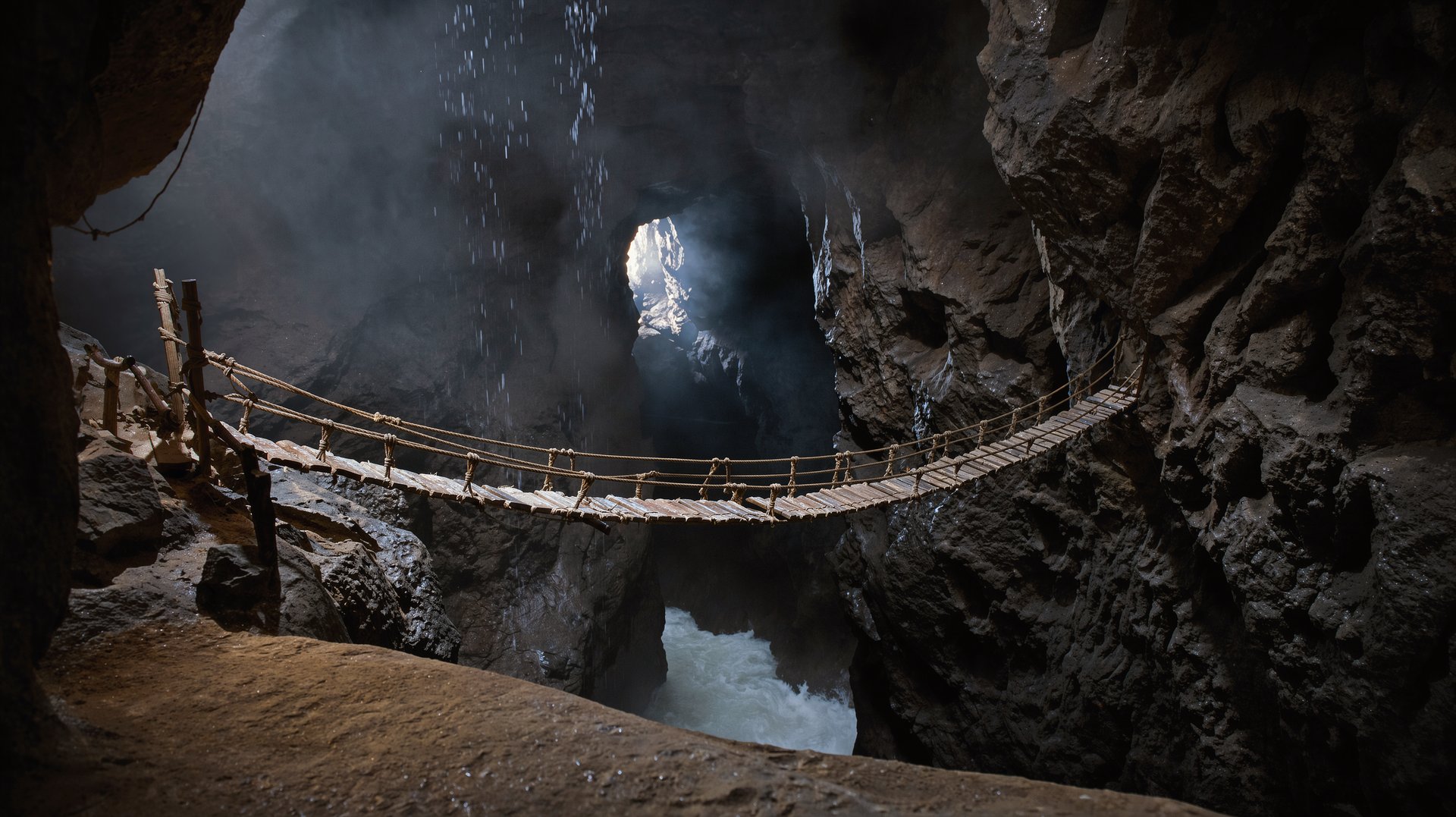
SCENE CONTEXT A 20-second cinematic sequence of six shots, grounded and believable, with the weight and patience of a large-format feature film. In a vast, dark, wet cave, a lone swordswoman of immense strength walks out of a tunnel and crosses a colossal 100-meter rope bridge over a bottomless chasm, dragging an enormous sword behind her. The bridge groans under its weight, but she moves with total, unbothered power. On the far ledge she stops, steam hisses from the sword's grille, and without turning around she cuts the bridge loose with one stroke behind her, then walks on into the darkness as it falls away. Quiet, heavy, completely nonchalant. ACTIVE REFERENCES <<<image_1>>>: the location only: the kind of place, its geometry and materials: - the rock ledges with rope-lashed wooden posts - the long sagging rope bridge with wooden planks and twisted hemp rope rails - the opening in the cave behind the bridge - thin streams of water falling from the ceiling - the white river at the bottom of the chasm - the massive wet rock walls Its camera angle, its scale and its brightness are not used: every shot is filmed from a new angle, the cave and the bridge are far larger, and the cave is much darker. <<<image_2>>>: the single source of truth for the heroine and her sword, 100% identical in every shot: her face, platinum-blonde bob with dark roots, blunt bangs and small braid, her full outfit, and the oversized sword with its broad black bolted blade, beige edge stripe, boxy beige mechanical guard housing with a round mesh grille and two small cylinders, and long black grip. The white studio background of <<<image_2>>> never appears. ADDITIONS TO THE LOCATION - A dark tunnel in the rock just behind the left posts; she emerges from it. - At the right end of the bridge, a narrow stone ledge with a second pair of rope-lashed wooden posts, and a dark narrow crevice in the wall directly behind them, leading deep into the rock. SCALE - The cave is colossal, a cathedral-sized void of rock. - The bridge is about 100 meters long and sags deeply in the middle. It is made of several hundred narrow wooden planks, each about 25 cm wide, with rope rails at her waist height. Its far end fades into the mist. - The river churns about 150 meters below, so deep that it is only a faint white thread in the darkness. - She is a normal 1.75 m person in her platform boots, and the sword is about her own height. Against the bridge and the cave she is tiny. - In the wide shots she occupies only 3 to 5 percent of the frame height, dwarfed by the rock, with layers of mist and falling water hanging between the camera and her. HEROINE: POWER AND WEIGHT - The sword is massively heavy, and its weight shows in the world around her: the planks bend and crack under it, the bridge dips with each step, and the blade gouges the wood as it drags. - She herself moves with complete, effortless strength: upright, shoulders square, a long, steady, heavy stride. She never hesitates, never checks her footing and never holds the rails. - She holds the sword only in her right hand by the long grip, her arm relaxed and straight, the blade dragging behind her on a low diagonal, its tip scraping the planks about a meter behind her heels. - When the tip snags on a plank edge, she yanks it free with a casual one-handed tug, without glancing back. - Her face is calm, tired and blank, her eyes fixed ahead, her mouth closed. No sighs, no exhales and no visible breath. - Her hair, straps, belt tails and gaiter flaps swing heavily with each step, and wet drops darken her shoulders. - Screen direction: in every side shot she moves from screen-left to screen-right. The image is never mirrored. - She never looks into the lens. FORMAT MODE Controlled multi-shot sequence, 20.0 seconds, six shots joined by hard cuts at 3.0s, 6.5s, 8.5s, 11.5s and 16.0s. Every shot uses a different camera position and angle, and no angle is ever repeated. CAMERA LANGUAGE - Shot like a large-format feature film: the camera sits on a tripod, dolly, crane or a rigid body-mounted rig, with deliberate, weighted moves and precise framing. No handheld shake, no drone glide, no fast pans. - Real large-format film texture: fine grain, soft highlight halation, deep blacks and true-to-life color. LIGHTING - A dark cave. The only light is the dim, diffuse daylight that seeps in from the distant opening and spreads softly through the mist. It is present everywhere but weak, like natural light deep inside a real cave: no visible beams, no spotlight, no bright pools and no studio look. - Most of every frame is deep, near-black shadow. Shapes read through soft gradations, the faint pale glow of the mist, thin specular glints on wet rock, and the dim white thread of the river far below. - She is lit only by that faint ambient glow: a subtle, soft rim on her hair, shoulders and blade, with her face mostly in soft shadow and only gently readable in the close shots. There is no fill light and no added colored light. - The palette is cold, muted and naturalistic: blue-grey and black stone, pale mist and muted earth tones. Underexposed, moody and real. SHOT 1 — 0.0s to 3.0s, medium, the emergence - Camera: on a tripod low on the rock floor just outside the tunnel mouth, a low 3/4 front angle looking slightly up, a normal lens, about 3 meters from her. - From the pitch-black tunnel she walks out toward the camera into the faint light, steady and unhurried, the heavy sword dragging behind her and its tip grinding across the stone with a little dust. - She passes the camera and steps between the posts onto the first planks, and the bridge visibly sinks under her weight. SHOT 2 — 3.0s to 6.5s, extreme wide, side, the scale - Camera: on a tripod far out on the opposite cave wall, level with the bridge, a wide shot from the side with a very slow pan to the right. - The whole 100-meter bridge crosses the frame as a long, thin, deeply sagging line over the black chasm, its far end fading into the mist. - She is a tiny figure near the left third of the bridge, only 3 to 5 percent of the frame height, striding steadily from screen-left to screen-right. Each of her steps sends a slow wave rippling along the enormous bridge. - Falling water and drifting mist hang soft in the foreground between the camera and her. SHOT 3 — 6.5s to 8.5s, beneath the bridge - Camera: rigidly mounted under the deck, looking straight up through the gaps between the planks. A wide lens. - Her heavy platform boots pass overhead across the gaps, the planks flexing down toward the lens under each step. - Right after them, the sword's blade drags across the planks just above the lens, gouging the wood; sand and splinters trickle down through the gaps, and drops of water fall past. SHOT 4 — 8.5s to 11.5s, extreme wide from below, the depth - Camera: on a tripod far down near the river at the bottom of the chasm, looking straight up. A wide lens with a very slow push-in. - High above, the bridge is a thin dark thread against the dim glow of the opening, and she is barely a dot on it. - 8.8s: one rotten plank slips out of its lashing behind her and falls. It tumbles slowly toward the camera through the mist and falling water, growing larger, for about three seconds, and splashes into the white river near the lens just before the cut. SHOT 5 — 11.5s to 16.0s, the head rig, the stop and the grille - Camera: one continuous shot on a rigid rig fixed in front of her face, about 80 cm away at eye level, moving exactly with her. A normal lens. - Her head stays in the same place in the frame while the world moves behind her: the last planks, the enormous sagging bridge stretching back into the mist, and then the rock of the right ledge. - Her face is steady and blank, her eyes looking past the lens into the distance, her hair swinging with each heavy step. - 14.0s: she steps off the bridge onto the stone, takes two more strides past the right posts, and stops dead. The rig stops with her. - 14.5s: the camera detaches from her face and glides smoothly down along her right shoulder and her relaxed arm, to her gloved hand on the grip and the guard housing of the sword resting behind her. - 15.3s: the round mesh grille on the beige housing fills the frame in close-up. With a sharp hiss, dense white steam forces out through the mesh holes in a thick jet, and the two small cylinders beside it twitch. Her gloved fingers tighten on the grip. SHOT 6 — 16.0s to 20.0s, from behind, the cut and the exit - Camera: on a tripod low on the right ledge, just behind the two right posts on the bridge side, looking past the posts at her back and the black crevice ahead of her. A normal lens. - 16.3s: without turning around, she swings the sword back in one effortless, lazy stroke. The steam jet from the grille drives the blade around behind her in a short, low, tight arc that passes cleanly through both wooden posts right in front of the camera, and the momentum carries it straight back into its trailing position in her hand. - The cut posts tip over, the ropes whip loose, and the end of the enormous bridge drops away out of the bottom of the frame into the chasm. - A thin arc of steam hangs in the air behind her and slowly dissolves. - Her body never turns. She simply walks on into the black depth of the crevice, the sword scraping behind her, until the darkness swallows her. - The frame holds on the dark crevice and the drifting steam until the last frame, with the long groan of the falling bridge echoing from below. PHYSICS - The bridge: each of her heavy steps presses the deck down, sending a slow wave along its great length, and the whole bridge sways sideways with a delay. The hangers stretch and slacken, and the rope rails creak and twist. - The sword has real mass: it drags, gouges and catches on the plank edges. Wood on metal makes a dry scrape with no sparks. - The steam comes only from the round mesh grille on the guard housing, as a dense white jet pointing opposite to the blade's motion, like thrust. It billows, hangs along the arc and fades. - The cut: one fluid, effortless flick driven by the steam thrust, not a muscular swing. Her feet stay planted and her body faces away from the bridge. - The collapse: with the right anchors cut, the 100-meter bridge falls away from the ledge into the chasm like a heavy chain, slowly, because of its enormous size, with planks shedding and snapped ropes recoiling with frayed ends. It is purely mechanical: wood and rope, with no explosions, sparks or debris near her. - Falling objects take as long to fall as the real height demands, without floating. - Water drips fall in straight fast streams, the river churns and throws up fine mist, and the wet rock glistens faintly. AUDIO - No music. - The cave: the deep, distant roar of the river, the hiss of falling water, echoing drips and a cold draft. - Her crossing: heavy boot thuds, cracking planks, groaning ropes and the long dry grind of the sword, all with long cave echo. - The plank's splash arrives late from far below. - The grille: a sharp, building steam hiss. - The cut: a whoosh and a double wooden crack, then the long groan and distant crash of the falling bridge echoing through the cave, while her footsteps fade into the crevice. - No breathing sounds. POSITIVE LOCKS - Six cinematic shots, each from a different angle, never using the camera angle of <<<image_1>>>. - A dark cave lit only by dim, diffuse natural light, with deep shadows everywhere. - The bridge is 100 meters long and she is tiny against it in the wide shots. - She is identical to <<<image_2>>> in every shot, moving with effortless strength. The sword is massively heavy and always in her right hand, and she always moves from screen-left to screen-right. - The steam comes only from the round grille. - Shot 5 is one continuous head-rig shot that ends on the grille close-up. - She stops on the ledge, cuts the bridge without ever turning around, and walks into the dark. She never sighs and never looks into the lens.
Recrear

Paso 5: compara cada fotograma con el plano de establecimiento

Pon cada fotograma nuevo junto al plano de establecimiento y verifica los detalles que enumeraste en el Paso 2. Si un detalle se desvía, nómbralo directamente en el siguiente prompt o regenera ese ángulo.

Paso 5: compara cada fotograma con el plano de establecimiento

Comprobar

Qué buscar

Claro

Viene del mismo lado en cada fotograma

Objetos clave

Mismos objetos, misma posición relativa entre sí

Superficies

Mismo color de pared y mismos materiales

Personaje

Mismo rostro, cabello y ropa

Ejemplo: una ubicación, cinco tomas en una generación

Guardamos una cueva con un puente de cuerdas como elemento de ubicación y una hoja de personaje como elemento de personaje. Luego generamos un video de 20 segundos en Cinema Studio 4.0 (1080p, 16:9, con sonido) con ambas etiquetas en el prompt. La versión que conservamos tomó 3 intentos. Hicimos esta prueba el 5 de noviembre de 2026 con un plan de pago.

Ejemplo: una ubicación, cinco tomas en una generación

Toma

Hora

Cámara

1

0:00 a 0:02

En el puente, mirando hacia el personaje mientras ella sube a él

2

0:03 a 0:05

Toma amplia de la cueva y el puente desde la cornisa

3

0:06 a 0:10

Desde debajo del puente, luego hacia arriba desde el río hacia la abertura de luz

4

0:11 a 0:15

Primer plano del personaje con el puente detrás de ella, luego su mano sobre el arma

5

0:16 a 0:20

Ángulo inverso: desde atrás mientras ella camina de regreso hacia los postes del puente

A lo largo de las cinco tomas, volvieron los mismos detalles: el puente de madera y sus cuerdas, las paredes de roca oscura, la abertura de luz arriba y el río abajo. Lo que cambió de toma a toma fue el ángulo de cámara.

La lista de verificación de consistencia

Antes de generar una escena de varias tomas, confirma:

  • El elemento de ubicación está guardado: un plano de establecimiento que muestra la disposición, la dirección de la luz y los detalles clave.
  • El elemento de personaje está guardado: un retrato claro o una hoja de personaje, o tu personaje de Soul ID, que ya está en My elements.
  • La descripción enumera los detalles fijos: las cosas que no deben cambiar entre ángulos.
  • Los ajustes son los mismos para cada ángulo: Film setup, Camera, Color palette, Lighting.
  • Cada prompt tiene ambas etiquetas: @Personaje y @Ubicación, más el ángulo de cada toma.
  • Cada fotograma está verificado: contra el plano de establecimiento, antes de continuar.

¿Cuánto cuesta?

Un video de Cinema Studio 4.0 en 1080p, 16:9, con sonido cuesta 16 créditos por segundo. Nuestro clip de 20 segundos costó 320 créditos por generación (≈ $15.68). Con 3 intentos, el clip que conservamos costó 960 créditos (≈ $47.04).

¿Cuánto cuesta?

Duración del video

Créditos

Costo aprox.

5 segundos

80

$3.92

10 segundos

160

$7.84

20 segundos

320

$15.68

20 segundos, 3 intentos

960

$47.04

El costo aproximado se basa en $49 por 1,000 créditos. Precios verificados el 5 de noviembre de 2026. Los precios y los detalles del plan pueden cambiar, y el costo exacto se muestra en el botón Generar. La tabla cubre solo el video, no las imágenes usadas para crear los elementos.

Los rostros y los lugares se desvían por la misma razón: el modelo reinterpreta una descripción de texto cada vez. La solución es darle las mismas referencias guardadas para cada toma. Los Elements en Cinema Studio 4.0 convierten eso en una configuración única en lugar de volver a subir archivos para cada ángulo.

Para elegir una herramienta de personajes, consulta nuestra guía de herramientas para personajes consistentes con IA. Para un personaje de marca recurrente, mira cómo crear una mascota de marca.

Cómo mantener personajes y locaciones consistentes en shots de IA (guía 2026)

Prueba Cinema Studio 4.0

¿Todavía tienes preguntas?

por Higgsfield