Creator Hub
뒤로

AI 샷에서 캐릭터와 장소를 일관되게 유지하는 방법

Higgsfield
10 min

AI 샷에서 캐릭터와 장소를 일관되게 유지하려면 매번 모델에 같은 레퍼런스 두 개를 제공하세요. 하나는 인물, 하나는 장소용이에요. Cinema Studio 4.0에서는 둘 다 Elements로 저장하고 각 프롬프트에 @로 추가하면, 새로 만드는 모든 앵글이 같은 얼굴과 같은 공간에서 시작돼요.

  • Elements는 캐릭터, 장소, 소품을 한 번만 저장하면 모든 Cinema Studio 프로젝트에서 사용할 수 있어요.
  • Cinema Studio 4.0 생성 한 번에 최대 50개의 레퍼런스를 사용할 수 있어요.
  • 테스트에서는 20초 생성 한 번으로 다섯 개의 샷에서 같은 동굴과 캐릭터가 유지됐어요. 최종으로 선택한 버전은 3번의 시도가 필요했어요.

장소 일관성이 더 어려운 절반인 이유

장소는 얼굴보다 일관되게 유지하기가 더 어려워요. 얼굴은 정체성 하나만 유지하면 돼요. 장소는 한 번에 고정되어야 하는 디테일이 많아요. 가구의 위치, 빛이 들어오는 방향, 벽의 색과 질감, 창문 너머로 보이는 것, 시간대, 선반 위의 물건까지요. 여러 샷에 걸쳐 카메라가 공간 안에서 움직이는 동안 이 모든 디테일이 고정되어 있어야 해요.

텍스트 설명은 이런 문제를 얼굴보다 더 못 다루는데, 그 이유는 구조적이에요. "아침 햇살이 드는 아늑한 주방"이라는 설명은 모델이 붙잡을 구체적인 정보를 거의 주지 못해서, 생성할 때마다 조금씩 다른 주방을 만들어내요. 창문 위치가 조금 옮겨지고, 캐비닛 색이 바뀌고, 조리대 재질이 달라지죠. 단일 샷만 보면 어느 것도 눈에 띌 만큼 틀리지 않아요. 하지만 같은 방이라고 가정한 두 앵글 사이를 컷으로 전환하는 순간, 시퀀스가 무너질 만큼은 모두 틀려 있어요.

장소 일관성이 더 어려운 절반인 이유

평가 기준

얼굴

장소

고정되어야 하는 것

골격, 피부 톤, 얼굴 형태

가구 위치, 빛 방향, 벽 색상, 눈에 띄는 랜드마크, 시간대

텍스트 프롬프트가 모델에 주는 것

모델이 매번 다시 해석하는 대략적인 설명

붙잡을 구체적인 정보가 거의 없음

"드리프트"가 나타나는 모습

샷마다 미묘하게 달라지는 인물

샷마다 미묘하게 달라지는 방, 창문, 광원

해결 방법

모든 프롬프트에 추가한 Character Element(또는 Soul ID)

설정 샷 하나로 만든 Location Element

고정이 더 어려운 이유

일정하게 유지할 변수가 하나

모든 카메라 앵글에서 한꺼번에 일정하게 유지해야 하는 수많은 변수

Cinema Studio의 Elements란 무엇인가요?

Elements는 Cinema Studio 4.0에 저장된 레퍼런스예요. 각 Element는 내 이미지나 영상으로 만든 캐릭터, 장소, 소품이에요. 한 번 저장하면 고유한 @ 태그가 생겨서, 샷마다 같은 레퍼런스를 다시 업로드하고 설명하는 대신 어떤 프롬프트에든 추가할 수 있어요.

음악 프로듀서 Oliver Alge는 뮤직비디오와 TV 광고 작업을 이런 방식으로 진행해요. 캐릭터와 장소를 스틸 이미지로 만든 다음 Cinema Studio에 Elements로 저장해 샷 전반에서 일관성을 유지하죠. 자세한 내용은 Oliver Alge의 이야기에서 확인해 보세요.

Cinema Studio는 크리에이티브 제작을 위한 생성형 플랫폼 Higgsfield의 영화 제작 워크스페이스로, 이미지를 생성하고 영상 장면으로 바꾸는 35개 이상의 프런티어 모델을 갖추고 있어요. Elements는 Cinema Studio 사이드바의 My elements에 있어요.

Cinema Studio의 Elements란 무엇인가요?

들판

기능

카테고리

Auto, Character, Location, Prop 중에서 선택할 수 있어요. Auto를 선택하면 Higgsfield가 알아서 골라요.

미디어

이미지(JPG, PNG, WebP) 또는 영상(MP4, MOV) 1개 이상

이름과 Element ID

ID는 프롬프트에 입력하는 @ 태그예요

설명

Element에 대한 메모예요. 예: “왼쪽에 창문, 빨간 네온사인”

커스텀 속성

직접 정의하는 추가 필드

Elements는 Soul ID와 달라요. Soul ID는 한 사람의 사진 20~80장으로 정체성을 학습해요. Element는 이미지 한 장으로도 시작할 수 있는 저장된 레퍼런스이고, 인물뿐 아니라 장소나 사물도 담을 수 있어요.

레퍼런스, Elements, Popcorn, 3D Jutsu: 무엇이 필요할까요?

샷 하나에는 레퍼런스 이미지 한 장이면 충분해요. Popcorn은 한 장면의 짧은 스토리보드를 한 번에 만들 때 적합해요. Elements는 인물이나 장소가 여러 세션이나 프로젝트에 걸쳐 다시 등장할 때 설정해 둘 만해요. 3D Jutsu는 레이아웃이 정확히 일치해야 할 때 적합해요.

레퍼런스, Elements, Popcorn, 3D Jutsu: 무엇이 필요할까요?

계정 액세스 문제로

사용

왜

어떤 장소에 있는 캐릭터의 샷이 하나만 필요할 때

프롬프트에 넣는 레퍼런스 이미지

나중에 재사용할 것이 없어요

한 장면의 프레임 1~8개를 한 번에 만들고 싶을 때

Popcorn

레퍼런스 이미지 최대 4장, Auto·Manual·Instadump 모드

여러 날에 걸쳐 또는 여러 프로젝트에서 같은 장소로 돌아올 때

Location Element

한 번 저장하고 모든 프롬프트에 @로 추가

여러 캐릭터를 한 공간에 배치할 때

Character Element와 Location Element

각 인물과 장소가 저마다 고유한 태그를 받아요

모든 앵글에서 레이아웃이 정확히 일치해야 할 때

3D Jutsu

프롬프트로 장소를 3D 장면으로 만들어요. 소품과 카메라를 조정한 다음 장면을 영상으로 바꿔요

같은 실제 얼굴이 많은 이미지에 필요할 때

Soul ID

사진 20~80장으로 학습해 만든 정체성

이 선택이 영구적인 건 아니에요. 마음에 드는 프레임의 출처가 Popcorn 이든 단일 레퍼런스 샷이든, 그 프레임을 새 Element의 소스 이미지로 사용할 수 있어요.

1단계: 장소의 설정 샷을 선명하게 만들기

공간 전체가 보이는 와이드 이미지 한 장으로 시작하세요. 레이아웃, 빛이 들어오는 방향, 쉽게 알아볼 수 있는 디테일 서너 개가 담겨야 해요. 아직 존재하지 않는 장소라면 먼저 생성하세요. 이 이미지가 이후 모든 앵글을 비교할 기준 레퍼런스가 돼요.

좋은 설정 샷의 조건:

  • 공간의 일부가 아니라 전체가 보여야 해요.
  • 창문이나 램프처럼 광원이 분명해야 해요.
  • 간판, 색이 있는 벽, 가구처럼 나중에 확인하기 쉬운 뚜렷한 사물이 있어야 해요.
  • 프레임에 사람이 없어야 Element에 장소만 저장돼요.

2단계: 장소를 Element로 저장하기

Cinema Studio에서 My elements를 열고 Add new를 클릭하세요. 설정 샷을 넣고 카테고리를 Location으로 설정한 뒤 짧은 이름을 붙이고 Create를 클릭하세요. Higgsfield가 카테고리와 이름을 바탕으로 Element ID를 채워 줘요. 예를 들어 Corner Cafe라는 이름의 Location이라면 loc_corner-cafe가 돼요. Element ID는 프롬프트에서 사용하는 @ 태그예요. Create를 클릭하기 전에 변경할 수 있어요.

  • 같은 장소의 이미지 여러 장이나 영상을 하나의 Element에 추가할 수 있어요.
  • 설명에는 바뀌면 안 되는 디테일을 적어 두세요. 예: “오른쪽에 창문, 초록색 벽, 황동 램프”

3단계: 캐릭터 추가하기

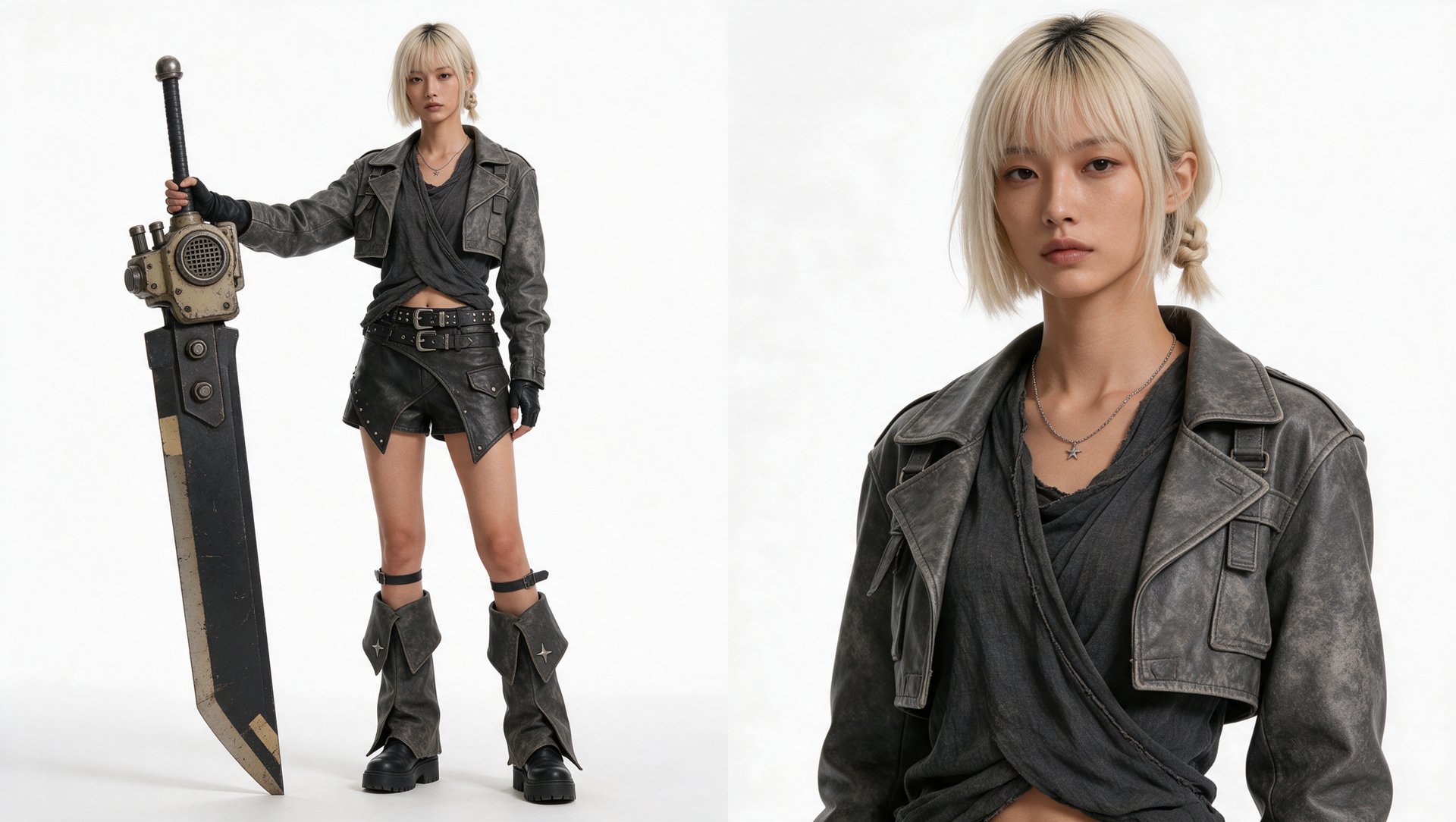
캐릭터도 같은 방식으로 저장하되, 카테고리를 Character로 설정하세요. 소스로는 캐릭터 시트가 잘 어울려요. 전신 뷰와 클로즈업 초상을 한 이미지에 담은 형태예요. 캐릭터가 이미 Soul ID로 존재한다면 다시 저장할 필요가 없어요. 학습된 Soul ID 캐릭터는 My elements에 Character 엘리먼트로 자동으로 표시돼요.

  • 얼굴이 또렷하게 보이고 전체 의상이 담긴 이미지를 사용하세요.
  • 화면에 나왔으면 하는 의상과 소품을 그 이미지에 담아 두세요.

Double Shots 팀은 팝 아이돌 Ivy의 뮤직비디오에 같은 접근 방식을 사용했어요. 촬영 중에 아티스트와 주요 소품을 사진으로 찍어 두어, Cinema Studio에서 만든 샷에도 실사 영상과 같은 얼굴, 의상, 사물이 담기게 했죠. Double Shots의 이야기를 읽어 보세요.

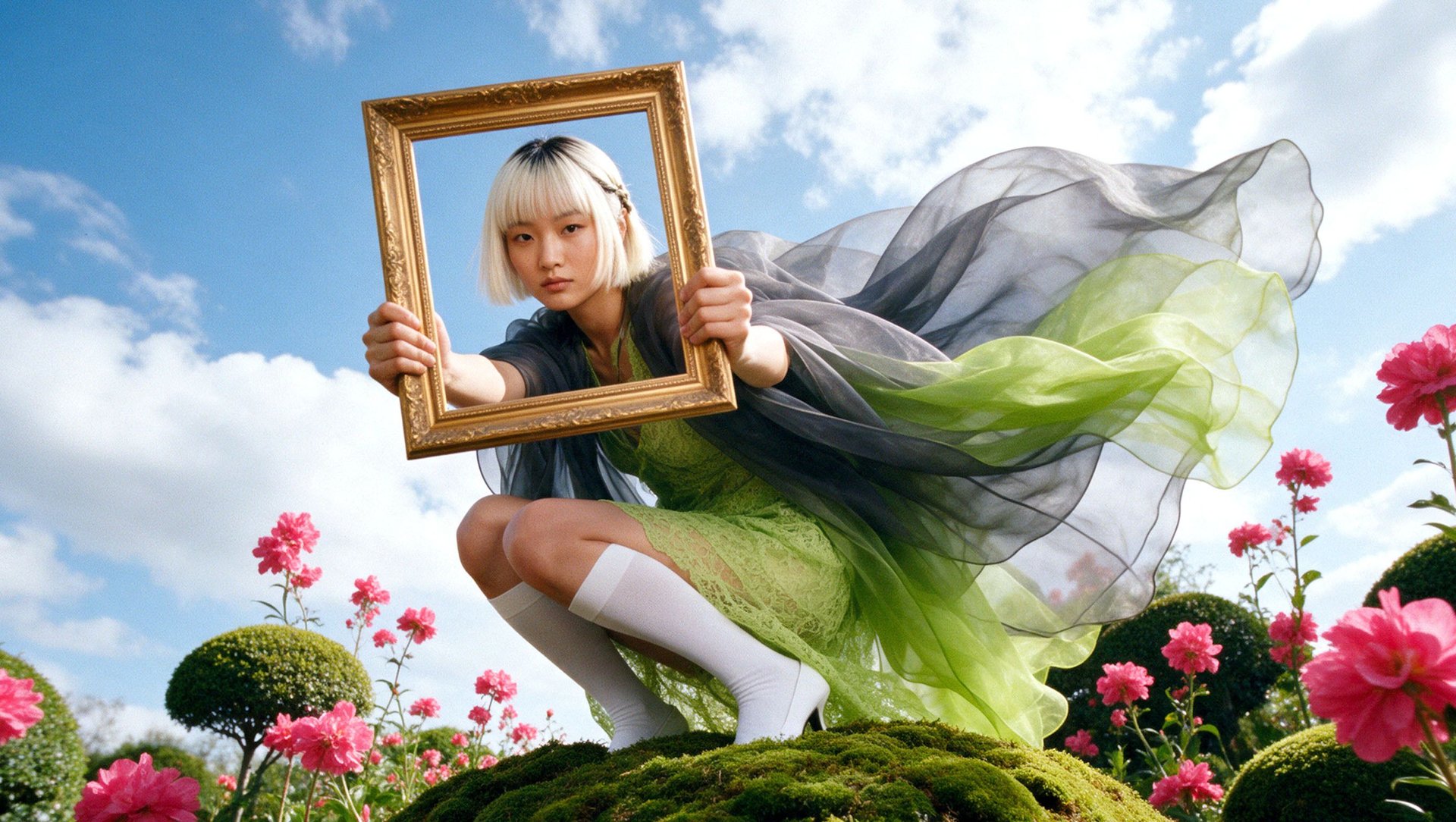
이 예시에서는 캐릭터 시트를 Soul 2.0으로 만들어 Character Element로 저장했어요.

4단계: 두 태그를 모두 넣어 각 앵글 생성하기

Cinema Studio 프로젝트를 여세요. 프롬프트 입력란에는 “use @ to add characters & locations”라고 적혀 있어요. @를 입력해 캐릭터와 장소를 선택한 다음 앵글과 액션을 설명하세요. 앵글을 하나씩 생성할 수도 있고, 한 프롬프트에 여러 샷을 설명할 수도 있어요. Cinema Studio 4.0 영상은 4초에서 30초까지 지원하므로, 생성 한 번에 같은 장면의 여러 앵글을 담을 수 있어요.

프롬프트는 이런 패턴을 따를 수 있어요:

“@캐릭터 + 액션 + @장소 + 카메라 앵글 + 조명. 예: “@char_mira가 @loc_corner-cafe의 빨간 안락의자에 앉아 있는 모습, 문 쪽에서 본 와이드 샷, 창문으로 들어오는 아침 햇살.””

  • 프롬프트 위에는 Film setup, Camera, Color palette, Lighting이 있어요. 한 장면의 모든 앵글에서 이 설정을 동일하게 유지하세요.
  • 샷 사이에는 카메라 앵글과 액션만 바꾸세요.
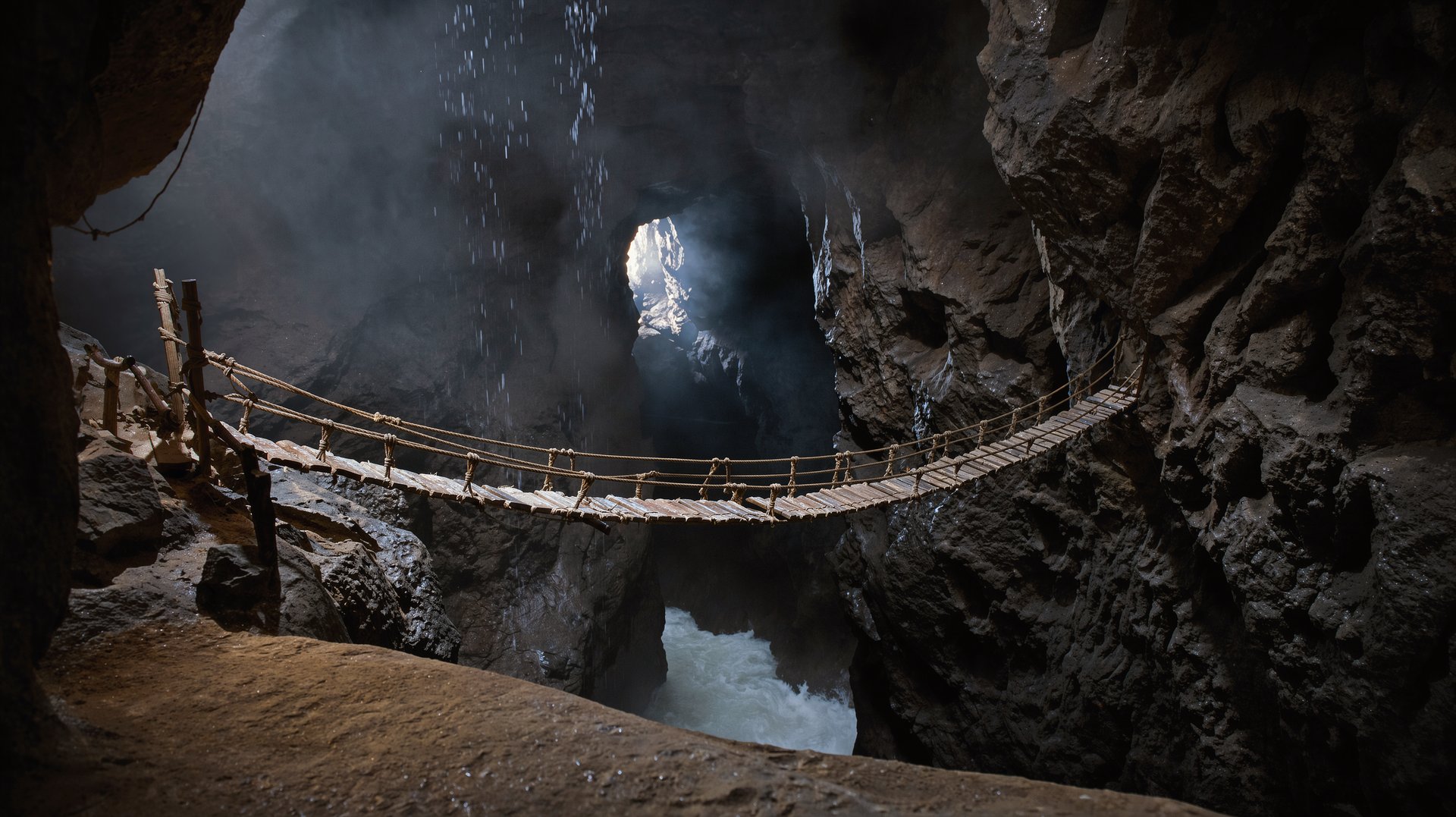
SCENE CONTEXT A 20-second cinematic sequence of six shots, grounded and believable, with the weight and patience of a large-format feature film. In a vast, dark, wet cave, a lone swordswoman of immense strength walks out of a tunnel and crosses a colossal 100-meter rope bridge over a bottomless chasm, dragging an enormous sword behind her. The bridge groans under its weight, but she moves with total, unbothered power. On the far ledge she stops, steam hisses from the sword's grille, and without turning around she cuts the bridge loose with one stroke behind her, then walks on into the darkness as it falls away. Quiet, heavy, completely nonchalant. ACTIVE REFERENCES <<<image_1>>>: the location only: the kind of place, its geometry and materials: - the rock ledges with rope-lashed wooden posts - the long sagging rope bridge with wooden planks and twisted hemp rope rails - the opening in the cave behind the bridge - thin streams of water falling from the ceiling - the white river at the bottom of the chasm - the massive wet rock walls Its camera angle, its scale and its brightness are not used: every shot is filmed from a new angle, the cave and the bridge are far larger, and the cave is much darker. <<<image_2>>>: the single source of truth for the heroine and her sword, 100% identical in every shot: her face, platinum-blonde bob with dark roots, blunt bangs and small braid, her full outfit, and the oversized sword with its broad black bolted blade, beige edge stripe, boxy beige mechanical guard housing with a round mesh grille and two small cylinders, and long black grip. The white studio background of <<<image_2>>> never appears. ADDITIONS TO THE LOCATION - A dark tunnel in the rock just behind the left posts; she emerges from it. - At the right end of the bridge, a narrow stone ledge with a second pair of rope-lashed wooden posts, and a dark narrow crevice in the wall directly behind them, leading deep into the rock. SCALE - The cave is colossal, a cathedral-sized void of rock. - The bridge is about 100 meters long and sags deeply in the middle. It is made of several hundred narrow wooden planks, each about 25 cm wide, with rope rails at her waist height. Its far end fades into the mist. - The river churns about 150 meters below, so deep that it is only a faint white thread in the darkness. - She is a normal 1.75 m person in her platform boots, and the sword is about her own height. Against the bridge and the cave she is tiny. - In the wide shots she occupies only 3 to 5 percent of the frame height, dwarfed by the rock, with layers of mist and falling water hanging between the camera and her. HEROINE: POWER AND WEIGHT - The sword is massively heavy, and its weight shows in the world around her: the planks bend and crack under it, the bridge dips with each step, and the blade gouges the wood as it drags. - She herself moves with complete, effortless strength: upright, shoulders square, a long, steady, heavy stride. She never hesitates, never checks her footing and never holds the rails. - She holds the sword only in her right hand by the long grip, her arm relaxed and straight, the blade dragging behind her on a low diagonal, its tip scraping the planks about a meter behind her heels. - When the tip snags on a plank edge, she yanks it free with a casual one-handed tug, without glancing back. - Her face is calm, tired and blank, her eyes fixed ahead, her mouth closed. No sighs, no exhales and no visible breath. - Her hair, straps, belt tails and gaiter flaps swing heavily with each step, and wet drops darken her shoulders. - Screen direction: in every side shot she moves from screen-left to screen-right. The image is never mirrored. - She never looks into the lens. FORMAT MODE Controlled multi-shot sequence, 20.0 seconds, six shots joined by hard cuts at 3.0s, 6.5s, 8.5s, 11.5s and 16.0s. Every shot uses a different camera position and angle, and no angle is ever repeated. CAMERA LANGUAGE - Shot like a large-format feature film: the camera sits on a tripod, dolly, crane or a rigid body-mounted rig, with deliberate, weighted moves and precise framing. No handheld shake, no drone glide, no fast pans. - Real large-format film texture: fine grain, soft highlight halation, deep blacks and true-to-life color. LIGHTING - A dark cave. The only light is the dim, diffuse daylight that seeps in from the distant opening and spreads softly through the mist. It is present everywhere but weak, like natural light deep inside a real cave: no visible beams, no spotlight, no bright pools and no studio look. - Most of every frame is deep, near-black shadow. Shapes read through soft gradations, the faint pale glow of the mist, thin specular glints on wet rock, and the dim white thread of the river far below. - She is lit only by that faint ambient glow: a subtle, soft rim on her hair, shoulders and blade, with her face mostly in soft shadow and only gently readable in the close shots. There is no fill light and no added colored light. - The palette is cold, muted and naturalistic: blue-grey and black stone, pale mist and muted earth tones. Underexposed, moody and real. SHOT 1 — 0.0s to 3.0s, medium, the emergence - Camera: on a tripod low on the rock floor just outside the tunnel mouth, a low 3/4 front angle looking slightly up, a normal lens, about 3 meters from her. - From the pitch-black tunnel she walks out toward the camera into the faint light, steady and unhurried, the heavy sword dragging behind her and its tip grinding across the stone with a little dust. - She passes the camera and steps between the posts onto the first planks, and the bridge visibly sinks under her weight. SHOT 2 — 3.0s to 6.5s, extreme wide, side, the scale - Camera: on a tripod far out on the opposite cave wall, level with the bridge, a wide shot from the side with a very slow pan to the right. - The whole 100-meter bridge crosses the frame as a long, thin, deeply sagging line over the black chasm, its far end fading into the mist. - She is a tiny figure near the left third of the bridge, only 3 to 5 percent of the frame height, striding steadily from screen-left to screen-right. Each of her steps sends a slow wave rippling along the enormous bridge. - Falling water and drifting mist hang soft in the foreground between the camera and her. SHOT 3 — 6.5s to 8.5s, beneath the bridge - Camera: rigidly mounted under the deck, looking straight up through the gaps between the planks. A wide lens. - Her heavy platform boots pass overhead across the gaps, the planks flexing down toward the lens under each step. - Right after them, the sword's blade drags across the planks just above the lens, gouging the wood; sand and splinters trickle down through the gaps, and drops of water fall past. SHOT 4 — 8.5s to 11.5s, extreme wide from below, the depth - Camera: on a tripod far down near the river at the bottom of the chasm, looking straight up. A wide lens with a very slow push-in. - High above, the bridge is a thin dark thread against the dim glow of the opening, and she is barely a dot on it. - 8.8s: one rotten plank slips out of its lashing behind her and falls. It tumbles slowly toward the camera through the mist and falling water, growing larger, for about three seconds, and splashes into the white river near the lens just before the cut. SHOT 5 — 11.5s to 16.0s, the head rig, the stop and the grille - Camera: one continuous shot on a rigid rig fixed in front of her face, about 80 cm away at eye level, moving exactly with her. A normal lens. - Her head stays in the same place in the frame while the world moves behind her: the last planks, the enormous sagging bridge stretching back into the mist, and then the rock of the right ledge. - Her face is steady and blank, her eyes looking past the lens into the distance, her hair swinging with each heavy step. - 14.0s: she steps off the bridge onto the stone, takes two more strides past the right posts, and stops dead. The rig stops with her. - 14.5s: the camera detaches from her face and glides smoothly down along her right shoulder and her relaxed arm, to her gloved hand on the grip and the guard housing of the sword resting behind her. - 15.3s: the round mesh grille on the beige housing fills the frame in close-up. With a sharp hiss, dense white steam forces out through the mesh holes in a thick jet, and the two small cylinders beside it twitch. Her gloved fingers tighten on the grip. SHOT 6 — 16.0s to 20.0s, from behind, the cut and the exit - Camera: on a tripod low on the right ledge, just behind the two right posts on the bridge side, looking past the posts at her back and the black crevice ahead of her. A normal lens. - 16.3s: without turning around, she swings the sword back in one effortless, lazy stroke. The steam jet from the grille drives the blade around behind her in a short, low, tight arc that passes cleanly through both wooden posts right in front of the camera, and the momentum carries it straight back into its trailing position in her hand. - The cut posts tip over, the ropes whip loose, and the end of the enormous bridge drops away out of the bottom of the frame into the chasm. - A thin arc of steam hangs in the air behind her and slowly dissolves. - Her body never turns. She simply walks on into the black depth of the crevice, the sword scraping behind her, until the darkness swallows her. - The frame holds on the dark crevice and the drifting steam until the last frame, with the long groan of the falling bridge echoing from below. PHYSICS - The bridge: each of her heavy steps presses the deck down, sending a slow wave along its great length, and the whole bridge sways sideways with a delay. The hangers stretch and slacken, and the rope rails creak and twist. - The sword has real mass: it drags, gouges and catches on the plank edges. Wood on metal makes a dry scrape with no sparks. - The steam comes only from the round mesh grille on the guard housing, as a dense white jet pointing opposite to the blade's motion, like thrust. It billows, hangs along the arc and fades. - The cut: one fluid, effortless flick driven by the steam thrust, not a muscular swing. Her feet stay planted and her body faces away from the bridge. - The collapse: with the right anchors cut, the 100-meter bridge falls away from the ledge into the chasm like a heavy chain, slowly, because of its enormous size, with planks shedding and snapped ropes recoiling with frayed ends. It is purely mechanical: wood and rope, with no explosions, sparks or debris near her. - Falling objects take as long to fall as the real height demands, without floating. - Water drips fall in straight fast streams, the river churns and throws up fine mist, and the wet rock glistens faintly. AUDIO - No music. - The cave: the deep, distant roar of the river, the hiss of falling water, echoing drips and a cold draft. - Her crossing: heavy boot thuds, cracking planks, groaning ropes and the long dry grind of the sword, all with long cave echo. - The plank's splash arrives late from far below. - The grille: a sharp, building steam hiss. - The cut: a whoosh and a double wooden crack, then the long groan and distant crash of the falling bridge echoing through the cave, while her footsteps fade into the crevice. - No breathing sounds. POSITIVE LOCKS - Six cinematic shots, each from a different angle, never using the camera angle of <<<image_1>>>. - A dark cave lit only by dim, diffuse natural light, with deep shadows everywhere. - The bridge is 100 meters long and she is tiny against it in the wide shots. - She is identical to <<<image_2>>> in every shot, moving with effortless strength. The sword is massively heavy and always in her right hand, and she always moves from screen-left to screen-right. - The steam comes only from the round grille. - Shot 5 is one continuous head-rig shot that ends on the grille close-up. - She stops on the ledge, cuts the bridge without ever turning around, and walks into the dark. She never sighs and never looks into the lens.

5단계: 각 프레임을 설정 샷과 비교해 확인하기

새로 만든 프레임마다 설정 샷 옆에 두고 2단계에서 적어 둔 디테일을 확인하세요. 디테일 하나가 어긋나면 다음 프롬프트에서 직접 언급하거나 해당 앵글을 다시 생성하세요.

5단계: 각 프레임을 설정 샷과 비교해 확인하기

확인하기

확인할 사항

라이트

모든 프레임에서 같은 방향에서 들어옴

주요 사물

같은 사물, 서로 같은 상대 위치

표면

같은 벽 색상과 재질

캐릭터

같은 얼굴, 머리, 옷

예시: 생성 한 번으로 한 장소, 다섯 개의 샷

밧줄 다리가 있는 동굴을 Location Element로, 캐릭터 시트를 Character Element로 저장했어요. 그런 다음 두 태그를 프롬프트에 넣어 Cinema Studio 4.0에서 20초짜리 영상 하나를 생성했어요(1080p, 16:9, 사운드 켬). 최종으로 선택한 버전은 3번의 시도가 필요했어요. 이 테스트는 2026년 11월 5일에 유료 요금제에서 진행했어요.

예시: 생성 한 번으로 한 장소, 다섯 개의 샷

샷

시간

카메라

1

0:00~0:02

다리 위에서, 캐릭터가 다리에 올라서는 모습을 바라보는 시점

2

0:03~0:05

바위 턱에서 본 동굴과 다리의 와이드 샷

3

0:06~0:10

다리 아래에서, 이어서 강에서 빛이 들어오는 구멍을 향해 위로

4

0:11~0:15

다리를 등진 캐릭터의 클로즈업, 이어서 무기에 올린 손

5

0:16~0:20

리버스 앵글: 캐릭터가 다리 기둥 쪽으로 다시 걸어가는 뒷모습

다섯 개의 샷에서 같은 디테일이 반복해서 나타났어요. 나무 다리와 밧줄, 어두운 암벽, 위쪽의 빛이 들어오는 구멍, 아래의 강이죠. 샷마다 달라진 것은 카메라 앵글뿐이었어요.

일관성 체크리스트

여러 샷으로 이루어진 장면을 생성하기 전에 다음을 확인하세요.

  • Location Element 저장 완료: 레이아웃, 빛의 방향, 주요 디테일이 보이는 설정 샷이에요.
  • Character Element 저장 완료: 선명한 초상이나 캐릭터 시트, 또는 이미 My elements에 있는 Soul ID 캐릭터예요.
  • 설명에 고정 디테일 기재: 앵글 간에 바뀌면 안 되는 것들이에요.
  • 모든 앵글에 동일한 설정 적용: Film setup, Camera, Color palette, Lighting이에요.
  • 모든 프롬프트에 두 태그 포함: @Character와 @Location, 그리고 각 샷의 앵글이에요.
  • 모든 프레임 확인: 다음 단계로 넘어가기 전에 설정 샷과 비교하세요.

비용은 얼마나 들까요?

1080p, 16:9, 사운드 포함 Cinema Studio 4.0 영상은 초당 16 크레딧이에요. 20초짜리 클립은 생성 한 번에 320 크레딧(≈ $15.68)이 들었어요. 3번의 시도를 거쳐 최종으로 선택한 클립에는 960 크레딧(≈ $47.04)이 들었어요.

비용은 얼마나 들까요?

영상 길이

크레딧

대략적인 비용

5초

80

$3.92

10초

160

$7.84

20초

320

$15.68

20초, 3번 시도

960

$47.04

대략적인 비용은 1,000 크레딧당 $49 기준이에요. 가격은 2026년 11월 5일에 확인했어요. 가격과 요금제 세부 정보는 변경될 수 있으며, 정확한 비용은 Generate 버튼에 표시돼요. 표에는 영상 비용만 포함되고, Element를 만드는 데 사용한 이미지는 포함되지 않아요.

얼굴과 장소가 달라지는 이유는 같아요. 모델이 텍스트 설명을 매번 다시 해석하기 때문이에요. 해결책은 모든 샷에 같은 저장된 레퍼런스를 제공하는 거예요. Cinema Studio 4.0의 Elements를 사용하면 앵글마다 다시 업로드할 필요 없이 한 번만 설정하면 돼요.

캐릭터 도구 선택에 대해서는 일관된 AI 캐릭터를 위한 도구 가이드를 참고하세요. 반복해서 등장하는 브랜드 캐릭터라면 브랜드 마스코트 만드는 방법을 참고하세요.

AI 샷 전반에서 캐릭터와 장소를 일관되게 유지하는 방법 (2026 가이드)

Cinema Studio 4.0 사용해 보기

아직 궁금한 점이 있나요?

Higgsfield 님